Help Documents
- Overview
- Hardware requirements
- Operating Systems
- Supported file systems
- Supported storage devices
- Install and uninstall
- Edition comparison
- File zip
- File sync
- Filters
- Check disk image
- Check file image
- Mount backup point
- Full backup
- Incremental backup
- Differential backup
- Edit backup
- Delete backup
- Delete image
- File sync
- Move/resize
- Create partition
- Format
- Partition recovery
- Surface test
- Align partition
- Change Volume Label
- Change Serial Number
- Change Cluster Size
- Check File System
- Rebuild MBR
- Wipe data
- More
File sync
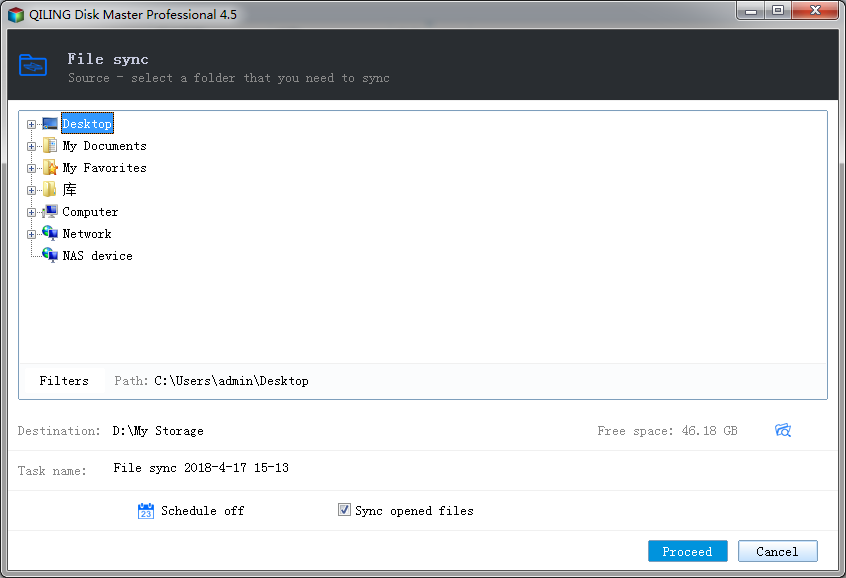
File sync transfers all the files on the volume(s) which you have selected to an other location. Click 'File sync' button in the Backup and recovery page to create file sync task.
- Specify the task name. An accurate task name will help you to distinguish this task from others which will make it much easier.
- Select a folder to sync. You can specify only one folder as the source.
- Set the file filters. To learn more, see Filters.
- Specify the destination to sync the file. Local disk, Network directory or NAS drive can be set as destination.
- Sync open files - Click this button to use VSS to sync open files to the destination.
- To specify to when run the sync in a schedule, click Turn on. See Schedule for detailed information.
- Click Proceed to finish the setting. The file sync will be executed immediately.