Help Documents
- Overview
- Hardware requirements
- Operating Systems
- Supported file systems
- Supported storage devices
- Install and uninstall
- Edition comparison
- File zip
- File sync
- Filters
- Check disk image
- Check file image
- Mount backup point
- Full backup
- Incremental backup
- Differential backup
- Edit backup
- Delete backup
- Delete image
- File sync
- Move/resize
- Create partition
- Format
- Partition recovery
- Surface test
- Align partition
- Change Volume Label
- Change Serial Number
- Change Cluster Size
- Check File System
- Rebuild MBR
- Wipe data
- More
File recovery
This is used to recover your files and programs to an earlier state when everything was working properly.
1. Click Recovery from list of tasks in the Backup and recovery page to start the wizard.
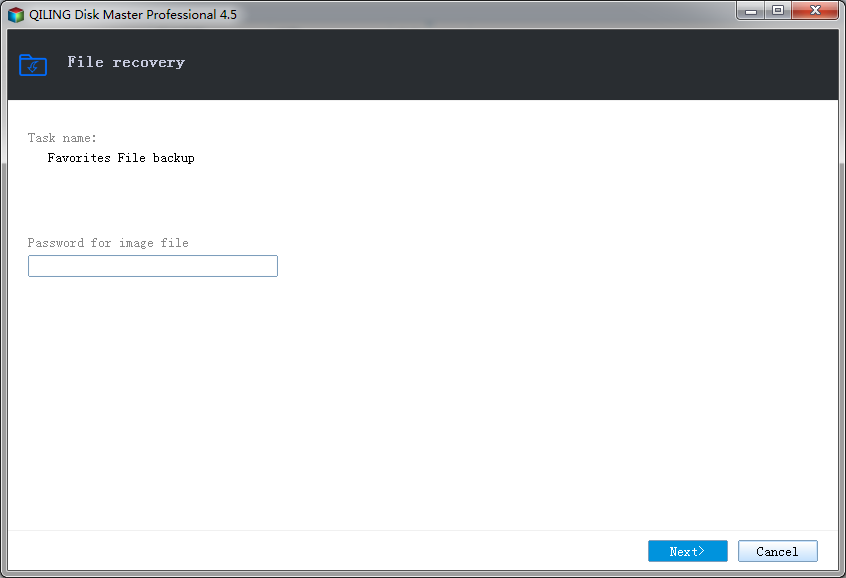
2. If the backup image is password-protected, a password dialog box is displayed. Enter the password for the backup image.
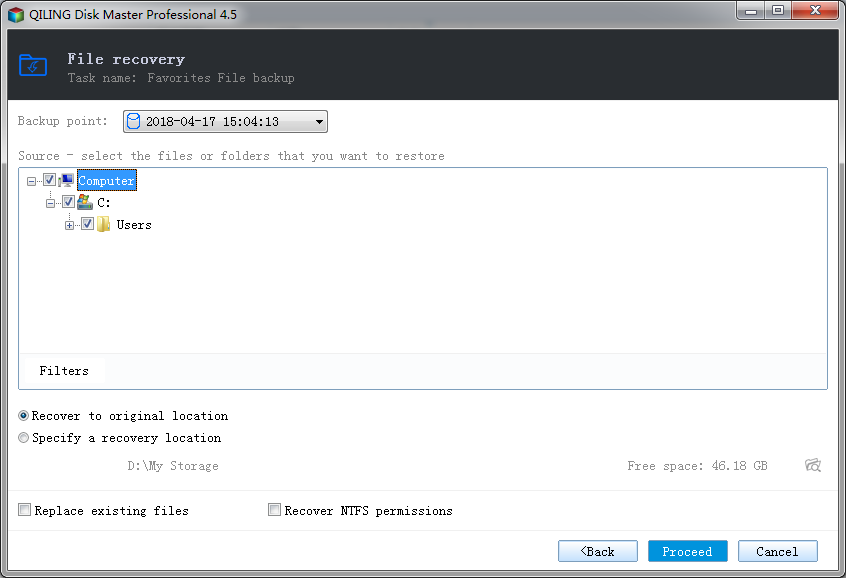
3. Select the source file/folder(s) and target location.
- Backup point - You can select the backup point to recover.
- Source - Select the file/folder(s) to recovery. You can specify multiple files or folders as source.
- Filters - Set the file filters. To learn more, see Filters.
- Recover to original location - Recover to original location.
- Specify a recovery location - Specify a recovery location. Local disk, Network directory or NAS drive can be set as recovery location.
- Replace existing files - If there is an open file can not be restored, the application will ask you to restart your computer.
- Recover NTFS permissions - If you backed up the security properties file, you can choose to restore security properties file.
4. Click Proceed to start recovery. The recovery process will be shown in the window.