Deep Data Recovery for Mac License and Safe Download Guide
Can You Find a Reliable Crack Site in Google?
Many users search for terms such as Deep Data Recovery for Mac crack, serial key, license code, activation key, or key generator. These results often lead to unsafe downloads instead of reliable recovery software.
Even if you are tempted to try cracked software, the chance of finding a safe and legal copy is extremely low. The risks of data damage, malware, and privacy leaks outweigh any short-term benefit.
Do You Receive an Antivirus Warning When Downloading or Installing Cracked Software?
When you search for unofficial Qiling data recovery downloads, antivirus software or Windows Defender may warn you about unsafe files. These warnings usually mean the installer may contain malware or other unwanted programs.
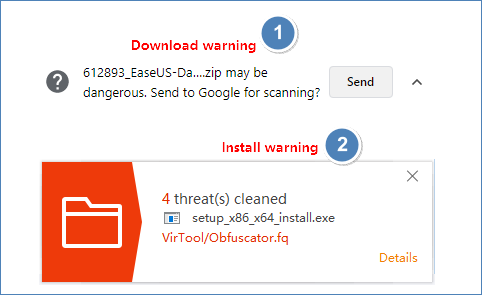
Do not ignore the warning or continue installing cracked software. Use the official copy of the data recovery software so you can protect your files and receive proper updates and support.
What Do We Guarantee with Our Copyrighted Data Recovery Software for macOS?
- 100% protection for your data privacy
- 100% virus-free software that is safe to download and install on your Mac.
- The software has the ability to recover over 400 types of files commonly used on Mac, including but not limited to, documents, spreadsheets, presentations, images, videos, audio files, and archives, as well as more rare file types, making it a comprehensive recovery solution for a wide range of file formats.
- Disaster recovery refers to the process of restoring data from backups in case of unexpected data loss scenarios, such as file corruption, computer crashes, or external device failures. This ensures that your valuable information is preserved and can be quickly recovered, minimizing downtime and business disruption.
- Free round-24/7 customer service that provides support from pre-sales inquiries to post-purchase support, ensuring seamless customer experience throughout the buying process and beyond.
- Get free remote tech support for resolving some common issues, including lost data recovery, on your MacBook or iMac.
- 2GB of files in total are provided for 100% free recovery without any ads.
- 30% discount of the Deep Data Recovery for Mac full version for unlimited file recovery
3-Step Guide on How to Recover Deleted Files with Qiling Mac Data Recovery Software
Step 1. Select the file type. Click the "Fast Scan" button.
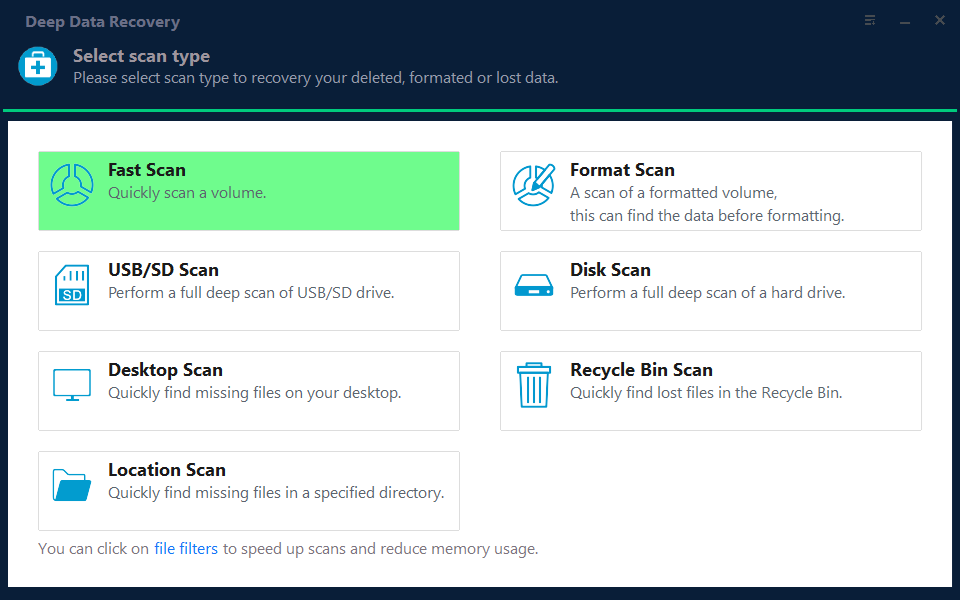
Note: You can choose different search modes based on where and why the data was lost.
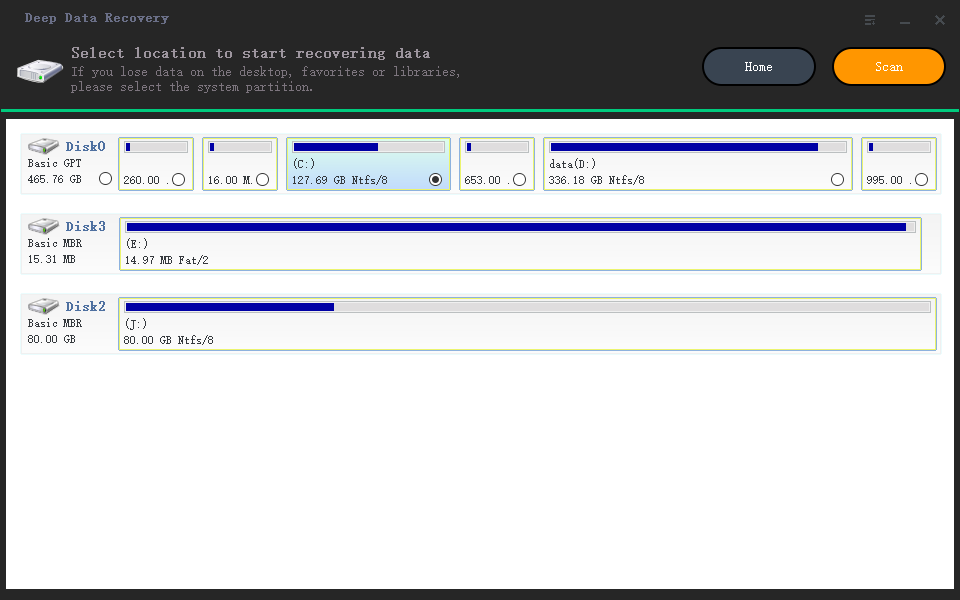
Step 2. Select the disk location where you lost data and click the "Scan" button.
Step 3. Deep Data Recovery for Mac will immediately scan your selected disk volume and display the scanning results on the left pane.
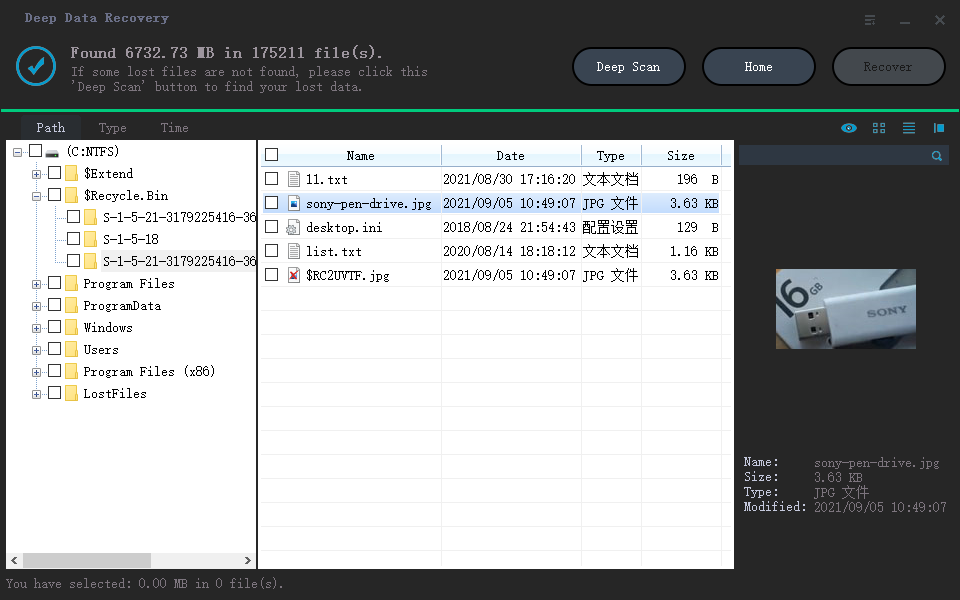
Step 4. In the scan results, select the file(s) and click the "Recover" button to have them back.
Related Articles
- 2 Ways to Recover Unsaved iWork Document on Mac
- Mac Data Recovery | How to Recover Pictures from Photo Booth on Mac
- How to Recover Deleted Photos from iCloud on Mac
- How to Recover Deleted Files on Mac After Emptied Trash Bin
- A Complete Guide to Recover Data from Broken RAID 0, 1, 5, 10 [SOLVED]
You can recover data from a broken RAID Array without removing the drive, thanks to Qiling NAS data recovery software. Simply download and install the software, then let it scan and recover data from RAID 0, 1, 5, 10 configurations with just a few clicks. - How to Recover Data from Corrupted Windows OS [Easy and Fast]
If your Windows OS is corrupted and won't boot, you can recover your data using Qiling bootable data recovery software in Windows 11/10/8/7 or other versions. This page provides guidance on how to do so.
Products
Articles & Tutorials
- Data Recovery
- Data Backup
- File Recovery
- File Backup
- System Backup and Restore
- Disk and Partition Clone
- Technical articles
- Mobile articles
- Disk Master Help
- Windows Data Recovery Tutorials
- Windows Secure Delete Tutorials
- Windows Partition Management Tutorials
- Windows File Backup and Restore Tutorials
- Windows System Backup and Restore Tutorials
- Windows Disk Backup and Restore Tutorials
- Windows Clone Tutorials