How to Recover Data from RAID 1 Disk with Raid 1 Recovery Software
Everything About RAID 1
RAID 1 is a data storage configuration that creates an exact copy (or mirror) of data on two or more disks, providing high fault tolerance and reliability. This setup, which can be achieved through hardware or software, writes two copies of data simultaneously on separate drives, ensuring that if one drive fails, the other can continue to function. RAID 1 is particularly useful for applications requiring high reliability, such as accounting and financial data, as well as small database systems, enterprise servers, and home PCs, where a duplicated set of data is more secure than using parity. Its low cost and high fault tolerance make it a popular choice for many users.
Advantages
- RAID 1 provides fast read and write speeds, comparable to a single drive, due to its ability to mirror data between two drives, reducing the time it takes to access and write data.
- RAID arrays typically consist of two or more disks, and RAID 1, in particular, offers more storage space than a single drive.
- In a computer with only one hard drive, if the drive fails, the system will immediately stop. However, in a RAID array, if a hard disk fails, the system can continue running normally for a while.
Disadvantages
- The drive's total capacity is halved due to data being written twice.
- In servers used by multiple people, a failed drive can't be replaced without powering down the system, which may not be acceptable due to simultaneous use. These systems often use hardware controllers that allow for hot-swapping.
Why You Lost RAID 1 Data
While RAID 1 is a reliable storage solution for data backup and fault tolerance, it's not immune to data loss issues. In the event of a RAID 1 disk or volume failure, data loss can occur due to various reasons, including hardware failure, software corruption, human error, or even a power outage. As a result, it's essential to have a backup plan in place, such as regular backups or using a different RAID configuration, to minimize the risk of data loss and ensure business continuity.
- 1. RAID 1 disk failure
- 2. RAID 1 disk rebuild
- 3. Format RAID 1
- Notice:
- If a RAID 1 drive is physically damaged or the controller is broken, you won't be able to recover lost data.
If you've lost important data on a RAID 1 setup in Windows 10/8/7, stop using the system immediately and let professional data recovery software help you restore your RAID 1 data.
Download RAID 1 Recovery Software for Help
Deep Data Recovery is a professional RAID 1 recovery program that helps recover data in various scenarios such as partition loss, software crashes, virus infections, and unexpected shutdowns. It provides a comprehensive solution for recovering data from RAID 1 systems. For small data losses under 2GB, free data recovery software can be used, while larger losses require the paid Deep Data Recovery Pro. The software also supports dynamic disks, RAID, and EXT2/EXT3 file systems.
Most importantly, it can recover lost files with their original file names and storage paths, a feature that other apps cannot do. Additionally, it works as a hard drive recovery tool, allowing you to rescue your files and save money by not needing to purchase a new drive.
Consult with Qiling data recovery experts for a one-on-one manual recovery service, which may include repairing damaged RAID structures and restoring data from all RAID levels, following a free diagnosis.
- Data can be restored from various RAID levels, including RAID 0, RAID 1, RAID 5, RAID 6, RAID 10, and others, allowing for the recovery of data from different types of disk arrays.
- Recover data from enterprise RAIDs such as QNAP, Synology, WD, Buffalo, and more, with the help of professional data recovery services or specialized software. These services and tools are designed to handle the complexities of enterprise RAIDs, extracting valuable data from damaged, corrupted, or failed storage systems.
- Retrieve lost RAID data caused by any issues
- Fix disks that become GPT protected partitions
- Recover data from RAID remotely, no need to ship
Steps to Recover RAID 1 Data with RAID 1 Data Recovery Software (for Win)
Step 1. Select file types
Launch Deep Data Recovery software on your PC, select file types, and click "Fast Scan" to begin the recovery process.
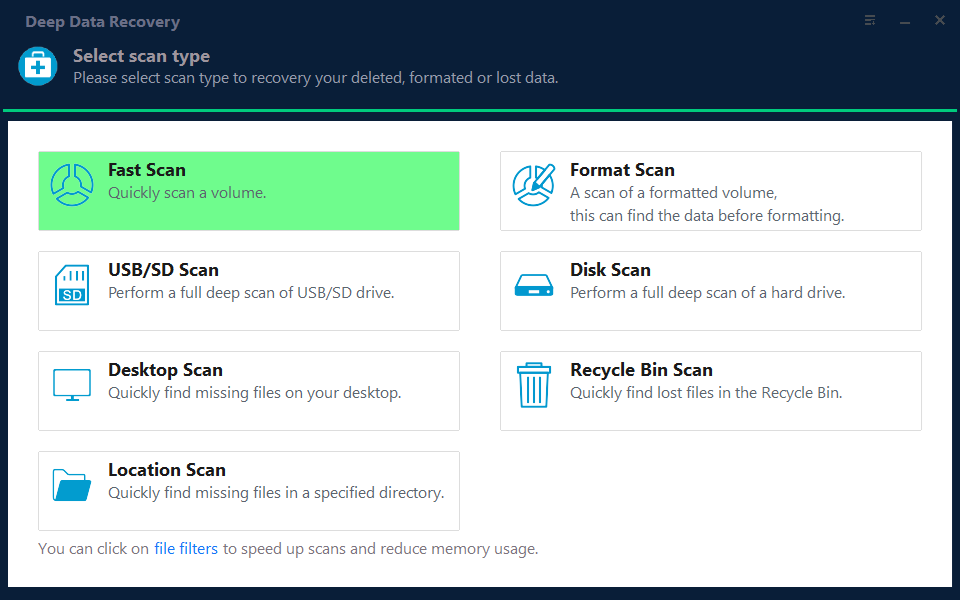
Note: You can choose different search modes based on where and why the data was lost.
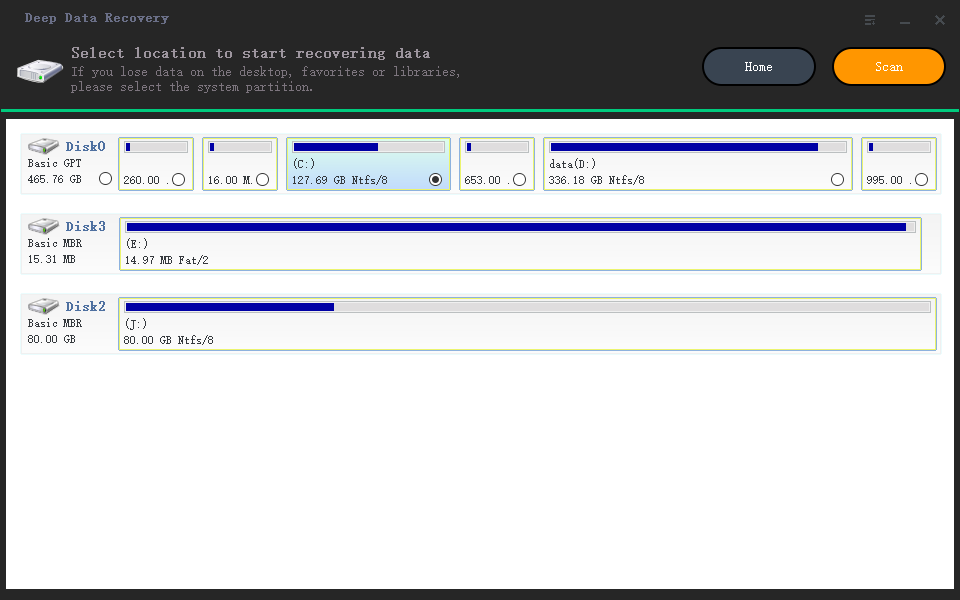
Step 2. Scan the RAID drive
Choose the RAID drive from which you wish to recover data, click "Scan", and wait for the scanning process to finish. Deleted files will then appear one by one.
Step 3. Find and preview lost RAID files
The feature "Filter" allows for quick navigation to find deleted or lost files, while the Search function enables finding lost RAID drive files by their file name or extension.
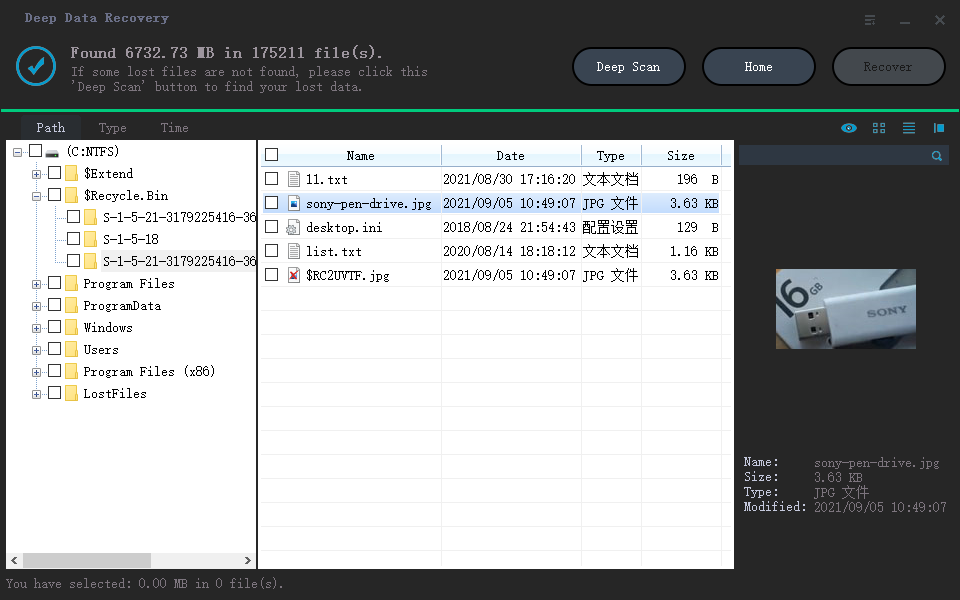
Step 4. Restore lost RAID drive files
Select the desired files and click "Recover" to save them to a safe location.
Why not download this RAID 1 recovery software to experience the magic recovery functions now?
RAID 1 Data Recovery for Mac
If you lost data on a RAID 1 setup on your Mac, you can try to recover it using Qiling Mac data recovery software. Since RAID is composed of multiple disks, if the RAID structure is intact, you can create a virtual disk from the RAID and recover your data using Qiling.
Step 1. Launch Deep Data Recovery software, select the desired file types, and click "Fast Scan" to initiate the recovery process.
Note: You can choose different search modes based on where and why the data was lost.
Step 2. Select the disk location where you lost data and files, then click the "Scan" button.
Step 3. Deep Data Recovery for Mac will immediately scan your selected disk volume and display the scanning results on the left pane.
Step 4. Select the file(s) you want to recover from the scan results and click the "Recover" button to have them back.
People Also Ask
1. What is RAID recovery?
Qiling data recovery software is a powerful tool that can successfully recover data from a failed RAID array, helping to retrieve lost information from a system that has encountered a malfunction.
2. Can a RAID 1 disk be read on its own?
Most RAID 1 systems create disks that can be read separately when connected to a non-RAID controller, allowing for individual disk access.
3. What is the difference between RAID 0 and RAID 1?
RAID 0 and RAID 1 are two types of RAID configurations. RAID 0, also known as striping, involves dividing data into strips and spreading them across multiple disks, but does not provide any redundancy or protection. In contrast, RAID 1, also known as mirroring, involves creating an exact copy of data on multiple disks, without any striping or parity, providing a level of redundancy and protection.
4. Can RAID 1 have more than 2 drives?
A minimum of two disks is required for RAID 1, but with software RAID 1, data can be mirrored between volumes on a single disk.
Related Articles
- How to Recover Files from USB Flash Drive with or Without Software
- Free Hard Disk Repair Software for Hard Disk | Step-By-Step Guide
- 5 Ways to Access Hard Disk Data Without OS
- Download Nikon Photo Recovery Software
- How to Recover Data after Diskpart Clean
Misusing Diskpart can lead to data loss on your computer. If you accidentally clean or delete important data using Diskpart, you can try to recover it by learning how to recover data after Diskpart clean. - Acer Iconia Recovery: How to Recover Files from Acer Iconia Tablet
Want to recover data from your Acer Iconia tablet? This article will guide you through the process of recovering deleted files from your Acer tablet, helping you get your important data back.
Products
Articles & Tutorials
- Data Recovery
- Data Backup
- File Recovery
- File Backup
- System Backup and Restore
- Disk and Partition Clone
- Technical articles
- Mobile articles
- Disk Master Help
- Windows Data Recovery Tutorials
- Windows Secure Delete Tutorials
- Windows Partition Management Tutorials
- Windows File Backup and Restore Tutorials
- Windows System Backup and Restore Tutorials
- Windows Disk Backup and Restore Tutorials
- Windows Clone Tutorials