Top 10 Best Hard Drive Recovery Software for Windows and Mac
What Is the Best Hard Drive Recovery Software?
Data loss can be a frustrating experience, especially when you've accidentally deleted a file and emptied the Recycle Bin. Fortunately, free hard drive recovery software can help restore lost files, even without a backup, in the event of deletion, formatting, or system crashes. There are many recovery programs available, and I've compiled a list of ten based on their features, performance, price, and personal experience.
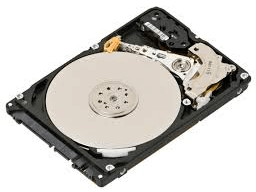
The best data recovery software:
- Deep Data Recovery
- Recuva
- Disk Drill Data Recovery
- Wise Data Recovery
- Ontrack Data Recovery Software
- Recover My Files
- PhotoRec
- TestDisk
- Orion File Recovery
- Windows File Recovery
Top 1. Deep Data Recovery Free (Windows & Mac)
Deep Data Recovery is a free data recovery utility that has helped millions of users retrieve their precious data. It can recover deleted files from a disk, formatted disks, lost partitions, and disks that have become RAW/inaccessible/unrecognized, making it a reliable hard disk recovery software.
Utilize Qiling Data Recovery Software
- Recover deleted, formatted, and inaccessible data in various data loss situations with our advanced data recovery solutions. Our tools can retrieve lost information from devices, storage media, and digital storage systems, even after a hard drive crash, accidental deletion, or formatting.
- Recover photos, audio, music, and emails from any storage with ease, safety, and completeness.
- You can recover data from various devices such as the recycle bin, hard drive, memory card, flash drive, digital camera, and camcorder.
Pros
- An easy 3-step recovery process.
- Repairs corrupt/damaged photos.
- Virus-free and plugin-free.
- Fast scanning speed and high-quality data recovery.
- Support for 1000+ file types on various devices.
Cons
- The software offers a free trial with a 2GB recovery limit, while the Pro version costs $69.95 and has no recovery limits.
Limitations on the free version: 2GB of free recovery is available, allowing users to instantly recover 500MB of data with Deep Data Recovery Free. Sharing the software on social media platforms like Facebook or Twitter can increase the free recovery limit to 2GB.
Overall Experience
Qiling data recovery software can be used on Windows 10-XP and Mac OS 10.15-10.9, but has a 2GB data recovery limit for free users, and is known for its high recovery rate and ability to repair corrupt files.
Top 10 Best Free Data Recovery Software for Windows 11?
This post provides you with the 10 best free data recovery software in Windows 11, allowing you to recover deleted, formatted, and lost data without spending a dime.
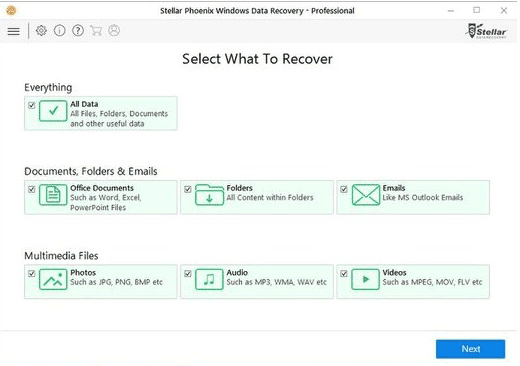
Top 2. Recuva - Hard Disk Recovery Software (Windows)
Piriform Recuva is a popular choice among users who have accidentally lost files. What sets it apart from other hard drive recovery software is its interactive approach, guiding users through the data recovery process with a series of questions, making it more user-friendly.
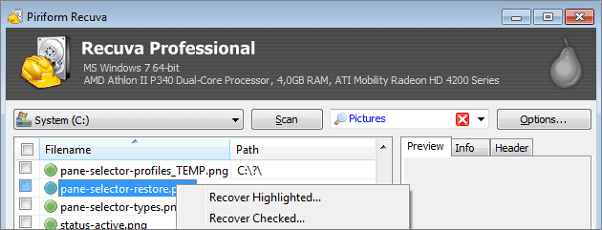
Pros
- Unlimited free data recovery with the standard version
- Deep scan mode for files that are hard to find.
- It has a portable version, too.
- 100% free data recovery software.
Cons
- The interface makes it look old.
- You cannot preview the results during the scan.
Limitations on the free version: Unlimited free recovery.
Overall Experience
Recuva is a user-friendly and affordable data recovery software that can satisfy basic needs, such as recovering deleted photos, music, documents, videos, and emails. It can also retrieve lost files, including Excel files, and is 100% free for personal use. However, it may not be able to recover data as thoroughly as more expensive software.
Top 3. Disk Drill Data Recovery (Windows & Mac)
Cleverfiles Disk Drill is a hard drive recovery software that retrieves deleted, erased, and lost data from hard drives, and also provides data protection and drive backup features.
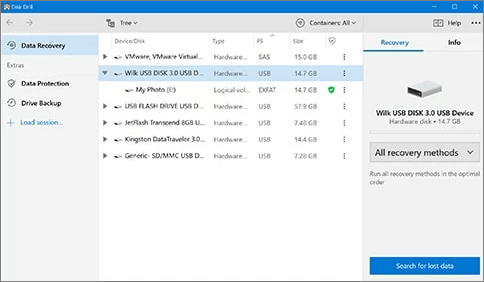
Pros
- Has auxiliary features like data protection and drive backup.
- Organizes files found by category.
- Filters the results by size and data.
- Supports multiple file systems.
Cons
- The Windows version can't recover data from iOS and Android
- The setup process can be a bit tricky and you might skip the custom installation path.
Limitations on the free version: 500MB of free recovery is available, with the option to upgrade to the Pro version for $89, which removes recovery limits.
Overall Experience
Disk Drill offers an intuitive interface for quick file recovery, also appealing to experienced users. The tool provides additional data protection features for free, including the Recovery Vault, which designates folders and files for enhanced protection, and a byte-level backup for recovering failing storage devices. However, the free version has a 500MB data recovery limit, requiring a $89 fee for more extensive recovery, which is considered expensive. The scanning process also takes longer compared to other equivalents, and fewer files are found.
Top 4. Wise Data Recovery - HDD Recovery Software (Windows)
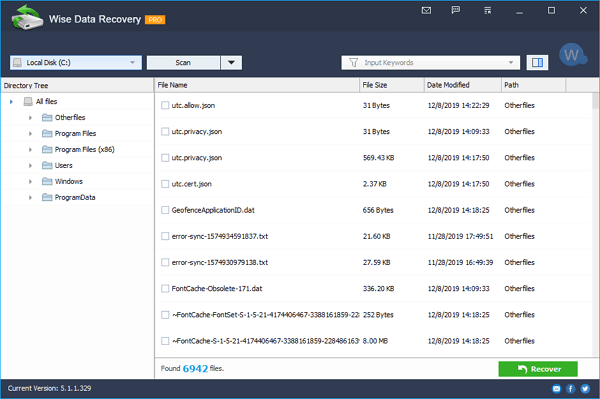
Wise Data Recovery is a free tool that helps recover lost data, including photos, videos, audio, documents, and more, from local hard drives, external hard drives, USB flash drives, SD cards, digital cameras, mobile phones, and MP3 players, using advanced algorithms to retrieve lost data from supported devices.
Pros
- Free to use
- Lightweight and space-saving
- Fast scanning speed
- Offers a portable version
- Filters files by category
Cons
- Only supports FAT, exFAT, and NTFS file systems
- Shows messy codes in the preview pane for unsupported formats
Limitations on the free version: The free version of the software has unlimited free recovery, but you can't run RAW recovery and deep scan with it. The Pro version, which costs $44.96, offers no recovery limits.
Overall Experience
Wise Data Recovery is a tool that allows you to recover lost files on your Windows system, including 64-bit and 32-bit versions, and works on Windows 10 and other operating systems from Windows XP onwards. The free version enables a quick scan and recovery of recently deleted files, but may not be effective for recovering permanently deleted files. The user interface is straightforward, making it accessible to less experienced users, and features a preview function to view deleted files before recovery, as well as detailed information about them, including file headers.
Top 5. Ontrack Data Recovery Software (Windows & Mac)
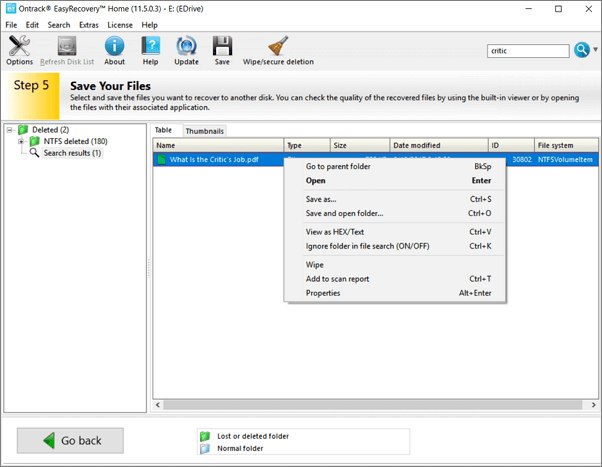
Ontrack EasyRecovery is a top choice for disk data recovery, allowing users to retrieve files from various devices and media after deletion, format, corruption, and more, with additional features for advanced RAID recovery.
Pros
- Recovers photos, videos, documents, and more
- Supports multiple storage devices
- Allows to preview results before recovery
- Retrieves files after deletion, format, hard disk damage, and corruption
Cons
- Must enter personal information to download the software
Limitations on the free version: 1GB of free recovery is available, but the Pro version, which costs $87.81, offers fewer recovery limits.
Overall Experience
Ontrack is a straightforward file recovery software that helps recover missing or deleted photos, videos, and more from various computer storage devices. It offers a quick scan and deep scan option to optimize recovery, as well as manual data recovery and repair with expert assistance. However, the cost of the service depends on the complexity of the recovery process and the amount of data involved, and the download process requires providing personal information, including an email address.
Top 6. Recover My Files (Windows Only)
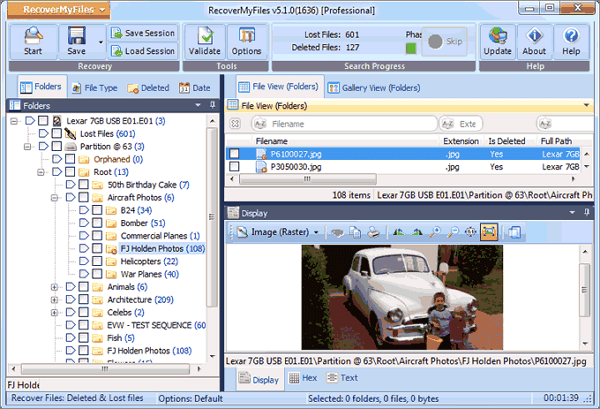
Recover My Files is a reliable data recovery software tool exclusive to Windows that can recover files from various storage devices, including hard drives, SD cards, USB zip drives, floppy disks, iPods, and more. It effectively recovers files from the Recycle Bin, formatted drives, OS reinstallation, RAW partitions, and more, allowing users to recover documents, photos, videos, audio files, and emails.
Pros
- The device supports conventional storage devices such as hard drives, SD cards, and USB drives, as well as iOS devices like the iPod.
- Allows to scan the backup (image file) of a partition
- Sorts files by date
- Allows to adjust the layout of the items
Cons
- Old-fashioned software interface
- The data recovery process is more complex than its competitors
Limitations on the free version: The software offers unlimited free recovery, however, the Pro version costs $69.95 and has fewer recovery limits.
Overall Experience
Recover My Files is a data recovery program that uses file carving to extract lost files from unallocated clusters, but its outdated interface and lack of updates make it difficult to use for common users.
Top 7. PhotoRec (Windows, Mac, and Linux)
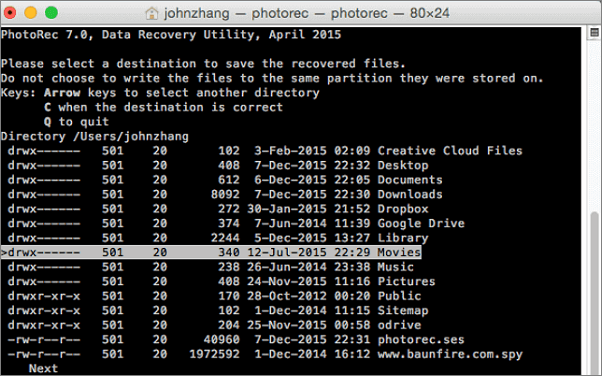
Photo Rec is a powerful open-source data recovery software that can recover images and files from various digital devices, including computers, digital cameras, cell phones, tablets, memory cards, and external hard drives. It supports a wide range of platforms and has the ability to recover over 480 file extensions, making it a versatile tool for recovering lost or deleted data.
Pros
- It supports data recovery cross-platform---Mac OS X, Windows, Linux, etc.
- It can restore data on most devices.
- This software works with a variety of file formats, not limited to images.
Cons
- Not for beginners
- All files are automatically recovered during the scan
- Unable to restore file names and folder structure
Limitations on the free version: Unlimited free recovery.
Overall Experience
PhotoRec is a free and open-source data recovery software that uses text-based data recovery techniques to retrieve lost files from a system. It features a text-only user interface, making it suitable for experienced users. Despite being 100% free, PhotoRec can compete with many paid data recovery software applications, offering a cost-effective solution without limitations.
Top 8. TestDisk (Windows, Mac, and Linux)
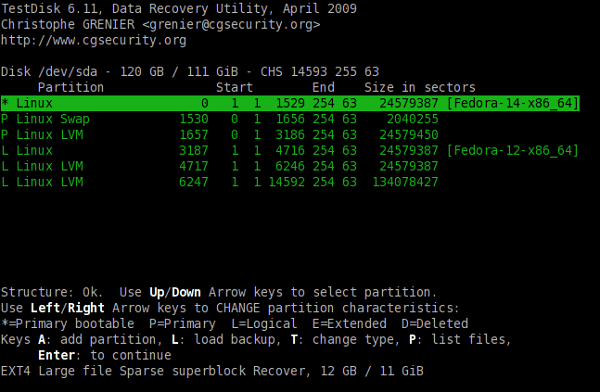
TestDisk is an open-source application used to recover lost partitions. It can recover deleted partitions from hard drives and fix the partition table, recover the boot sector, and more. As an open-source software, its code can be inspected, modified, and enhanced by users who have the necessary expertise.
Pros
- Open-source software
- Recover lost partitions
- Fix disks that won't boot
- Recover various file types
Cons
- Lacks an intuitive graphical user interface---command-line only
- Repairs damaged partitions and file systems but not files
Limitations on the free version: Unlimited free recovery.
Overall Experience
This freeware solution is a command-line tool that specializes in partition recovery, supporting various operating systems and filesystems. Despite being a more specialized tool, it remains supported by its developer and is available in a bootable version. If you've lost a partition, this software can help, but for other types of data loss, you may want to consider other free data recovery software.
Top 9. HDD Recovery Software - Orion File Recovery (Windows)
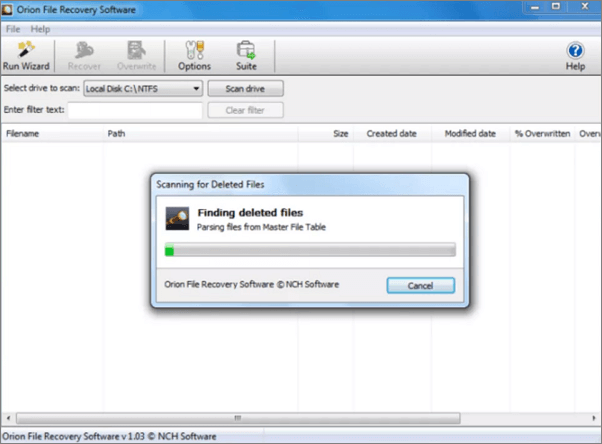
Orion File Recovery is a tool that can undelete files from Windows computers and compatible storage devices, offering data recovery features. In addition to its recovery capabilities, it also has exclusive features to permanently erase data from your hard drive, providing an added layer of privacy protection.
Pros
- The software provides a step-by-step wizard that guides users through the data recovery process, making it easy to recover lost files.
- Filters search results by folder, file type, name, and more
- Allows to specify scan locations
- Provides extra features like "Scrub Files" to erase data completely
Cons
- The scanning process is slightly slow
- Installing software can sometimes lead to the unintentional installation of other utilities, which may not be necessary or desired.
Limitations on the free version: Unlimited data recovery.
Overall Experience
Orion File Recovery Software is user-friendly, with a recovery wizard that helps users specify search criteria, but has many configurable options and unreliable scanning results and recovery rates.
Top 10. Windows File Recovery ( Windows 10 2004 and Above)
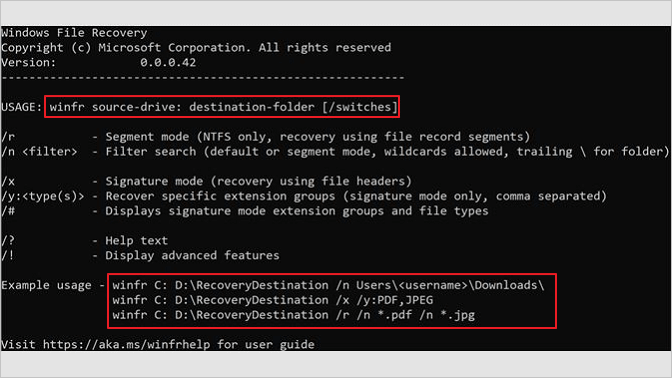
Windows File Recovery is a free command-line utility from Microsoft that allows users to recover deleted files on Windows 10 version 2004 and later. It can recover a wide range of file types, including JPEG, PDF, PNG, MPEG, Office files, MP3, MP4, and ZIP files, from hard drives and other devices.
Pros
- This tool can recover a wide variety of file types, including JPEG, PDF, PNG, MPEG, Office files, MP3, MP4, ZIP files, and many others.
- It is completely free to recover deleted files from various storage devices, including hard disk drives (HDD), solid-state drives (SSD), USB drives, and memory cards.
Cons
- It only works on Windows 10 2004 and above.
- You must use the command-line to get back files according to the file types.
Limitations on the free version: Limited file type recovery.
Overall Experience
This tool allows you to recover specific file types, including JPEG, PDF, PNG, MPEG, Office files, MP3, MP4, and ZIP, but you need to know the target file names, keywords, file paths, or extensions beforehand. Each type of file recovery requires a different command, which can be difficult for non-technical users to find. The tool is completely free and clean, and will not install any additional software or plugins.
How to Recover Files from My Hard Drive for Free
Here are the simple steps needed to recover lost and deleted files using Qiling data recovery software for Windows. First, download and install the Qiling software, then launch it and select the drive or partition where your lost files were located.
Step 1. Select the file types and click "Fast Scan" to start.
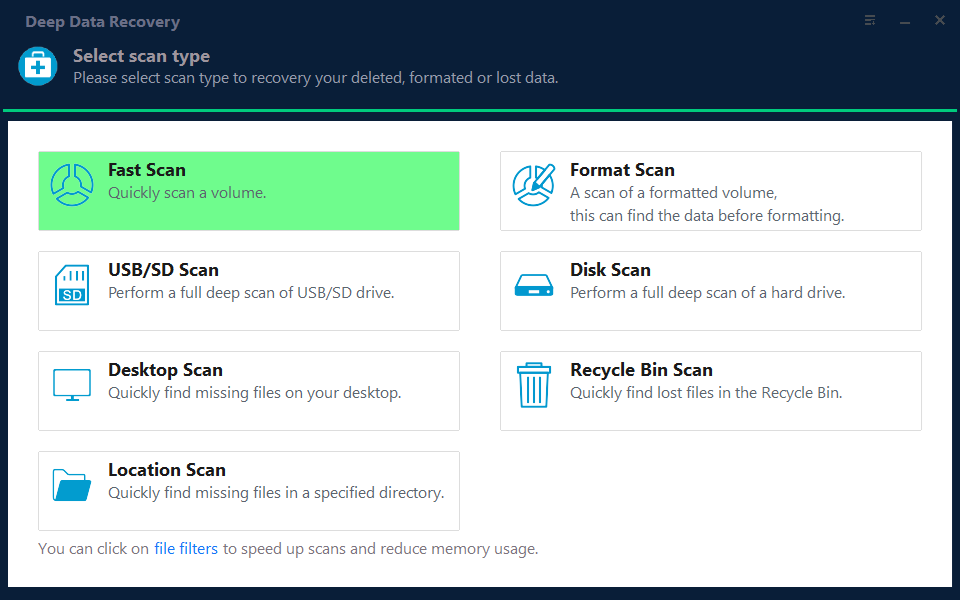
Note: You can choose different search modes based on where and why the data was lost.
Step 2. Select the drive where you lose your data and click "Scan".
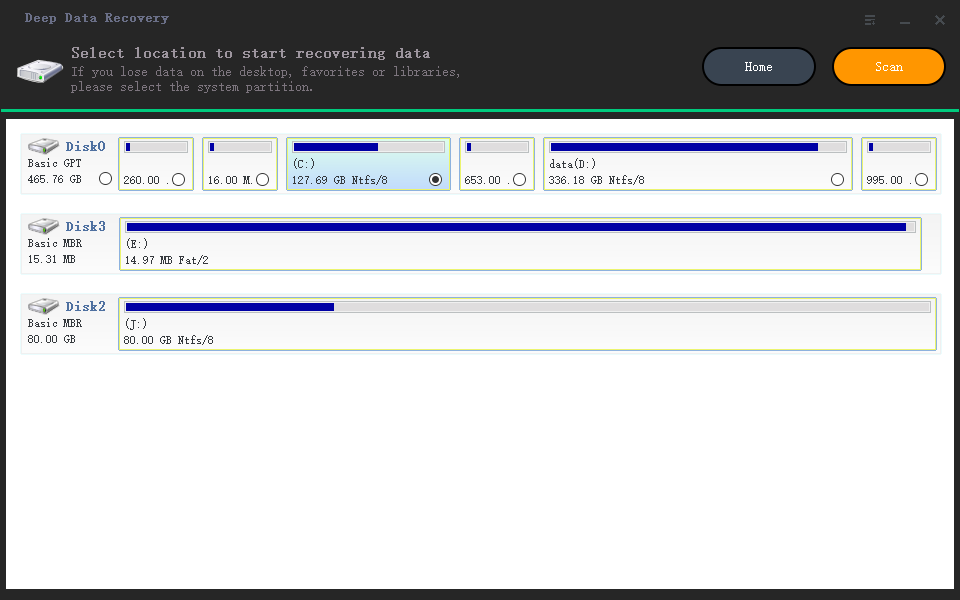
Step 3. When the scan is complete, you can use the "Filter" or "Search" feature to locate the lost files. This allows you to quickly find the files that were detected by the scan, making it easier to recover them.
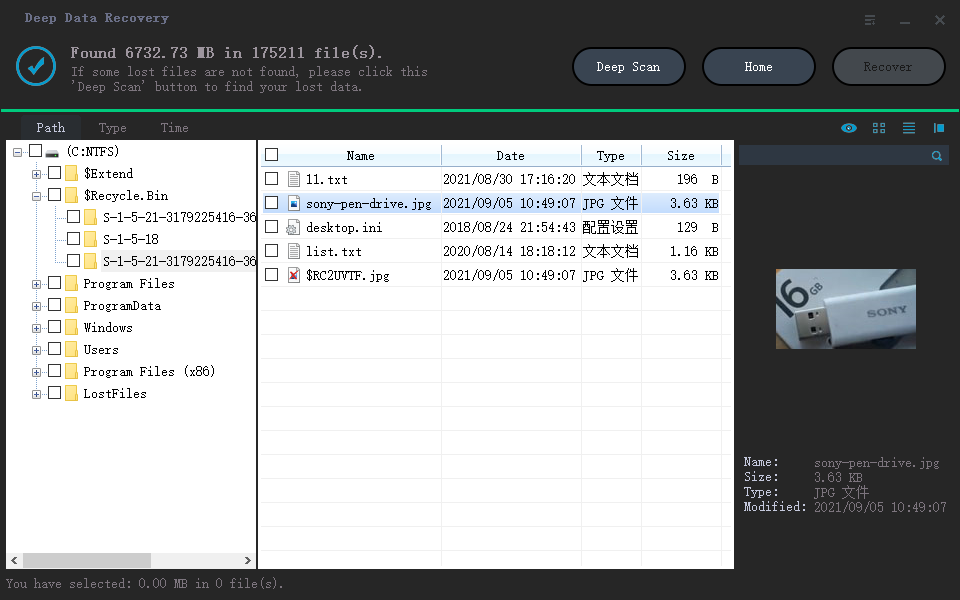
Step 4. Select all the files you want and click "Recover". Then, browse another secure location to save them.
Causes of Hard Drive Data Loss
Hard drive data loss can occur due to various reasons such as mechanical failure, physical damage, software corruption, power surges, virus attacks, and human error. These factors can cause the hard drive to malfunction, resulting in loss of important files and data. It's essential to have a backup system in place to prevent or minimize data loss.
- A file or folder was accidentally deleted.
- Some or all of the partitions have been formatted, which means they have been erased and are no longer usable. This could be done using a tool like Fdisk, which allows users to create, modify, and delete partitions on a hard drive. As a result, the data that was previously stored on those partitions is now lost and cannot be recovered.
- The system displays the message "NTLDR is missing, Press any key to restart" because the NTLDR file, which is necessary for the boot process, is either missing or corrupted. This file is responsible for loading the operating system, and its absence or corruption prevents the system from booting up.
- The partition table is corrupt or damaged.
- A file or folder on your hard drive became inaccessible due to a virus attack or virus infection.
Most people learn the importance of a backup, but often lose data without one, making hard drive recovery software necessary for users.
What You Should Consider While Choosing Disk Recovery Software
Choosing the best hard drive recovery software can be a daunting task, with many developers claiming their tool is the best. However, a great data recovery tool is not necessarily determined by its price, and free software may not always be the best option. When selecting a hard disk data recovery software, consider factors such as the software's quality, functionality, and user reviews to ensure you get the best results for your needs.
First, it should meet your needs well
Here "needs" indicates the situation in which you need to perform data recovery. A good software tool should be able to recover data from a hard drive in different data loss scenarios, such as deletion, format, partition loss, or virus infection, and recover it in one go.
Second, it should be reliable
The ideal hard drive recovery software should be virus-free, plugin-free, and not cause further damage to lost, deleted, or formatted data, and should be able to complete the data recovery process without crashing.
What's equally important is that there should be both pre-sale and after-sale technical support available from the software developers that will serve you anytime you need it.
Third, it should be fast and have a high success rate
Scanning a hard drive to find lost files can be a time-consuming process, taking hours depending on the drive's capacity and the amount of data stored. This is why speed is crucial in such situations.
To ensure a successful data recovery, choose a reliable hard drive data recovery software that has a high success rate, as evidenced by user reviews and ratings from trusted websites such as Trustpilot.
Last but not least, it should be user-friendly
A great disk recovery tool should have a clear and intuitive interface, making it easy for users to navigate and recover their lost data. The data recovery process should be straightforward and simple, with features like filters, search bars, and a preview pane to help users quickly locate their lost files. This will allow users to recover their data with minimal hassle and effort.
When looking for a hard drive recovery software, consider the qualities that matter most to you, such as ease of use, compatibility, and features. Check the list above and choose the best software that fits your needs. No matter what it is, check the list above and choose the best hard drive recovery software for yourself.
Comparison Table - How to Choose a Suitable Software
The comparison of hard drive recovery software scanning the same partition (127GB free of 141GB) searching for deleted/lost files shows that different software can have varying results. You can choose the best one according to your needs.
| Product Name | Recover My Files | Recuva | Disk Drill | Wise Data Recovery | Deep Data Recovery |
|---|---|---|---|---|---|
| Scanning Time | 1h | > 1h | > 1h | 37min | 27min |
| Files Found | 321,297 files | 111,213 files | 2,254 files | 414,170 files | 784,741 files |
| File Size | 13.80GB | no size is shown | 1.92GB | 19.84GB | 38.53GB |
Conclusion
You can try using hard drive recovery software to recover lost files, but the success rate varies and depends on the software's ranking. If the files are not overwritten, one of the software from the list may work, but if the hard drive is physically damaged, manual data recovery services are needed.
Frequently Asked Questions
Updated by Qiling Team
What is data recovery software?
Data recovery software is a specialized application that helps recover deleted files from storage devices, with various options available offering different levels of functionality. A reliable solution like Qiling for Windows or Mac machines can recover over 1000 different types of files that were accidentally deleted.
How does data recovery software work?
Data recovery software uses algorithms to locate deleted files and attempt to recover data, but the success of recovery depends on the file system of the device.
Why do you even need data recovery software?
While many people think all you need to do is run data recovery software, not all data loss situations require a commercial solution. In some cases, native operating system features can help you recover deleted files or data lost due to a system crash or virus, and hard drive recovery software may be able to recover files from your hard drive in such situations.
Related Articles
- Deleted NAS Recovery: How to Recover Deleted Data from NAS Quickly
- Top 10 Best SD Card Repair Tool Download
- 2022 Best Free Linux Data Recovery Software for EXT2/EXT3
- SD/Memory Card Recovery Software Free Download
- How to Reset Canon Rebel DSLR to factory settings
Learn how to reset a Canon Rebel DSLR or Canon camera to factory settings, restore default camera settings, and prepare before resetting. - Microsoft File Recovery Software – How to Use and 10 Best Alternatives
Microsoft File Recovery is a software that can help recover lost or deleted files, but it may not always be the most effective solution. Fortunately, there are alternative software options available that can provide better results.
Products
Articles & Tutorials
- Data Recovery
- Data Backup
- File Recovery
- File Backup
- System Backup and Restore
- Disk and Partition Clone
- Technical articles
- Mobile articles
- Disk Master Help
- Windows Data Recovery Tutorials
- Windows Secure Delete Tutorials
- Windows Partition Management Tutorials
- Windows File Backup and Restore Tutorials
- Windows System Backup and Restore Tutorials
- Windows Disk Backup and Restore Tutorials
- Windows Clone Tutorials