Data Recovery Software Full Version Free Download (in 2026)
A reliable data recovery software tool can help you rescue precious files, such as family pictures, work documents, and favorite movies, from unexpected data loss situations.
You can download Qiling data recovery software full version for free to easily recover your lost data.
Features of Data Recovery Software Full Version
Data recovery software is crucial when personal data is lost on hard drives or storage devices, and numerous options are available online, including free and paid-for programs.
The full version of data recovery software is preferred by many users because it offers a comprehensive set of features, including advanced functionalities, customization options, and an intuitive user interface. The full version often includes additional tools and resources, such as tutorials, support, and updates, which enhance the overall value and usability of the software.
- # No.1: Better data recovery quality
- Users often opt for the full version of data recovery software to achieve better results, as it allows them to fully recover their lost files, unlike the free version which may have limitations.
- # No.2: More and even unlimited data recovery capacity
- Compared to the free version, most full versions of data recovery software can restore more or even unlimited data, whereas free file recovery software has limitations.
- Some famous software developers don't even offer a free version, making it difficult for users to try out their product.
Many users look for free hard drive recovery software to rescue their data, as most full versions of data recovery software cost over $100, which is often too expensive for a normal user.
Official Path: Download Qiling Data Recovery Software Full Version
Unlike its competitors, Qiling software offers two versions of its file recovery software to cater to different user needs, rather than just a demo version to purchase.
Both versions of Deep Data Recovery, the full version and the free version, are officially produced and can be downloaded for free. You can choose either version to fully restore your lost files.
For free data recovery
You can get 2GB of free data recovery capacity by clicking the download button.
For unlimited data recovery
Click the product link of Deep Data Recovery Professional in the comparison table to download it for free on the Qiling official product website.
PLUS: Activation is required after the download.
Tutorial: 3-Step Data Recovery
You can either follow the video guide or the step-by-step written guide to learn how the program works to restore your data, allowing you to get started with the process.
Here, you can either follow the step-by-step written guide to learn how the program works to restore your data.
Step 1. Launch Qiling file recovery software on your Windows computer. Select file types and click "Fast Scan" to start the recovery process.
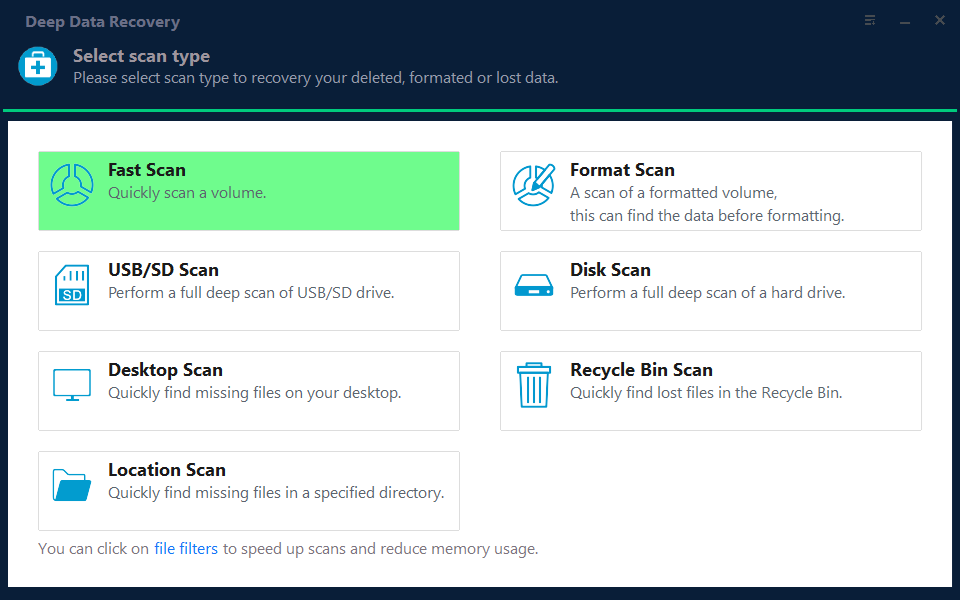
Note: You can choose different search modes based on where and why the data was lost.
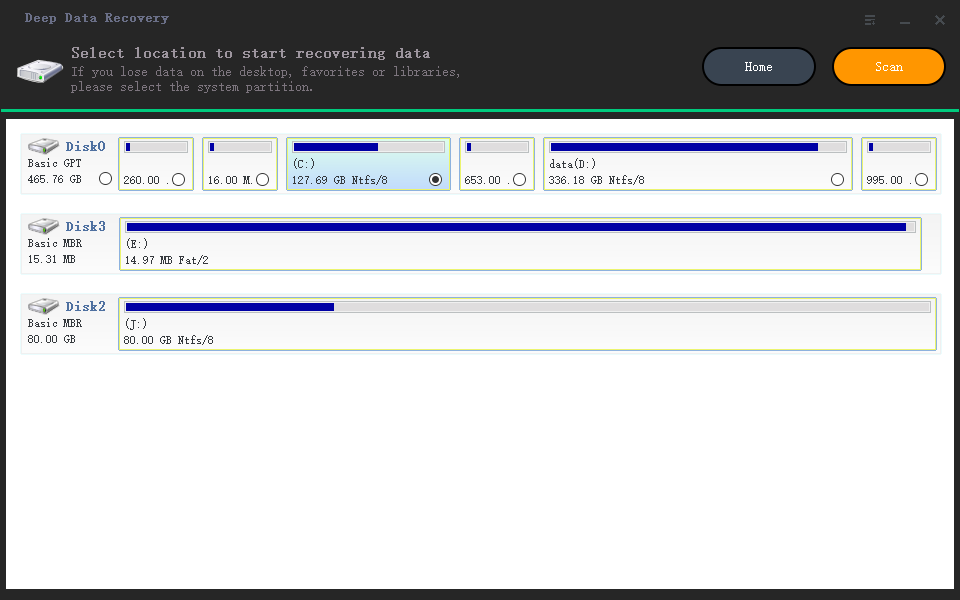
Step 2. Click on the location you want to search and then click the "Scan" button. This will initiate a search for the missing files in that location.
Step 3. The software will quickly scan the drive and display deleted files, allowing you to stop the scan if you find the needed files. To speed up the search, you can use the file format filter to find the target file.
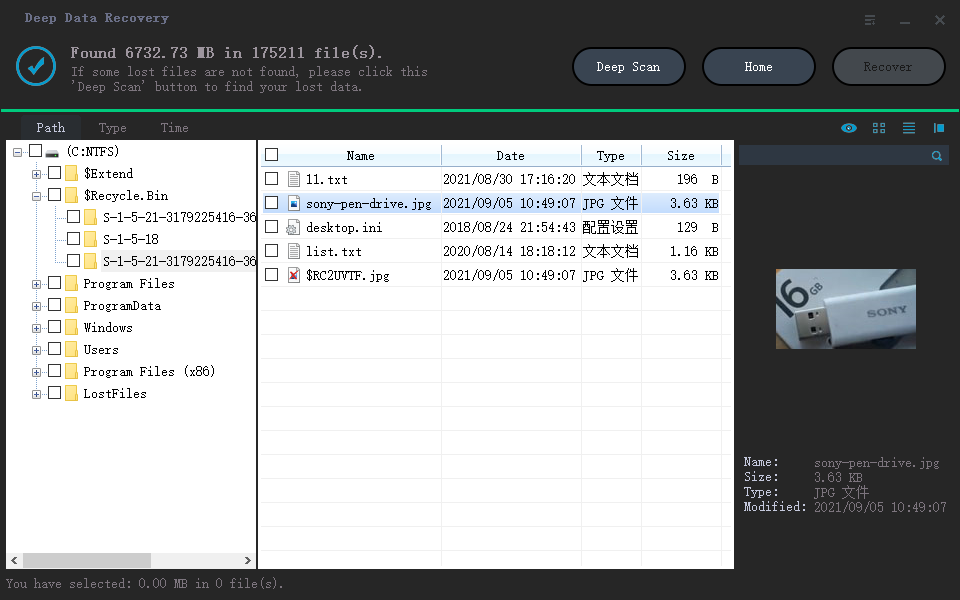
Step 4. To recover files, select the desired files (such as Word, Excel, PDF, photos, videos, or emails) and click the "Recover" button, allowing you to browse for a different location to store the recovered files.
Related Articles
- [Solved] Recover Data from Ext4/3/2 NAS/Linux Device
- How to Correct #DIV/0 Error in Excel | Check Your Full Guide 2022
- How to Recover Deleted TikTok Videos in Android/iPhone/PC
- How to Recover Latest Windows Update Deleted Files (21H2/2004)
Windows updates do not intentionally delete files from your hard drive, SD card, or SSD. However, users often experience missing files after updating to Windows 10 or 11. Professional solutions are available to help restore lost documents and missing files. - How to Restore Lost WPS Office 2016 Files
You can easily recover and restore lost WPS Office 2016 files, including documents, excel, and ppt, due to deletion, formatting, virus attacks, or program updates. Follow these steps to restore your important WPS Office files with ease.
Products
Articles & Tutorials
- Data Recovery
- Data Backup
- File Recovery
- File Backup
- System Backup and Restore
- Disk and Partition Clone
- Technical articles
- Mobile articles
- Disk Master Help
- Windows Data Recovery Tutorials
- Windows Secure Delete Tutorials
- Windows Partition Management Tutorials
- Windows File Backup and Restore Tutorials
- Windows System Backup and Restore Tutorials
- Windows Disk Backup and Restore Tutorials
- Windows Clone Tutorials