[Samsung Data Migration Windows 10/11] Clone A Hard Drive with Samsung Disk Cloner
Main Content:
What Is Samsung Disk Cloner (Samsung Data Migration)?
What Are the Benefits of Samsung Drive?
How Does Samsung Data Migration Work on Windows 10/11?
Professional Alternative to Samsung Disk Cloner in Windows 10/11
FAQ about Samsung Data Migration
Samsung has developed software for cloning, specifically called Samsung Data Migration (SDM), which allows users to instantly try its cloning capabilities.
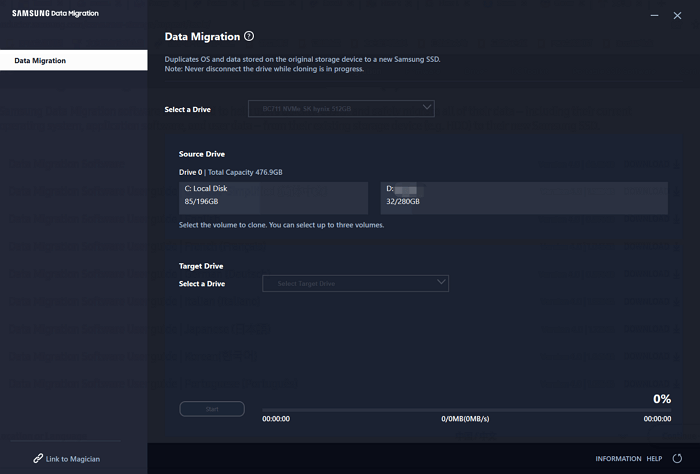
What Is Samsung Disk Cloner (Samsung Data Migration)?
Samsung Drive Cloner/Samsung Data Migration is a software that allows you to clone or migrate data from one Samsung SSD to another, making it easy to upgrade your SSD or transfer data to a new computer. It offers various options for cloning or migrating data, including compressing or encrypting it for added security, and is compatible with all Samsung SSDs.
What Are the Benefits of Samsung Drive?
Samsung data migration on Windows 10 and Windows 11 are two popular options, offering several benefits.
Samsung data migration on Windows 10 is a user-friendly process that is easy to follow and allows users to get started quickly.
Samsung data migration on Windows 10 is a reliable process that ensures safe and secure transfer of data.
Samsung data migration on Windows 10 is an affordable option, offering a cost-effective solution for users to save a significant amount of money compared to other alternatives.
How Does Samsung Data Migration Work on Windows 10/11?
Samsung Data Migration is a tool that helps users transfer data from an old storage device to a new Samsung SSD in just a few minutes, making the process quick and easy.
1. To transfer data from an old Samsung phone to a new one, download and install the Samsung Data Migration software on your computer, which will help you migrate your data seamlessly.
Visit official website.
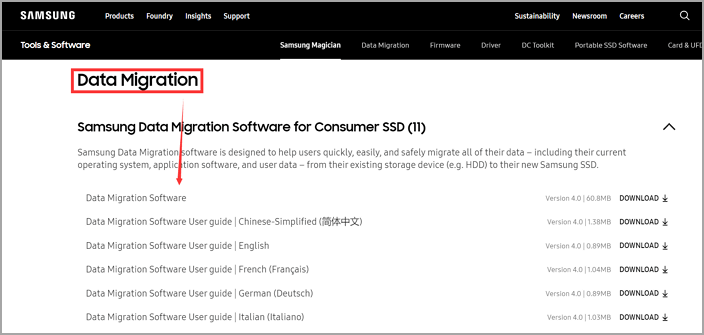
2. Connect your old storage device (HDD or SSD) to your computer.
3. Once the old storage device is connected, open the Samsung Data Migration software and select it as your source drive.
4. Then, select your new Samsung SSD as your destination drive.
5. Click the "Start" button to initiate the data migration process, marking the beginning of the data transfer.
Within minutes, your data will be transferred to your new Samsung SSD, allowing you to enjoy faster data access speeds and improved overall performance.
However, this tool may encounter some errors.
When migrating data to a new Samsung SSD, you might encounter the error message "Samsung Data Migration Failed". This issue could be caused by various factors, including incorrect installation of the Samsung Data Migration software, insufficient disk space on the target drive, or compatibility issues between the source and target drives.
- To resolve the error, ensure you're using the latest version of the Samsung Data Migration software. If the issue persists, it's likely due to incompatible files on your source drive, which can be resolved by selecting only the most essential files for migration or by contacting Samsung Support for further assistance.
- If you're performing a cross-When migrating from one operating system to another, such as from Windows to macOS, differences in file systems can cause the migration to fail. To resolve this, a third-party tool that supports both file systems should be used to facilitate the data migration.
- Need a third-party disk cloning software - check on the next part.
Professional Alternative to Samsung Disk Cloner in Windows 10/11
If you're looking for an alternative to Samsung Data Migration, Qiling Partition Master is a great option. This software allows you to clone your hard drive, including your data and settings, with a simple and easy-to-follow process that takes just a few minutes to complete, making it an excellent choice for anyone who wants to transfer their data from one hard drive to another.
Step 1. Select the source disk.
Right-Select the disk you want to copy or clone, then choose "Clone" from the menu.
Step 2. Select the target disk.
Select the desired hard drive or solid-state drive as your destination and click "Next" to proceed.
Step 3. View the disk layout and edit the target disk partition size to ensure optimal storage allocation.
You can customize your disk layout by selecting "Autofit the disk", "Clone as the source", or "Edit disk layout". If you want to leave more space for the C drive, choose "Edit disk layout".
Step 4. Click "Proceed" to start the disk cloning process.
Then click "OK" when the program warns it will wipe out all data on the target disk. (If you have valuable data on the target disk, back up it in advance.)
FAQ about Samsung Data Migration
1. Is Samsung Data Migration the Same Is Cloning?
Samsung Data Migration can help clone your hard drive by completing the data migration process, ensuring a seamless transfer of your data.
2. How Long Does Samsung Migration Take?
If your hard drive is less than 50GB, it may take a few minutes to clone, but if it's 2TB or larger, the process will be completed in under an hour.
Related Articles
- How to Format to FAT32 in Windows 11 (4 Useful Methods)
- Reformat PS4 Hard Drive for PC in Windows 10/8/7
- 4 Top Best Windows 11 Formatter Free Download with Tutorials
- How to Extend C Drive in Windows 7/8/10
- How to Remove MBR Partition in Windows 7/8/10/11
This article delves into the details of the MBR (Master Boot Record) partition table, providing a deeper understanding of its functionality. Additionally, it will guide you through the process of removing the MBR partition table from a hard drive or USB drive in a Windows environment. - How to Fix Remove PIN (Greyed Out) on Windows 11
To fix the issue of a greyed out PIN on Windows 11, follow these steps: follow the steps below. This will help you resolve the problem and remove the greyed out PIN within a few minutes.
Products
Articles & Tutorials
- Data Recovery
- Data Backup
- File Recovery
- File Backup
- System Backup and Restore
- Disk and Partition Clone
- Technical articles
- Mobile articles
- Disk Master Help
- Windows Data Recovery Tutorials
- Windows Secure Delete Tutorials
- Windows Partition Management Tutorials
- Windows File Backup and Restore Tutorials
- Windows System Backup and Restore Tutorials
- Windows Disk Backup and Restore Tutorials
- Windows Clone Tutorials