Basic Disk VS Dynamic Disk (The Features, Differences, and Conversion)
What Is a Basic Disk?
Basic disks are the most commonly used type of partition in Windows OS, where partition tables or logical drives manage all data on hard disk partitions.
Basic disks are conventional storage models that mimic the setup used with MS-DOS, where the operating system is installed on a hard drive configured as a basic disk. By default, each new disk is created as a basic disk unless specified otherwise.
In a basic disk setup, the simple volumes are partitions that can be formatted and later altered or expanded. The size of a partition can also be modified or expanded after its creation, with the maximum size being the total hard drive space.
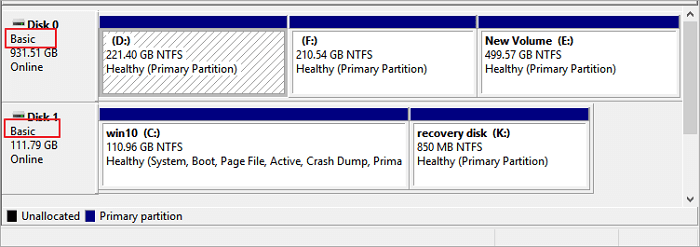
Each partition on a disk is independent, unable to share or split information with others, and can use either Master Boot Record (MBR) or GUID Partition Table (GPT) partition styles. The maximum number of partitions on a basic disk is limited, depending on the partition style used.
Basic disks that use the GPT partition style allow up to 128 primary partitions, while those using the MBR style can have up to four, including four primary or three primary with one extended and various logical partitions. They also support FAT, FAT32, and NTFS file systems.
What Is a Dynamic Disk?
Windows 2000 introduced dynamic disks, a technology that enabled more flexible data management, including fault-tolerant volumes.
Dynamic disks allow for dynamic volumes that can be split, converted, and expanded even after creation. They can also be extended over noncontiguous spaces on one or more physical disks, with varying maximum sizes.
Dynamic disks can utilize either Virtual Disk Service (VDS) or a hidden Logical Disk Manager (LDM) database, and they also support both Master Boot Record (MBR) and GUID Partition Table (GPT) formats.
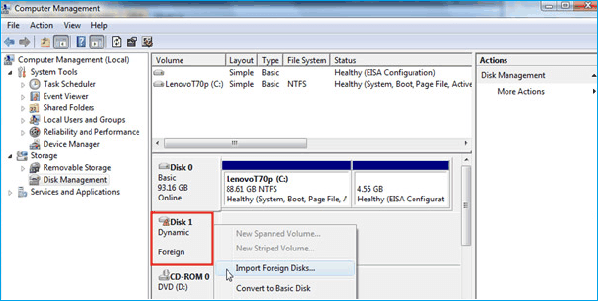
Dynamic disks support five volume types: simple, spanned, striped, mirrored, and RAID-5. A simple volume is a single dynamic disk, a spanned volume is a single dynamic disk that spans multiple disks, and a striped volume is a dynamic disk that splits data across multiple disks. A mirrored volume is a dynamic disk that duplicates data across multiple disks, providing redundancy and protection against disk failure. RAID-5 is a striped volume with parity, providing both redundancy and protection against disk failure.
Striped, mirrored, and RAID-5 volumes are types of dynamic storage configurations. A striped volume is a single dynamic volume spread across multiple disks. A mirrored volume provides fault-tolerance by storing two copies of data. A RAID-5 volume is a fault-tolerant dynamic volume that stores data on rotating disks, but cannot be mirrored or extended.
You can have up to 2,000 dynamic volumes on a hard disk, regardless of whether it uses MBR or GPT partition style, but it's recommended to have 32 or less.
The Difference Between Basic Disk and Dynamic Disk
When deciding between a dynamic and basic disk, consider the type of storage you need. Both can store data, but the main difference lies in how they're utilized. A basic disk is a traditional storage option, while a dynamic disk is a more modern, flexible choice that can be divided into smaller volumes or used for other purposes.
Basic disks The original type of disks, used since DOS days, track data with GTP and MBR, only allowing primary and logical partitions. Once created, partitions can't be changed directly without third-party tools, limiting partition sizes to the hard drive space.
A basic disk is the most popular storage method due to its dual multi-bootability, simplicity of use, and data protection features. Fortunately, you can convert a basic disk to a dynamic disk without losing any data.
Dynamic disks, Dynamic disks are a type of storage used by Windows computers, originally developed for Windows NT and made available with Windows 2000. They track volumes with LDM and VDS databases, and can be identified by MBR or GTP.
On MBR disk partitions, the database occupies the last megabyte of space, while on GPT disk partitions, it occupies a reserved 1-MB disk.
Dynamic disks allow for the creation of volumes with varied space configurations, enabling easy resizing and movement between them. This feature utilizes the database to create new dynamic disks and repair corrupted ones, providing flexibility and redundancy in disk management.
Dynamic volumes are a feature of the operating system that allows users to create and manage storage spaces, but they do not support multi-boot functionality. There are five types of dynamic volumes: simple, spanned, striped, mirrored, and RAID-5, each serving a different purpose. However, these types do not offer the capability to boot multiple operating systems.
By combining multiple regions, you can create a dynamic volume with no bounds, making it easier to manage data. This setup also allows for sections to be divided, making it simpler to organize and access information. Additionally, you can modify the volumes or backup data without needing to restart your operating system, reducing the risk of data loss.
You can't convert dynamic disks to basic disks directly, and deleting them before conversion is required, but this may result in data loss. Third-party tools are necessary to avoid this issue.
How to Convert Basic Disk to Dynamic Disk (2 Ways)
You're about to learn effective ways to convert a basic disk to a dynamic disk, including using third-party partition manager software and using Disk Management in Windows 10/8.1/8/7.
Method 1. Convert to Dynamic Disk with Qiling Partition Master
Qiling Partition Master allows users to manage and partition their data drives on Windows OS, with features like converting basic to dynamic disks or vice-versa, resizing, creating, moving, deleting, merging, wiping partitions, and changing drive letters, all through a user-friendly interface that works on Windows 2000 to Windows 10.
Step 1. Install and open Qiling Partition Master on your Windows computer.
Step 2. To convert a disk, select it, right-click, and choose the conversion option from the menu.
- Basic to Dynamic: right-click a basic disk and select "Convert to Dynamic".
- Dynamic to Basic: right-click a dynamic disk and select "Convert to Basic".
Step 3. The conversion process from basic to dynamic disk or vice versa can be initiated by clicking "OK" on the pop-up notice window, which then begins the conversion.
Method 2. Use Windows Disk Management to Convert to Dynamic
Windows Disk Management provides a straightforward tool for managing hard drives, offering essential functions and the ability to convert basic disks to dynamic disks.
Follow this step-To convert a basic disk to a dynamic disk on Disk Management, follow these steps: First, open the Disk Management console by searching for it in the Start menu or typing 'diskmgmt.msc' in the Run dialog box.
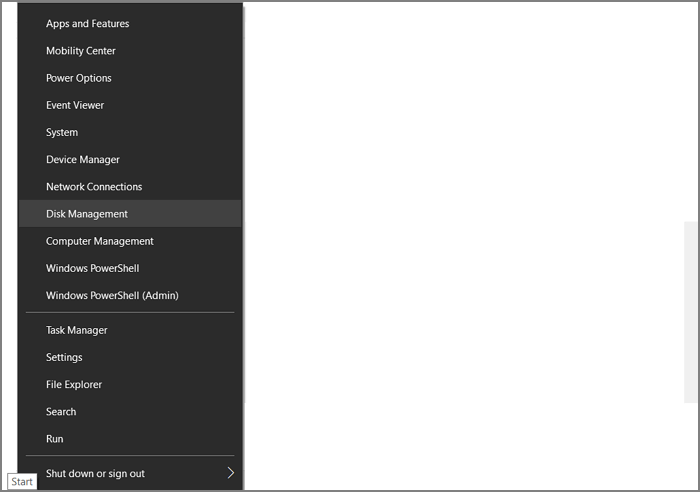
Step 1. To open Disk Management, right-click the Windows Start button and select "Disk Management".
Step 2. The loaded drives will be displayed in the Disk Management tool.
Step 3. To convert a basic disk into a dynamic disk, right-click over the disk and select "Convert to Dynamic Disk".
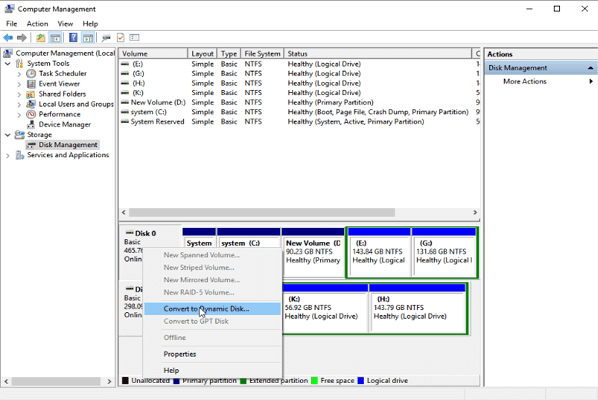
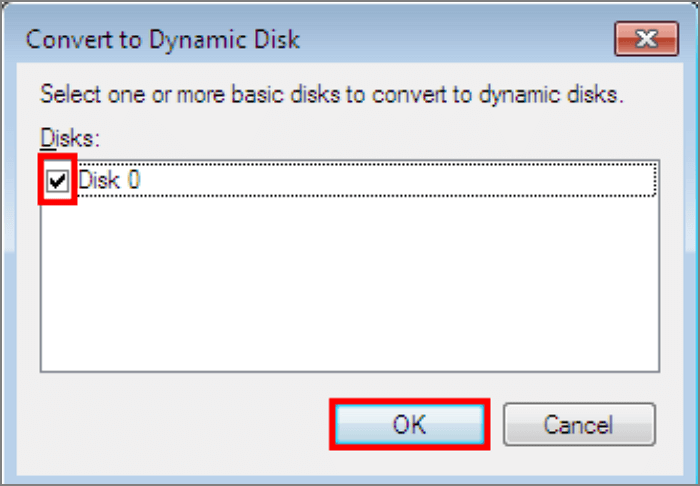
Step 4. Select the disk you want to convert and press "OK".
Step 5. 1 tonne is equal to 1,000 kilograms, 2,204.62 pounds, 35.274 ounces, or 1,102.
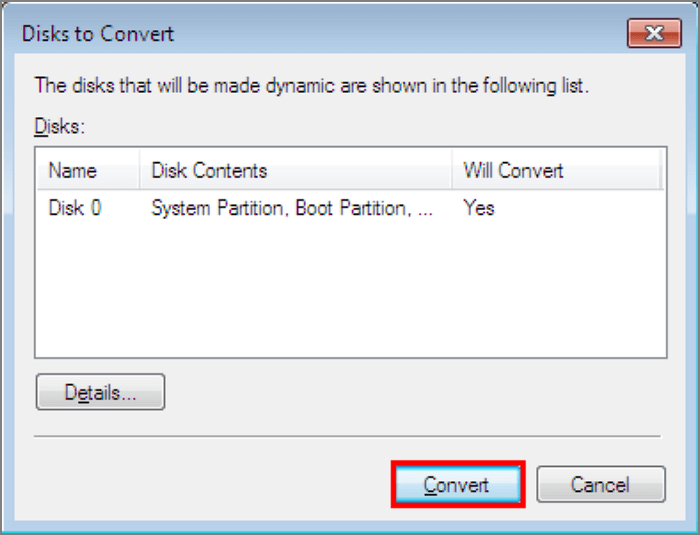
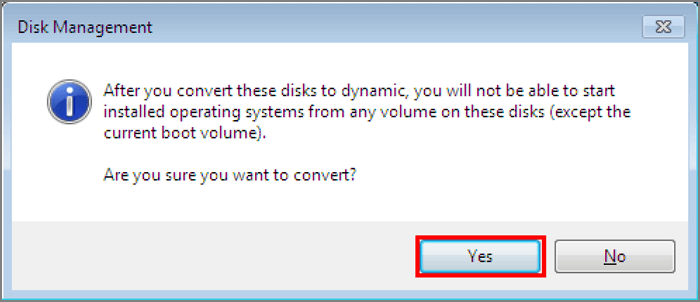
Step 6. Disk Management will warn you that converting a basic disk to a dynamic disk will prevent you from starting operating systems from any volumes on these disks, except for the current boot volume. Once the process is complete, the basic disk will be converted into a dynamic disk.
How to Convert Dynamic Disk to Basic Disk
To convert a dynamic disk to a basic disk, you need to create a new basic disk, copy all data to the new basic disk, and then delete the dynamic disk. You can use Disk Management to create a new basic disk, copy all data to the new basic disk, and then delete the dynamic disk. Alternatively, you can use a third-party tool to clone the dynamic disk to a basic disk.
To convert a dynamic disk to a basic disk in Windows, you need to delete all volumes on the dynamic disk and then convert it to a basic disk, which can result in data loss.
To convert dynamic disks into basic disks, you can use the built-in Disk Management tool in Windows. First, open Disk Management, which can be accessed by right-clicking on the Start button and selecting Disk Management.
Step 1. To convert a dynamic disk to a basic disk, you should first ensure that all data is backed up, as this process will erase all data on the dynamic disk. This involves connecting the dynamic disk to the system, and then using the Disk Management tool to convert it to a basic disk.
Step 2. To access Disk Management, right-click the Start button and select "Disk Management" while running with administrator powers. This allows you to manage and configure your computer's disk storage.
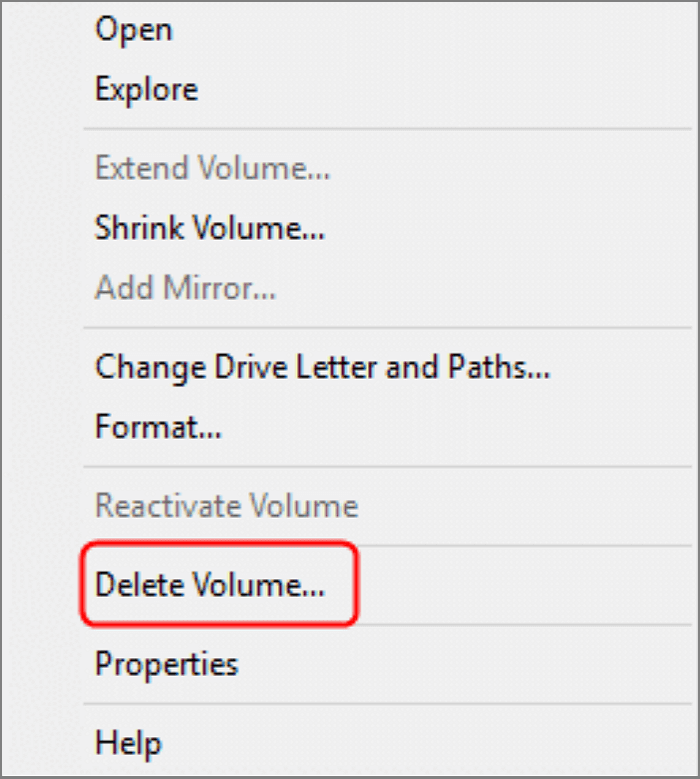
Step 3. Delete all volumes on the dynamic disk that will be converted and click "Delete Volume" on each one.
Step 4. Right-click on the disk, then click "Convert to Basic Disk".
Conclusion
Dynamic disks offer more flexibility than basic disks, but they cannot be directly converted to basic disks. Additionally, only basic disks can be used for multi-boot partitions, which can cause issues if you need to work with both types of disks without proper tools.
We learned how to convert basic disks to dynamic disks, and vice-versa, using the Disk Management tool, which requires deleting all data to avoid loss.
Hard disks cannot be easily expanded or converted once formatted, limiting the ability to add space to unused areas, often requiring third-party tools.
Qiling Partition Master enables the conversion of a basic disk to a dynamic disk or vice versa, allowing users to utilize unused hard drive space. It also allows for the expansion, resizing, and modification of volumes without data loss.
Related Articles
- Lenovo VS Dell: Which Is Better Laptop in Terms of Price, Performance, and Much More?
- Windows 11 Home VS Pro, Which Is Better? Your Tips Are Here
- How to Stop Disk Checking and Stock CHKDSK on Startup in Windows 11
- [Full Guide] How to Rebuild MBR | Fix Damaged MBR
- DiskPart: Format Disk Partition in Windows 11, 10, 8, 7
DiskPart format command enables you to quick format a disk partition in Windows 11, 10, 8, 7. Here comes the step-by-step guide. - Windows 10/8/7: How to Shrink Volume Using Diskpart Command Line?
Learn how to use DiskPart to shrink volume from in command line prompt with the syntax in Windows 11/10/8/7. But sometimes, it may tell you there is an error. Fortunately, Qiling Disk Master can fix it.
Products
Articles & Tutorials
- Data Recovery
- Data Backup
- File Recovery
- File Backup
- System Backup and Restore
- Disk and Partition Clone
- Technical articles
- Mobile articles
- Disk Master Help
- Windows Data Recovery Tutorials
- Windows Secure Delete Tutorials
- Windows Partition Management Tutorials
- Windows File Backup and Restore Tutorials
- Windows System Backup and Restore Tutorials
- Windows Disk Backup and Restore Tutorials
- Windows Clone Tutorials