XLS VS XLSX | What's the Real Difference of .xls VS .xlsx [Full Guide]
A .xls file is an older Microsoft Excel file format, while a .xlsx file is the newer, more widely supported format. The main difference between the two is that XLSX is a newer, XML-based compressed file format introduced with Microsoft Office 2007, offering better efficiency, larger data capacity, and more features compared to the older binary XLS format used by Excel 2003 and earlier versions.
What Is XLS VS XLSX
XLS is the file format used by Excel 2003 and earlier versions, whereas XLSX is the file format used by Excel 2007 and later versions.
What Is XLS
The .xls file is a Microsoft Excel worksheet, a widely used spreadsheet format that can be opened with Microsoft Excel. Additionally, Microsoft has created an Excel Viewer for users without Excel installed, allowing them to view .xls files.
You can use Microsoft Excel to convert XLS format tables into multiple formats, including XML tables, XML data, web pages, text files separated by tabs, and text files separated by commas.
What Is XLSX
Microsoft Office Excel 2007/2010/2013/2016/2019 documents use the file extension .xlsx. This format was introduced in Office 2007, replacing the proprietary default file format with a smaller, XML-based compressed file format. The addition of the letter "x" to the traditional file name extension (e.g. .docx, .xlsx, .pptx) resulted in a more compact file size. This change was consistent across various Microsoft Office applications, including Word (docx) and PowerPoint (pptx).
Difference Between XLS and XLSX in Tabular Form
The choice between .xls and .xlsx depends on various factors. .xls files are older and were widely used in the past, but they have limitations such as a 65,536-row limit per worksheet and a 256-column limit.
| Comparison | XLS | XLSX |
|---|---|---|
| Format | XLS is a proprietary binary format | XLSX is based on Microsoft Office Open XML format. |
| Version | 2003 and older versions | versions since 2007 |
| File size | XLS files are larger | XLSX files are smaller |
| Capability | XLS is compatible with older versions before 2003 | XLSX files may not be compatible with older software or systems due to their complex formatting and data structure, which can cause issues with file opening, formatting, and data retrieval. This can result in errors, corruption, or even complete file failure. |
| Ability | XLS can store fewer data than XLSX. | XLSX has more rows and columns capacity than XLS. |
Comparison summary: To save Excel files, it's recommended to use the .xlsx format, which is a newer and more compatible format compared to .xls, unless there are specific compatibility considerations that require using the older .xls format.
How to Convert XLSX to XLS or Save XLS as XLSX File
You can easily convert an XLSX file to an XLS file or vice versa by using the "Save As" feature in Microsoft Excel or by using a third-party converter software. Additionally, you can also use online conversion tools or built-in conversion features in some office software to achieve the conversion.
Step 1. To convert an XLSX file to CSV, you can use Excel 2007 or later. Open the XLSX file you want to convert, then go to the "File" tab and click on "Save As".
Step 2. To save your file, click on the File tab at the top left corner, then select "Save As" from the dropdown menu, and choose a location on your computer where you'd like to save the file.
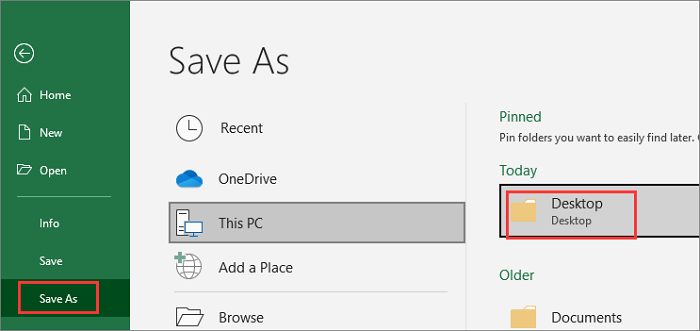
Step 3. To save a file in Excel 97-2003 format, click the drop-down menu of "Save as type" and select "Excel 97-2003 Workbook" with the file extension "(*.xls)".
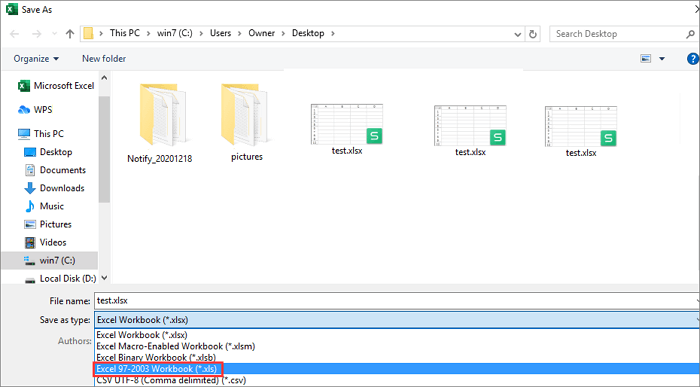
Step 4. To rename the file, click on File > Save As. In the Save As window, change the file extension from .xlsx to .xls and click "Save".
How to Convert XLSX to XLS Without Opening
This is another way to convert an XLSX document to XLS without opening the file.
Step 1. Press Windows + E keys to open the file explorer.
Step 2. Go to the folder where the file is located.
Step 3. Right-click on the XLSX file, and select "Rename". Change .xlsx to .xls.
Step 4. Click "Yes" to save the change.
Bonus Tips: How to Recover Deleted Excel Files on Windows 10/8/7
Accidental deletion is the main reason for file loss, including Excel files, due to careless deletion, hard drive formatting, virus attacks, USB flash drive corruption, emptying the Recycle Bin, and other similar incidents.
To restore deleted or lost Excel files on Windows 10, Windows 8, or Windows 7, you can use the Deep Data Recovery tool, which is one of the best file recovery tools available. It can help you recover your lost Excel files.
- Recover deleted, formatted, and inaccessible data in various data loss scenarios.
- Recover lost data from any storage with a reliable tool, ensuring safe and complete recovery of Word documents, photos, audio, music, and emails.
- Data can be retrieved from various storage devices, including the recycle bin, hard drive, memory card, SD card, flash drive, digital camera, and camcorder.
- Restore lost data on various Windows operating systems, including Windows 10, 8.1, 8, 7, Vista, XP, and Windows Server 2019 and 2003.
You can download Deep Data Recovery for free to easily recover deleted Excel files with just a few steps. Additionally, this tool is also effective in repairing corrupted Excel, Word, PDF, and PPT files.
Step 1. Select file types and click "Fast Scan" to start
Launch Deep Data Recovery. Select file types and click "Fast Scan" to start the recovery process.
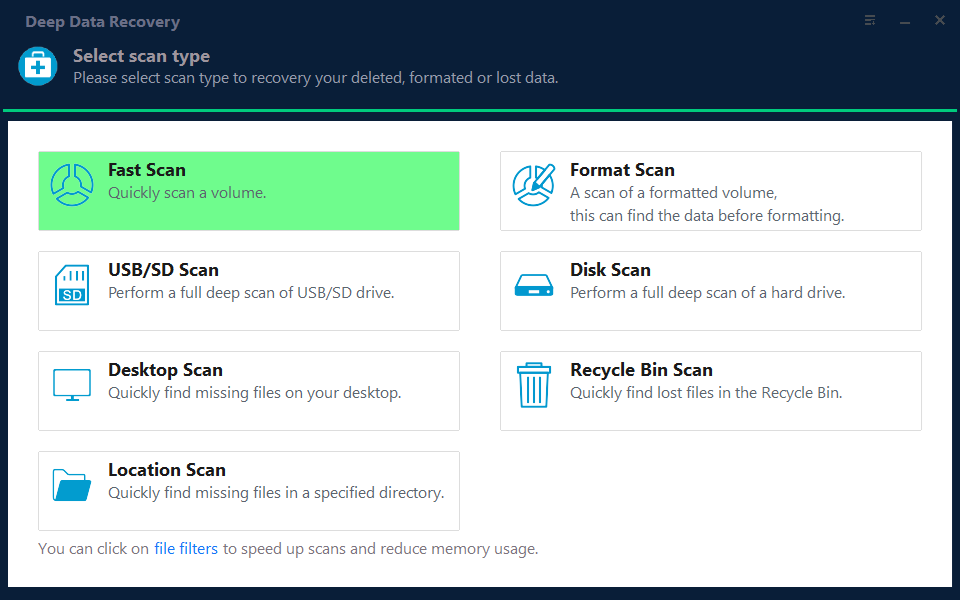
Note: You can choose different search modes based on where and why the data was lost.
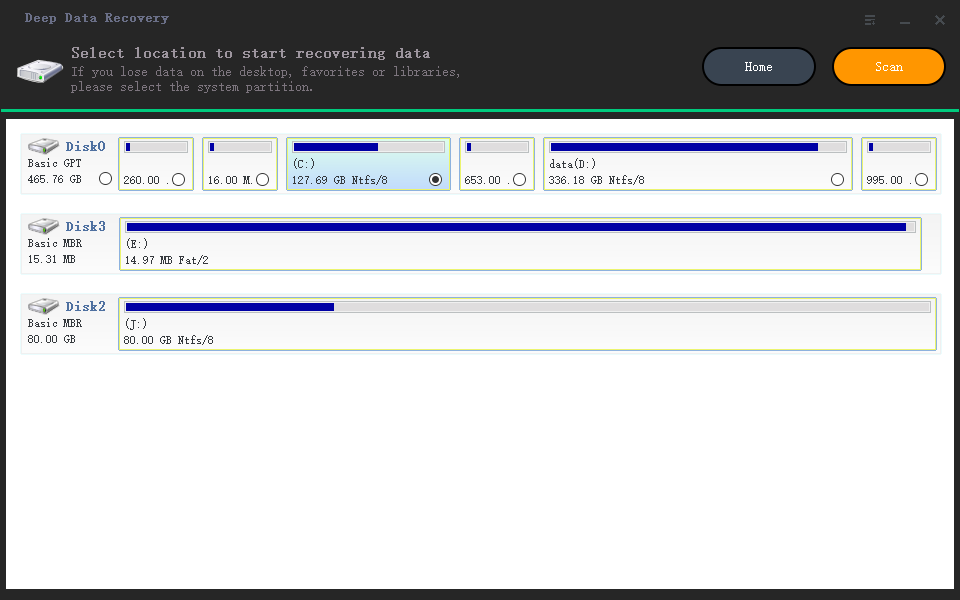
Step 2. Select location and click "Scan"
To recover lost Excel files, select the drive or folder where the files were located and click the "Scan" button.
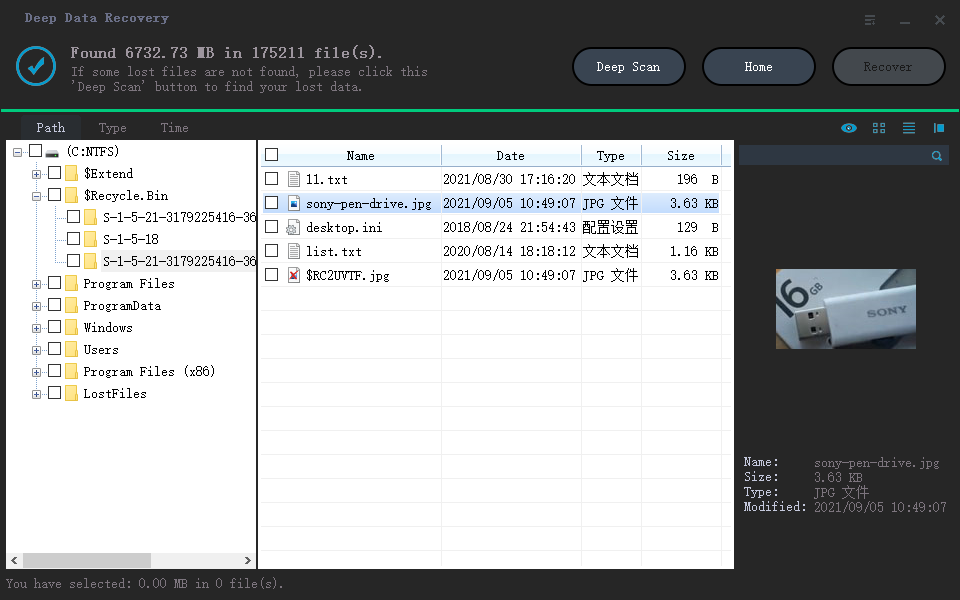
Step 3. Locate your excel files
To quickly find the Excel files from the scan results, click the "Documents" option in the left panel, select "Excel", and click "Preview" to confirm they are the desired files.
Step 4. Recover Excel files
Select the desired Excel files, click the "Recover" button, and choose a folder to save the recovered Excel files to a new location.
More Relative Topics About XLSX VS XLS
Here are more related readings about XLSX VS XLS.
Why is XLSX smaller than XLS?
.xlsx replaces the traditional .xls file format with a new XML-based compressed file format, adding the letter x after the file name extension, and is actually compressed to save space, which can be opened by unzipping with a tool.
Can you convert XLS to XLSX?
You can convert a file from XLS to XLSX or vice versa by opening the file in Excel and using the Save as feature to change the file format.
XLS VS CSV
CSV is a text file that can be opened with Notepad, while XLS is a binary file that can only be opened with Excel. This means CSV files are human-readable and can be edited with any text editor, whereas XLS files are proprietary and can only be edited with Excel software.
XLS and XLSX files are Microsoft Excel spreadsheet formats, while CSV (Comma Separated Values) is a more common file format that can be easily imported into various databases and tables. In a CSV file, each row represents a single row of data, with fields separated by commas.
CSV files are smaller and more suitable for storing structured information, such as record exports and traffic statistics, as they are essentially text files that can be easily opened in Excel on Windows.
Concluding Words
XLS and XLSX are file formats for Microsoft Office Excel, with XLS being an older version and XLSX being the newer, more widely used format. Both have their advantages and disadvantages, and the choice between them depends on the specific application and requirements. Understanding the differences between these formats can help users select the most suitable one for their needs.
To convert a file between XLS and XLSX, you can follow the same process we previously mentioned. It's a straightforward process. Additionally, you can also learn how to use Qiling data recovery tool to recover deleted Excel files and fix corrupted Excel documents, which can be a useful skill to have.
Related Articles
- How to Fix Hitachi Hard Drive Not Working/Recognized
- Microsoft Flight Simulator Free Download (Full Version)
- Recycle Bin Empties Itself: How to Stop Recycle Bin Auto Deletion in Windows 7/8/10
- Free Download Professional Data Recovery Software with Crack
- Free Toshiba HDD Recovery: Perform Toshiba Hard Drive Recovery for Free
Download free Toshiba hard drive recovery software, scan the drive to recover deleted, formatted, inaccessible data, and retrieve with simple steps. - Fix Corrupted Data and Recover Files from PSP Memory Stick
If you're unable to play PSP games, it's possible that the PSP data is corrupted. To fix this, you can manually repair the corrupted data using a specific method.
Products
Articles & Tutorials
- Data Recovery
- Data Backup
- File Recovery
- File Backup
- System Backup and Restore
- Disk and Partition Clone
- Technical articles
- Mobile articles
- Disk Master Help
- Windows Data Recovery Tutorials
- Windows Secure Delete Tutorials
- Windows Partition Management Tutorials
- Windows File Backup and Restore Tutorials
- Windows System Backup and Restore Tutorials
- Windows Disk Backup and Restore Tutorials
- Windows Clone Tutorials