Fix MS SQL Database Corruption (823/824/825) Errors
This page provides guidance on repairing corrupted SQL database errors on Windows operating systems, including Windows 10/8.1/7/Vista and Windows Server 2012/2008.
Microsoft SQL Server has become increasingly popular among business owners and advanced administrators due to its advanced features, user-friendly interface, and improved UI design, making it a top choice for database management.
With the growing popularity of SQL, database corruption issues have become more common. Qiling software has developed a data recovery software specifically for MS SQL users, making it easier to manage and resolve SQL Server database corruption errors. This software allows for quick recovery of lost database data, deleted tables, and even repair of corrupted databases with just a few simple steps, helping to prevent and resolve this problem.
MS SQL Database Corruption Errors - 823, 824, 825, etc.
Here are some common error messages that may occur when a database becomes corrupted in MS SQL Server:
- Msg 823 error in SQL Server

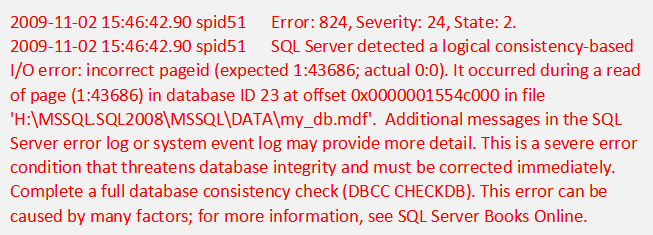
- Msg 824 error in SQL Server
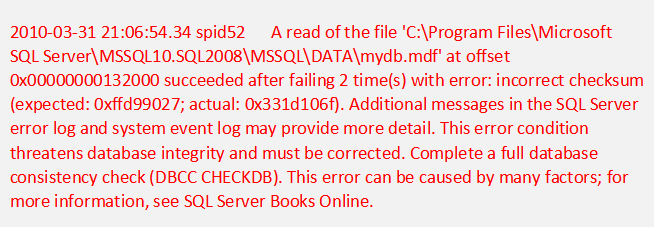
- Msg 825 error in SQL Server
- DBCC CHECKDB reports database consistency errors
- Data pages corruption error
- Metadata corruption error
- etc.
If you encounter a database corruption error in SQL, indicated by error messages or codes, it's essential to resolve the issue to prevent further problems. To do so, you can follow the provided solutions to address the corruption and prevent similar errors from occurring in the future.
How to resolve MS SQL database corruption errors
To fix database corruption errors on your MS SQL Server, you can try two methods. Firstly, you can use the built-in utilities such as DBCC CHECKDB and DBCC CHECKTABLE to scan your database for errors and inconsistencies.
Method 1. Run Database Console command to repair SQL database
When searching online for how to deal with SQL Server error codes 823, 824, or 825, you'll often find suggestions to run DBCC command lines to repair the database.
- DBCC DBREPAIR
- DBCC CHECKDB
These two command lines can help repair a SQL database with minor corruption issues. If you have more severe corruption, consider seeking help from Microsoft or a professional SQL service provider.
Method 2. Repair corrupted SQL database with SQL recovery software
If you're looking for a simpler and more effective way to repair a corrupted SQL database, you can use Qiling MS SQL Recovery, a tool that allows you to directly repair the database in just a few clicks.
Qiling MS SQL Recovery allows for the management of database loss, table, and sheet recovery, and even repair of NDF or MDF files.
- Important
- Qiling MS SQL Recovery allows sharing one key on three SQL machines for database recovery and data protection, enabling users to safeguard their SQL data.
Step 1. Close the SQL Service in Task Manager or SQL Server Manager Console.
Step 2. Run Qiling MS SQL Recovery, and browse or search for the corrupted database file to select it. Then, click "Repair" to initiate the recovery process.
Step 3. When the scan is complete, select the files you want to repair and click "Export" to save them to a new location.
Step 4. To enable the SQL service, you can export the repaired files to a database, which will generate SQL scripts for you. This allows you to easily manage and work with the repaired data.
That's the whole process of MS SQL database repair. To learn the ways to repair a corrupted database is not enough. Continue reading, and we've collected the top 5 ways to help you prevent SQL database from corruption, which is also highly significant.
Top 5 Ways to prevent MS SQL database from corrupting
While running MS SQL, database corruption can be unpredictable, but it's not entirely unavoidable. With careful maintenance, monitoring, and backup strategies, the risk of corruption can be significantly reduced. Regular backups, consistent database maintenance, and monitoring for potential issues can help prevent data loss and corruption. Additionally, implementing best practices such as using transactional replication, implementing database snapshots, and regularly running DBCC CHECKDB can also help mitigate the risk of corruption.
Here we'll discuss the top 5 ways to prevent database corruption error, and you may follow on to find the best one to protect your SQL database.
1. Back up SQL database and logs
Regular backups of SQL databases and records can ensure that your SQL can be restored in case of disasters. There are various online methods available to back up and restore SQL Server databases.
You can back up and restore MS SQL databases for free using Qiling SQL Server backup software. This free trial allows you to directly back up and restore SQL Server databases within 30 days.
2. Run Database Integrity Checks
Regular database integrity checks, also known as 'solid corruption resistance', can help prevent database corruption errors in SQL Server. The DBCC CHECKDB command is a recommended resolution to repair corrupted databases. Performing these checks on a regular basis can indeed help prevent database corruption issues.
3. Add and leave enough disk space for SQL database
To resolve the SQL Server database corruption issue, try increasing the disk space allocated to the drive where the database is saved, ensuring there is enough space to accommodate the database file size. Regularly check the database file size and disk used space to prevent running out of space, which can lead to database corruption errors.
4. The regular update for optimization
To ensure smooth SQL Server operation, it's recommended to update your SQL Server regularly, but not necessarily to the latest version. Instead, choose a stable version that's compatible with your hardware. This will help prevent issues even if your hardware is outdated.
5. Don't use the cold shutdown
When many users are connected to a SQL database, a cold shutdown can cause significant system issues. It's crucial to monitor connections and users before deciding to shut down the server for maintenance or updates. This ensures a smoother and less problematic process.
The bottom line
There are two reliable methods to repair corrupted MS SQL Server databases, and several ways to prevent database corruption. Firstly, the database can be repaired using the built-in database integrity check and repair tool, which can identify and fix issues such as page checksum errors and data page corruption.
When SQL Server records are deleted or lost, or MDF/NDF files are corrupted, use Qiling MS SQL Recovery to quickly repair them.
Related Articles
- SQL Recovery Program Download: Repair SQL Server Database
- Restore Database from MDF and LDF Files in SQL Server 2017/2014/2012
- How to Fix SQL Server Database Stuck in Restoring State
- How to Rollback DROP/TRUNCATE Table in SQL Server
- 5 Best Micro SD Card Recovery Software Free Download
The best Micro SD card recovery software for Windows/Mac enables users to recover deleted or lost photos, videos, documents, and more from a Micro SD card, and selecting the right Windows or Mac micro SD data recovery among the top 5 options is key. - Microsoft File Recovery Software – How to Use and 10 Best Alternatives
This article provides a comprehensive guide to using Microsoft File Recovery and alternative software for data recovery, walking you through the entire process to recover lost files.
Products
Articles & Tutorials
- Data Recovery
- Data Backup
- File Recovery
- File Backup
- System Backup and Restore
- Disk and Partition Clone
- Technical articles
- Mobile articles
- Disk Master Help
- Windows Data Recovery Tutorials
- Windows Secure Delete Tutorials
- Windows Partition Management Tutorials
- Windows File Backup and Restore Tutorials
- Windows System Backup and Restore Tutorials
- Windows Disk Backup and Restore Tutorials
- Windows Clone Tutorials