How to Choose and How to Use Online Repair Word Document Tool
When searching online for how to repair corrupted Word documents, you'll find numerous search results. To choose the right online Word document repair tool, consider the selection criteria and use a reliable service. Additionally, a data recovery and repair tool, such as [tool name], can also help repair corrupted Word documents on Windows 10/8/7.
Repair Word Document Online Tool Selection Criteria
Here are the critical aspects of choosing an online Word document repair tool:
Feature and performance:Online Word document repair tools vary in features, with some having limitations, such as supporting only older file versions. This can be inconvenient, especially if the tool is not updated. Additionally, most online tools do not support password-protected files, so it's essential to carefully read the feature description before using one.
Security:Online Word repair tools face data security risks due to their web-based nature, making it essential to verify the safety of the page to avoid potential virus infections.
Privacy: To ensure the security of sensitive documents, it's essential to upload them to a reputable online tool that prioritizes user privacy. Look for tools that explicitly state their data protection policies, such as deleting uploaded documents from their database after a certain period, like 2 hours. This way, you can maintain confidentiality and avoid information leakage.
Price: Each tool charges differently, so it's essential to consider the functions you need and choose a tool with the best cost performance. To make an informed decision, it's also helpful to understand the charging strategy and refund method of each tool.
3 Top Online Word Document Repair Tools
There are several stable and reliable online tools available that can be used to repair corrupted Word documents, providing a solution for fixing damaged files.
1. Word Recovery Toolbox (https://word.recoverytoolbox.com/)

This tool provides a simple solution to repair corrupted Word files, recovering damaged Word or Rich Text documents and saving them as new files with a .docx extension, compatible with the latest MS Word file format.
To repair corrupted Word documents online, visit the site, upload the damaged file, and provide a valid email address to receive the repaired document. Once recovered, you can download the Word file for reuse.
2. OnlineFile. Repair (https://onlinefile.repair/rtf)

This online file repair tool is a comprehensive solution that not only fixes word documents but also repairs various other file types, including PDF, AutoCAD, Photoshop, PowerPoint, Excel, and more, making it a one-stop-shop for all file repair needs.
This online service can repair corrupted Word documents after a virus attack, hard drive formatting, or system crash, and supports recovery from Rich Text documents, compatible with Word 95/98/2000/2003/2007/2010 and newer.
3. Online OffficeRecovery (https://online.officerecovery.com/word/)
OfficeRecovery for Word Online can repair corrupted Word documents in various formats, including .doc, .docx, .docm, and .rtf, and supports a range of Word versions from 2010 to 6.0 and Word for Mac.
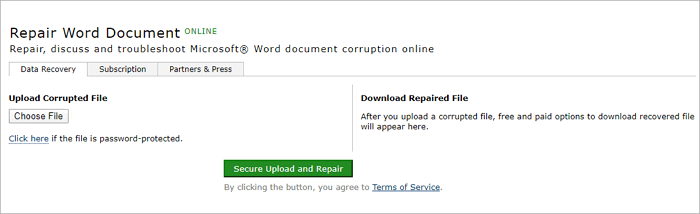
This online Word repair tool offers free recovery and purchase recovery. You can download a demo file to select the product version and even order a review by their technical team.
How to Repair Corrupted Word File with Online Word Repair Tool
Most online Word repair tools follow the same recovery process: users upload a damaged file, wait for the repair process to complete, and then download the fixed Word document.
Here, we take OnlineFile. Repair as an example to show how to fix corrupted Word documents online. This service allows users to upload their corrupted Word files, and then download a repaired version once the process is complete.
Step 1.Select the corrupted Word .doc/.docx file, and we'll send it to the specified email address where it will be repaired and returned to you in a usable format.

Step 2. Wait for the repair process to complete.

Step 3. Preview the fixed document and finish the payment.

User experience:Online word repair tools offer numerous conveniences to users, but their shortcomings are also apparent, including limitations that hinder their effectiveness.
- The privacy of file data cannot be guaranteed.
- The repair speed is not stable.
- The cost of online repair tools is high, with many charging per document, such as $10 per document.
If you're not comfortable repairing Word documents online, you can consider using a desktop file repair software instead, which can provide a safer alternative for fixing damaged Word files.
How to Repair Corrupted Word (Docx and Doc) with File Repair Software
To fix corrupted Word, Excel, PDF, or PPT files on Windows and Mac computers, Qiling file repair software is a great option.
This software has powerful file repair functions and additional features that automatically repair damaged files when they are restored.
- Repair corrupted files photos from multiple storage media
- Fix corrupted PDF, Word, Excel, and PPT documents
- Easily Restore corrupted word documents with simple steps.
Here are the steps to use Deep Data Recovery to repair corrupted Word documents offline:
Step 1. Launch Deep Data Recovery, select the file types you want to recover, and click "Fast Scan" to initiate the recovery process.
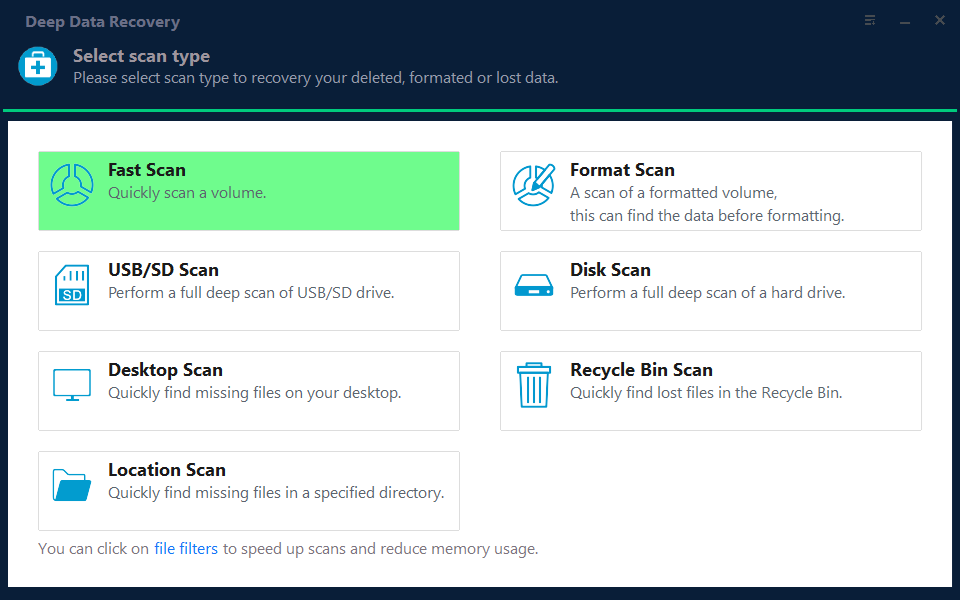
Note: You can choose different search modes based on where and why the data was lost.
Step 2. This software allows you to fix damaged Word, Excel, PPT, and PDF files in the same steps, and can be used to scan a disk with corrupted documents by clicking the "Scan" button.
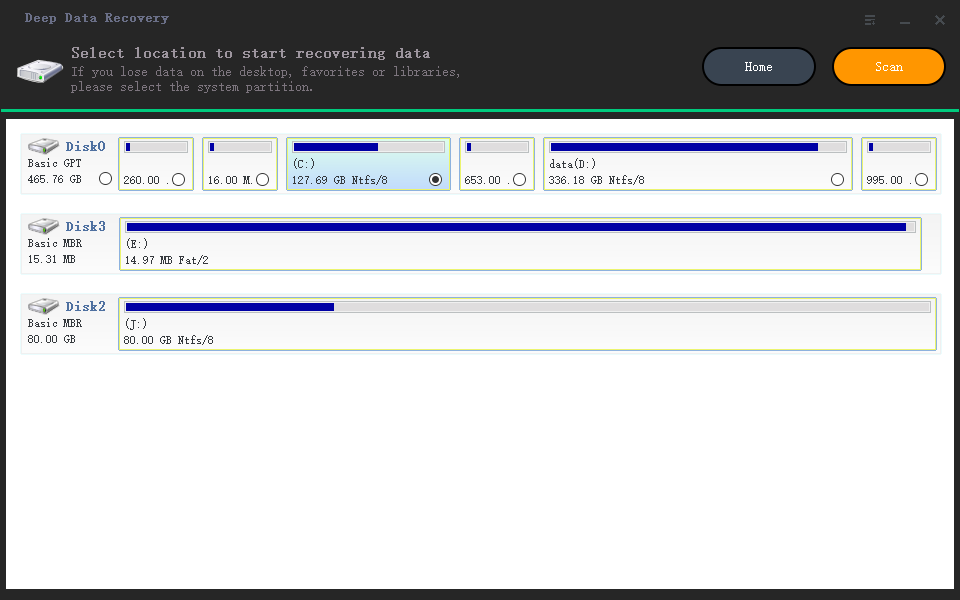
Step 3. The Qiling data recovery and repair tool will scan for all lost and corrupted files, allowing you to locate them by file type or search by typing the file name in a search box.
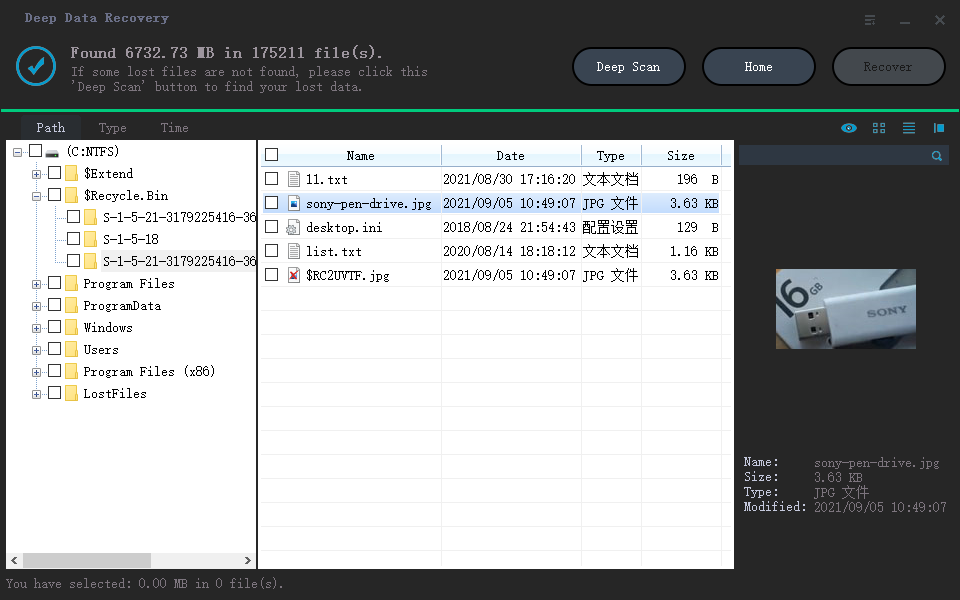
Step 4. Deep Data Recovery can automatically repair damaged documents, allowing you to preview and then recover Word, Excel, and PDF files to a safe location.
To Sum Up
To repair a corrupted Word document, you can use either an online Word repair service or a desktop file repair program. If you prefer the online route, choose a reputable service to ensure your file is fixed correctly. Alternatively, you can use a desktop tool like Deep Data Recovery, which can easily repair common file types, making it a convenient option for fixing damaged Word documents.
Related Articles
- How to Fix Missing DLL Files in Windows 10/8/7 [2022 Full Guide]
- Reliable Ways to Fix i saved a word document and can't find it Issue
- How to Fix Hitachi Hard Drive Not Working/Recognized
- How to Automatically Delete Temp Files in Windows 7/8/10
- iBoysoft Data Recovery and Best Deep Data Recovery Alternative You Must Know
iBoysoft data recovery is a safe option, but it's not free to recover data. It allows for the recovery of up to 1GB files for free, while an alternative option, Qiling Free Data Recovery, offers the recovery of up to 2GB for free. - Kingston Recovery Tool | Recover Data from Kingston SSD/USB Drive/SD Card
Kingston recovery tool software allows you to repair and recover files from Kingston SSD, USB drive, memory/SD card, or flash card due to accidental deletion, formatting, or RAW drive issues.
Products
Articles & Tutorials
- Data Recovery
- Data Backup
- File Recovery
- File Backup
- System Backup and Restore
- Disk and Partition Clone
- Technical articles
- Mobile articles
- Disk Master Help
- Windows Data Recovery Tutorials
- Windows Secure Delete Tutorials
- Windows Partition Management Tutorials
- Windows File Backup and Restore Tutorials
- Windows System Backup and Restore Tutorials
- Windows Disk Backup and Restore Tutorials
- Windows Clone Tutorials