What Is RAID 5? RAID 5 Requirements, Benefits, and Calculator
What Is RAID 5
RAID, or Redundant Array of Independent Disks, is a storage technology that stores the same data in multiple locations on different hard disks or solid-state drives (SSDs) to ensure data preservation in case of a drive failure. By using techniques such as mirroring, striping, and parity, RAID enhances performance, capability, and fault tolerance, making it a reliable solution for data storage. RAID5 is a specific type of RAID configuration that combines striping and parity to provide a balance between data protection and storage capacity.
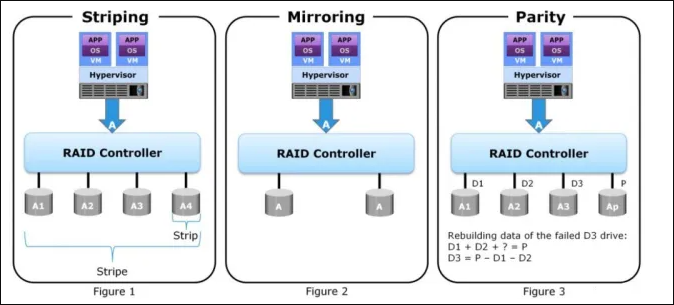
RAID 5 is a data backup technology that uses both disk striping and parity to ensure operability even when a disk fails. It distributes data efficiently across multiple disks using disk striping, and ensures correct data transfer and reconstruction of missing data using disk parity, making it a reliable option for data storage.
RAID Requirements for Disks
The minimum requirements for each RAID level, including RAID 5, have specific numbers of hard disks that must be met to ensure each level functions as a single unit, promoting data integrity and redundancy. These requirements are: RAID 0 requires 2 disks, RAID 1 requires 2 disks, RAID 5 requires 3 disks, RAID 6 requires 4 disks, RAID 10 requires 4 disks, RAID 50 requires 6 disks, RAID 60 requires 8 disks, and RAID Z1 and RAID Z2 require 3 and 5 disks respectively. These minimums are crucial for maintaining data security and performance.
RAID 0: requires at least 2 disks.
RAID 1: requires at least 2 disks.
RAID 5: requires at least 3 disks.
RAID 6: requires at least 4 disks.
RAID 10 or RAID 01: requires at least 4 disks.
Key Features of RAID 5
RAID 5 is a powerful technology designed to ensure the security and integrity of data stored on hard drive disks, providing a robust solution for data protection.
1. Functionality of RAID 5
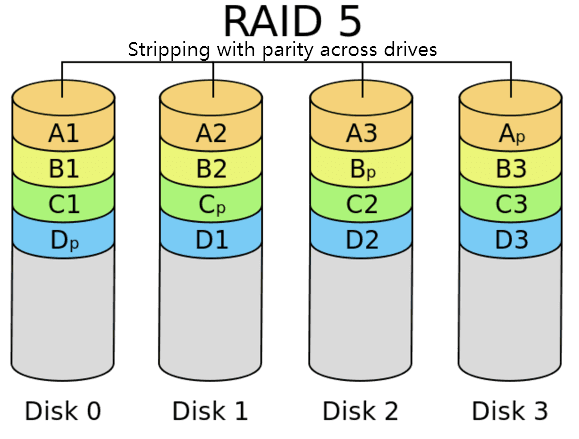
RAID 5 is the most commonly used RAID level, which combines striping and parity to distribute data across multiple disks, allowing missing data to be reconstructed based on information from other disks. This distribution of data and parity information across multiple drives is what sets RAID 5 apart from other levels.
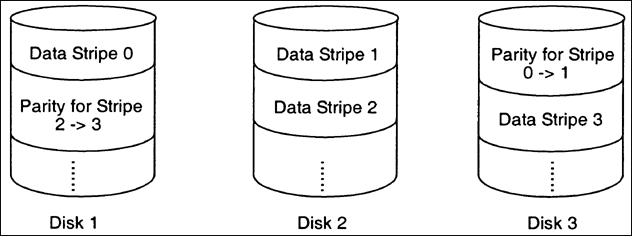
RAID 5 offers excellent performance in reading and writing systems with a higher level of fault tolerance, allowing you to use all disks simultaneously. Its capacity is N - 1, where N is the total number of disks, resulting in an effective usable capacity that's the combined capacity of all units minus the capacity of one drive.
2. Benefits of RAID 5
RAID 5 is a widely used technology that consists of at least 3 disks and a maximum of 16 disks, providing a good balance between data safety and reconstruction capabilities. Its benefits extend beyond just keeping data safe, offering advantages such as efficient data storage and retrieval, making it a popular choice for users who need reliable and efficient storage solutions.
- Highly efficient for data storage
- Fast reading speed due to the striping feature
- Less expensive to implement compared with other RAID levels
- Good balance between security, fault tolerance, and performance
3. Drawbacks of RAID 5
While RAID 5 offers numerous benefits, it also has some drawbacks that may make it less desirable.
- Rebuilding time is longer.
- Implementation is more difficult.
- Data can be lost when multiple disks fail and the parity feature occupies half of the storage capacity.
4. RAID 5 Commonly Used Situations
RAID 5 is a great technology that offers efficient storage, robust security, and adequate performance, making it perfect for file and application servers with only a few data drives. It's generally suitable for scenarios where data redundancy and protection are crucial, such as in environments with limited storage capacity or where data loss is not an option.
- Data warehousing
- Web serving
- Archiving
Differences Between Hard RAID 5 and Soft RAID 5
Raid can be categorized into hardware and software RAID. Hardware RAID is more reliable and requires specialized hardware to handle drives, while software RAID is less expensive and uses a portion of the host processor.
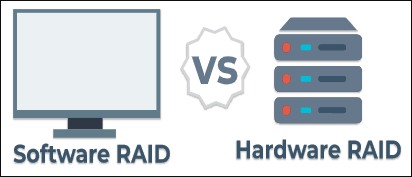
Raid 5 can be categorized into two types: hardware and software RAID 5. The main difference between the two is that hardware RAID 5 uses a dedicated controller to manage the array, while software RAID 5 relies on the operating system to manage the array. This distinction affects the performance, reliability, and manageability of the array.
Hardware RAID 5 uses a dedicated RAID card or controller to manage multiple drives, enhancing system performance, especially for servers. In contrast, software RAID 5 combines physical drives into logical units using the operating system's computing capabilities, rather than relying on a dedicated hardware controller.
The benefits and drawbacks of hardware RAID 5 and soft RAID 5 differ. Hardware RAID 5 offers faster read and write speeds and is more stable, but comes at a higher cost. Soft RAID 5 is cheaper and supports unlimited RAID controller numbers, but has slower data access speeds.
| Differences | Hard RAID 5 | Soft RAID 5 |
| Advantages |
Faster read and write speed More stable that the soft RAID 5 |
Cheaper than Hard RAID 5 Unlimited RAID Controller numbers |
| Disadvantages |
Cost is relatively high |
The data access speed is slower |
RAID 5 Data Recovery With Hard Drive Recovery Software
A RAID 5 system may experience data loss due to disk failure, causing permanent loss of stored data, despite various recovery attempts.
You can still restore permanently deleted files and documents. If you've encountered a data loss problem and tried various ways to recover it without success, consider using Qiling data recovery software.
Deep Data Recovery is a software that effectively restores various types of files and documents, widely used globally due to its high performance and compatibility, and can recover data even if a RAID 5 installation fails and data is deleted or lost.
You can follow these steps to recover lost RAID 5 data:
Step 1. Select file types and click "Fast Scan" to start
Launch Qiling Deep data recovery software on your PC, select file types, and click "Fast Scan" to start the recovery process.
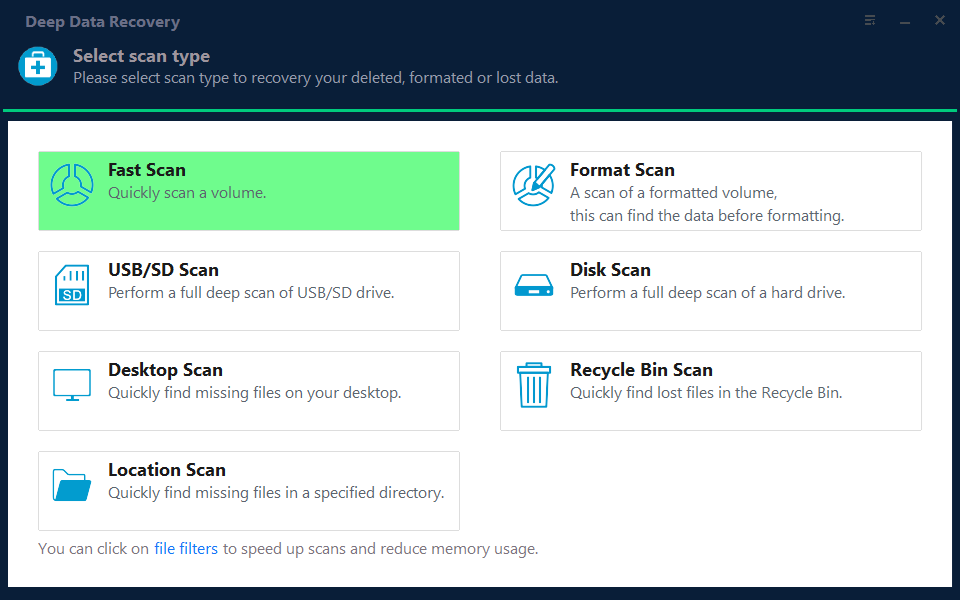
Note: You can choose different search modes based on where and why the data was lost.
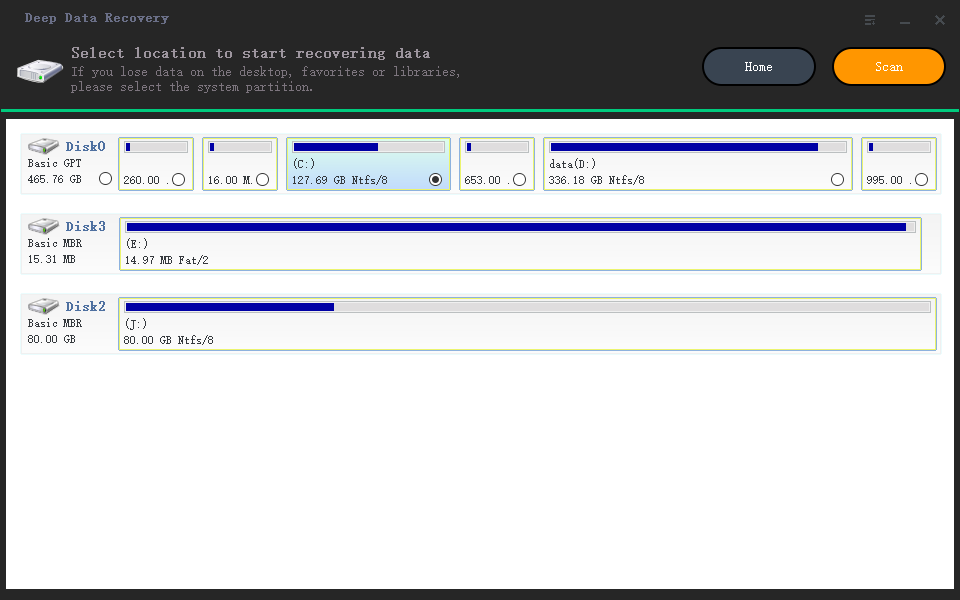
Step 2. Scan the RAID drive
To recover data from a RAID drive, select the drive from which you want to recover data and click "Scan". Wait for the scanning process to complete, and the deleted files will be displayed one by one.
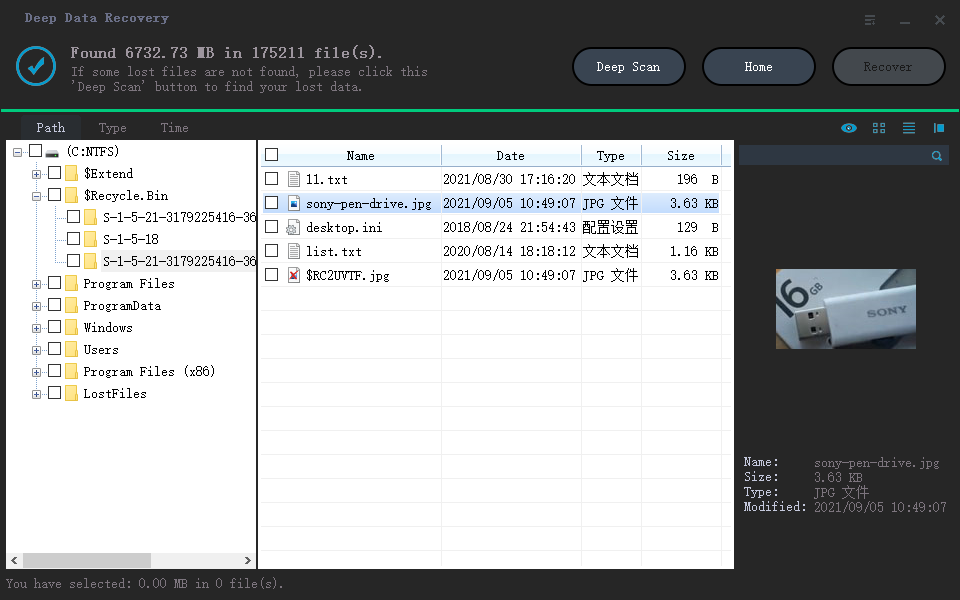
Step 3. Find and preview lost RAID files
Users can quickly find deleted or lost files using the "Filter" feature, and also search for lost RAID drive files by their file name or extension using the search function.
Step 4. Restore lost RAID drive files
Select the desired files and click "Recover". Save them to a safe location.
RAID 5 Data Recovery Services
If the deleted or lost data is still not recovered after trying Qiling data recovery software, you can try the manual recovery service supported by Qiling, which may provide additional assistance to recover your data.
Consult with Qiling data recovery experts for a one-on-one manual recovery service, which includes a free diagnosis. Our experienced engineers can repair damaged RAID structures and restore data from all RAID levels, offering a range of services after the initial assessment.
- Data can be restored from various RAID levels, including RAID 0, RAID 1, RAID 5, RAID 6, RAID 10, and more, allowing for recovery of critical information.
- Recover data from enterprise RAIDs such as QNAP, Synology, WD, Buffalo, and more, by utilizing specialized software and techniques tailored for each brand. These tools can help retrieve lost or corrupted data from faulty or damaged storage devices, providing a crucial safety net for businesses and individuals who rely on these systems for critical operations.
- Retrieve lost RAID data caused by any issues
- Fix disks that become GPT protected partitions
- Recover data from RAID remotely, no need to ship
Comparisons of RAID 5 and Other RAID Types
Comparing RAID 5 with other commonly used RAID technologies provides a comprehensive understanding of this data storage system. By examining the strengths and weaknesses of RAID 5 alongside other options, one can gain a deeper appreciation for its capabilities and limitations.
1. RAID 5 vs RAID 0
RAID 0 focuses on striping, which improves performance by partitioning data into blocks written across all devices in the array. This is in contrast to RAID systems that incorporate disk striping and parity functions. By distributing data across multiple devices, RAID 0 enables faster data access and processing, making it suitable for applications that require high-speed performance.

Pros of RAID 0:
- Implementation is easy.
- Storage capacity is completely utilized.
- Read and write operations are great.
Cons of RAID 0:
- No fault tolerance
- Complete data loss due to single drive failure
- Not suitable for mission critical systems
When performance is key, choose RAID 0, but for mission-critical data, go with RAID 5 for its added fault tolerance.
2. RAID 5 vs RAID 1
Raid 1 technology is a relatively simple redundancy system that uses mirroring to store identical data across multiple disks, copying the same data to two or more disks for better redundancy.
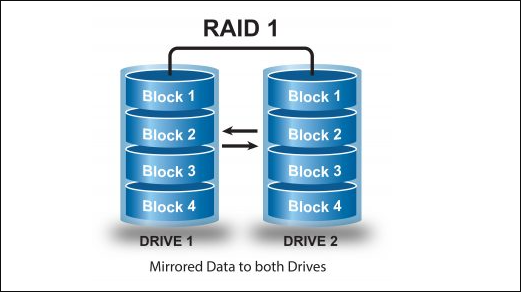
RAID 1 offers several advantages, including high data availability and redundancy, as well as fast data recovery in case of a drive failure. However, it also has some significant disadvantages compared to RAID 5, such as requiring twice the number of drives, which can be expensive and take up more space.
Pros of RAID 1
- Perfect for mission-critical data
- Read multiple data simultaneously with a high speed
- Offer enhanced performance even when the write operations are slower
Cons of RAID 1
- More expensive
- No security measures
- Require twice the storage space
- Need to shut down to repair the failure disks
In real-life cases, RAID 1 technology can function well in scenarios where data redundancy is not the primary concern, and high availability is more important. This includes situations where data loss is not critical, such as in development environments, testing labs, or in scenarios where data can be easily recreated. RAID 5, on the other hand, is more suitable for scenarios where data redundancy is crucial, such as in production environments, databases, or in situations where data loss would have significant consequences.
- Financial Systems
- Electronic Databases
- Enterprise Web Servers
A RAID 5 setup may be the best choice when a great balance between speed and safety is required. It's suitable for both home and enterprise use, particularly in file and application servers where the number of data drives is limited.
3. RAID 5 vs RAID 6
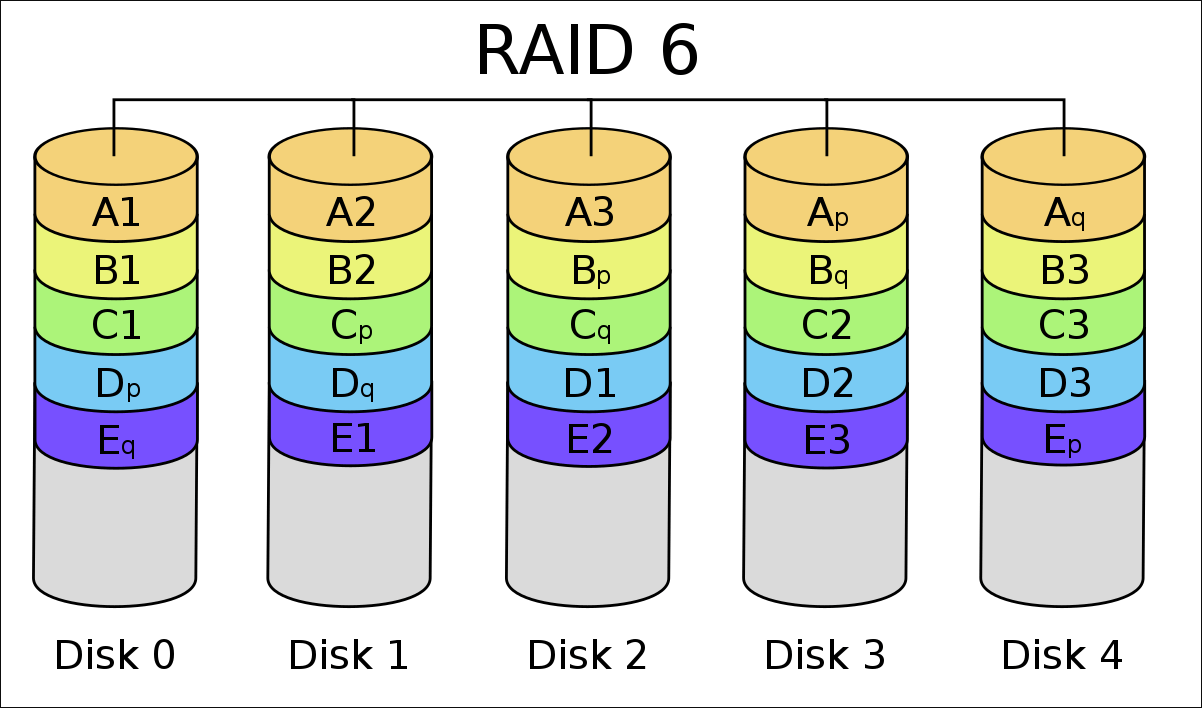
The RAID 6 technology is similar to RAID 5, using disk striping and parity data to store and secure information. However, RAID 6 offers double parity, providing double fault tolerance capacity to improve performance, but is more expensive and complex to implement compared to RAID 5.
Pros of RAID 6
- Fast read operations
- Excellent data accessibility
- Highly secure due to double parity
- High fault tolerance and data redundancy
Cons of RAID 6
- The restoration takes a long time.
- Implementation is rather difficult.
- Write speed is very slow due to double parity.
- The system is vulnerable to data loss if more than 3 disks fail at the same time.
RAID 5 Frequently Asked Questions
Some frequently asked questions about RAID 5 may help clarify this data storage system.
What is a RAID Controller?
A RAID controller is a hardware device or software program that enables multiple hard disk drives or solid-state drives to function as a single logical unit, ensuring smooth operation and preserving stored data. By using a RAID controller, computing performance is elevated, making it a valuable component in computer and storage array systems.
How many physical disks are required to implement raid 5?
The minimum number of physical disks required for RAID 5 is 3, but it can support up to 16 disks if needed.
What will be the available drive space in a RAID 5 configured system with 3250 GB hard drives?
A system with 3250 GB of hard drives configured in RAID 5 will have 500 GB of available drive space.
What is the minimum number of physical disks required to create a RAID 5 volume?
To create a RAID 5 volume, you need to prepare at least 3 physical disks.
Conclusion
After learning about RAID 5 technology, you may have a good understanding of its benefits. When a balance between security, fault tolerance, performance, and efficiency is needed for data storage, RAID 5 is a great choice. With RAID 5, you can ensure data safety and minimize downtime in case of failure. Fortunately, Qiling data recovery software is available to help recover lost files and documents, providing peace of mind and minimizing the impact of data loss.
Related Articles
- Fix the Error that Memory Card Not Show Up or Detected in Mobile/PC
- External Hard Drive Not Recognized After Unplugging [Solved]
- SD Card/USB Drive/Pen Drive Shows 0 Bytes
- How to Recover Deleted Recordings on Sky Q and Sky Plus Box
- CCTV DVR Data Recovery: How to Get Data From DVR Hard Disk
The CCTV DVR data recovery guide provides a step-by-step process to recover data from a DVR hard disk. Using professional DVR data recovery software and a previous hard drive backup, you can easily retrieve deleted surveillance videos/footages. - How to Recover Deleted Files After Upgrading to Windows 11
If you've recently upgraded to Windows 11 and are having problems finding files, read this tutorial and see how to recover deleted files after Windows 11 upgrade. You can recover lost files on Windows 11 with data recovery software, restore files from backups and previous versions.
Products
Articles & Tutorials
- Data Recovery
- Data Backup
- File Recovery
- File Backup
- System Backup and Restore
- Disk and Partition Clone
- Technical articles
- Mobile articles
- Disk Master Help
- Windows Data Recovery Tutorials
- Windows Secure Delete Tutorials
- Windows Partition Management Tutorials
- Windows File Backup and Restore Tutorials
- Windows System Backup and Restore Tutorials
- Windows Disk Backup and Restore Tutorials
- Windows Clone Tutorials