All Things You Should Know About RAID 1
What Is RAID 1
RAID 1, or "redundant array of independent disks," is a data storage technology that improves reliability, capability, and performance by creating a mirror of data on two or more disks, increasing the speed of reading, writing, and access while securing data efficiently.
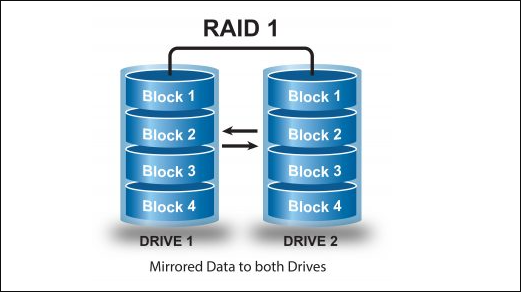
Some levels of RAID can be combined to achieve higher data storage performance. For example, RAID 10 combines levels 1 and 0, also known as RAID 1+0, to provide enhanced performance.
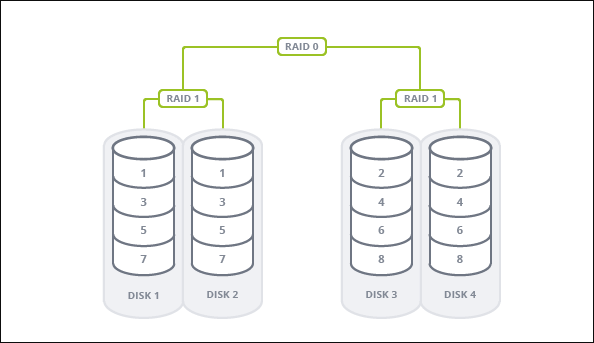
RAID 1+0 combines the mirroring and striping functions, allowing it to preserve data in case of a disk failure while also enhancing performance by writing data to multiple drives in sequential order. This combination of level 1 (mirroring) and level 0 (striping) makes RAID 1+0 a reliable and efficient storage solution.
Performance and Key Features of RAID 1
RAID 1 is a data storage technique that not only improves efficiency and performance but also reduces the risk of data loss. It's a great option to consider, but before trying it on your computer, it's recommended to learn more about its performance and key features.
Functions of RAID 1
RAID 1, a type of disk array, has three main functions that make it useful for both home and workplace use. It provides data protection by mirroring data across two disks, ensuring that data is not lost in case of disk failure.
- Mirror or copy the data easily
- Store critical and sensitive data
- Access mission-critical data where redundancy is a must
Application Scenarios of RAID 1
RAID 1 is a reliable storage solution that can be used in various scenarios. When applied correctly, it can provide a high level of data redundancy and protection against hardware failures. Typically, RAID 1 is used in situations where data integrity is crucial, such as in databases, virtualization environments, and high-availability applications.
- Emails
- Operating Systems
- Transaction applications like Payroll, Financial, and Accounting
Highlights of RAID1
The advantages of RAID 1, such as its ability to provide data redundancy and high reliability, have made it a popular choice among users, who appreciate its benefits in maintaining data integrity and minimizing the risk of data loss.
- Allow people to easily use it.
- Offer excellent read and write speed.
- Provides excellent data access speed.
- Ensures data storage efficiency and data security.
Drawbacks of RAID1
The RAID 1 has some advantages, including improved reliability and data redundancy. However, it also has some disadvantages that may make it look less perfect, such as increased complexity and higher costs.
- The cost of the delivery service will be higher because it requires twice as many drivers.
- The storage capacity is reduced to half of the total drive capacity.
- When replacing a failed drive, it's necessary to power down all the devices attached to it.
Differences Between RAID 1 and Other RAID Levels
RAID data storage technology has six basic levels, and comparing RAID 1 to others can help you understand its features. If you're unsure which RAID level is best for you, consider the following comparisons between RAID 1 and other levels as a reference.
1. RAID 1 VS RAID 0
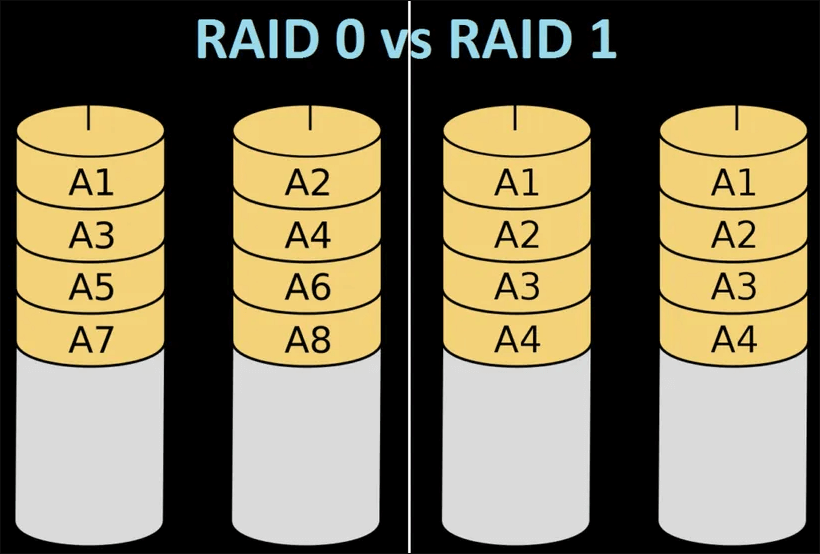
The main difference between RAID 1 and RAID 0 is that RAID 1 replicates data across two or more disks for redundancy, whereas RAID 0 splits data across multiple disks to enable simultaneous read and write operations.
The two most popular types of mattresses, memory foam and innerspring, have distinct differences in terms of highlights and drawbacks. Memory foam mattresses are known for their pressure-relieving properties, contouring to the body, and ability to reduce motion transfer, making them ideal for side sleepers and those who tend to toss and turn.
Pros of RAID 1:
- Better performance
- Better fault tolerance
- High data availability
- High level of data redundancy
Cons of RAID 1
- More expensive
- Less storage capacity
- No real-time swapping
Pros of RAID 0
- Lower cost
- No overhead
- Easy to implement
- Improved performance
Cons of RAID 0
- No-fault tolerance
- Difficult to recover lost data
- Unsuitable for critical data
RAID 1 and RAID 0 are suitable for different scenarios. If you prioritize performance over data redundancy, RAID 0 may be the better choice. However, if you're dealing with mission-critical data, RAID 1 is recommended for its ability to provide redundancy and protect against data loss.
2. RAID 1 VS RAID 5
Like RAID 1, RAID 5 provides fault tolerance, but it achieves this through the use of parity and checksum, where data is striped and stored uniformly across all drives, rather than through mirroring.
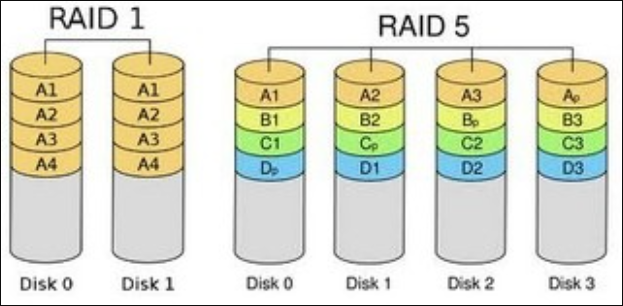
Compared to RAID 1, RAID 5 has several advantages and disadvantages. On the one hand, RAID 5 offers better performance and storage capacity than RAID 1, as it allows for multiple disks to be used in a single array.
Pros of RAID 5
- Provide faster read operation speed.
- Offer a higher level of data redundancy.
- Make disk space utilization more efficient.
- Allow multiple users to access it simultaneously.
- Rebuild data when the drive fails without powering down.
Cons of RAID 5
- At least three disks are required.
- Write operation speed is slower.
- Recovery operation speed is slower.
While comparing RAID 1 and RAID 5, you may have already made a choice between the two. If simplicity is your priority, RAID 1 might be the better option. However, for more complex systems, RAID 5 could be more suitable due to its underlying technology, which may differ from RAID 1.
3. RAID 1 VS RAID 10
The key difference between RAID 10 and RAID 1 lies in the number of drives used in each configuration. While RAID 1 replicates only two disks for redundancy, RAID 10 is a more complex setup that requires at least four disks, built with two or more RAID 1 mirrors, and a RAID 0 stripe.
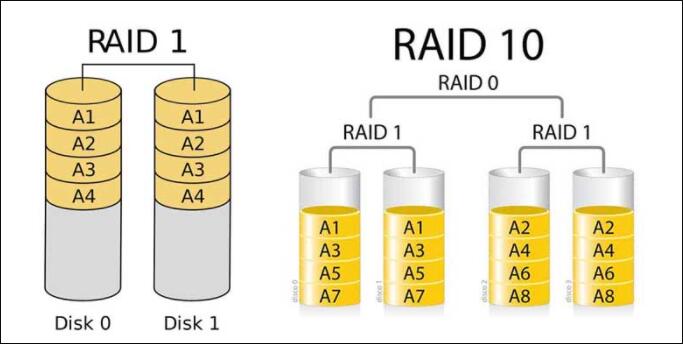
RAID 10 combines the capabilities of RAID 1 and RAID 0, offering both fault tolerance and improved performance. This integration means that RAID 10 has the benefits of RAID 1, such as data redundancy and fault tolerance, while also providing the performance boost of RAID 0, making it a more efficient and reliable storage solution compared to RAID 1 alone.
Pros of RAID 10
- No data loss
- Enhanced performance
- Fast data read and write speed
- Excellent data protection and security
Cons of RAID 10
- Costs are higher.
- More disks are required.
- l The storage capacity is decreased to 50%.
RAID 1 Data Recovery with Specialized Data Recovery Software
Although RAID 1 offers high fault-tolerance for storing and backing up data, it's still possible for data to be lost due to disk failure, rebuild, or format. However, if you experience a data loss issue, you can easily and quickly recover your significant data by using Deep Data Recovery, which can help you restore data stored and backed up in the RAID 1.
As a professional RAID 1 recovery program, this software has gained a good reputation for its powerful function in recovering deleted or lost data, widely used by individuals from different countries.
If your RAID 1 setup is broken and you've lost the data stored in it, you can follow these steps for a free data recovery guide.
Step 1. Select file types and click "Fast Scan" to start
Launch Qiling Deep data recovery software on your PC, select file types and click "Fast Scan" to start the data recovery process.
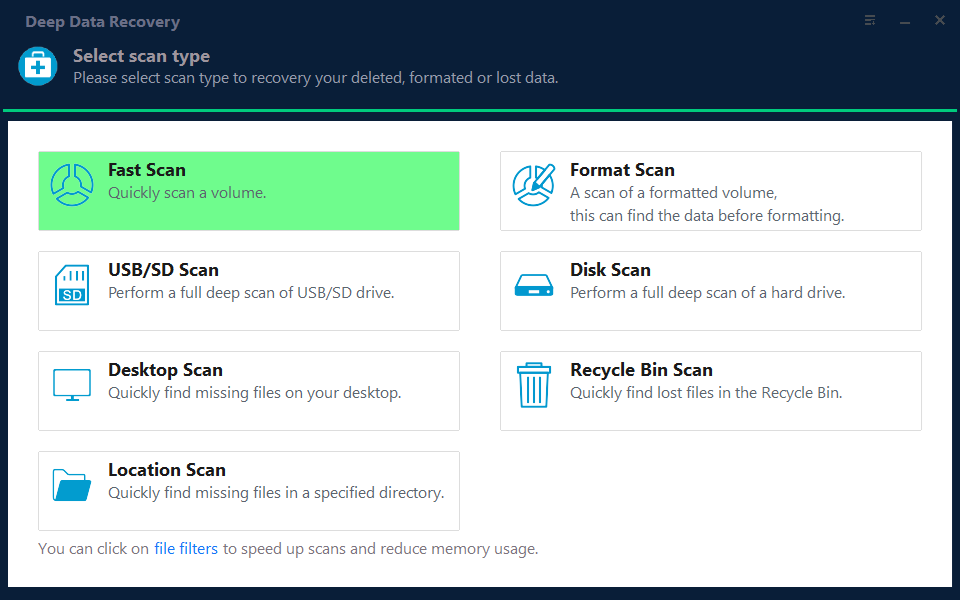
Note: You can choose different search modes based on where and why the data was lost.
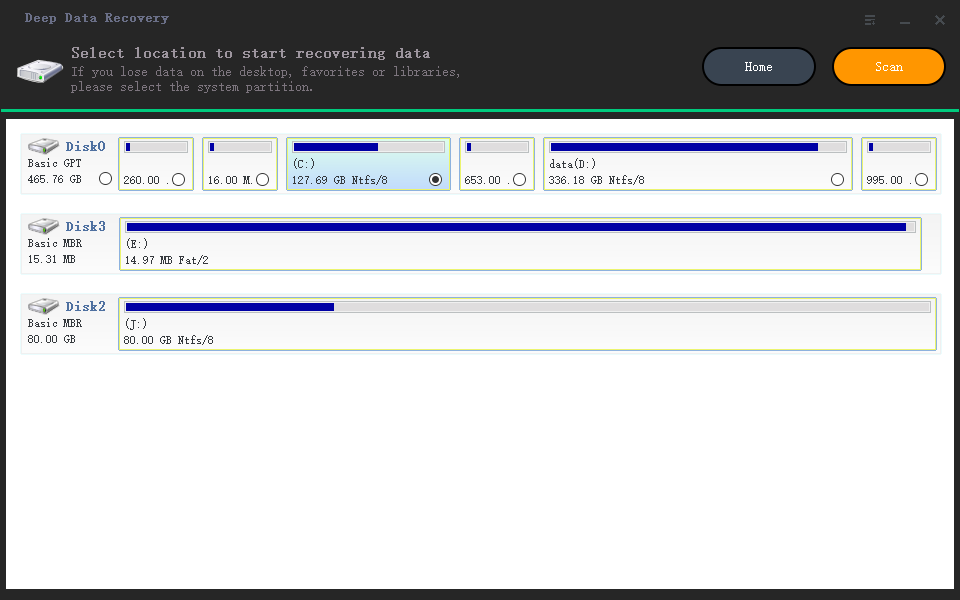
Step 2. Scan the RAID drive
Choose the RAID drive from which you wish to recover data, click "Scan", and wait for the scanning process to finish, then deleted files will show up one by one.
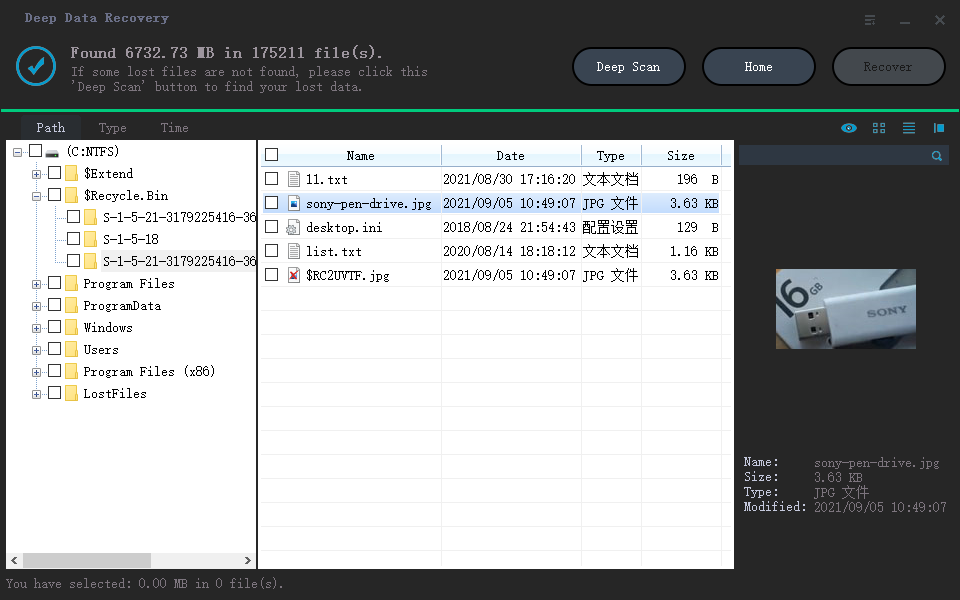
Step 3. Find and preview lost RAID files
To quickly locate deleted or lost files, you can use the "Filter" feature for navigation. Alternatively, you can search for the lost RAID drive files using their file name or extension via the Search function.
Step 4. Restore lost RAID drive files
Select the files you want to recover and click "Recover". Then, browse to save them to a safe location.
RAID 1 Data Recovery Services
If Qiling data recovery software can't recover lost or deleted files and documents on the RAID, it's recommended to try the manual data recovery service offered by the Qiling support team.
Consult with Qiling data recovery experts for one-on-one manual recovery service, which may include repairing the damaged RAID structure and restoring data from all RAID levels, offered after a free diagnosis by our decades-experienced engineers.
- Data can be restored from various RAID configurations, including RAID 0, RAID 1, RAID 5, RAID 6, RAID 10, and others, allowing users to recover data from different types of array setups.
- Recover data from enterprise RAIDs such as QNAP, Synology, WD, Buffalo, and more, by utilizing specialized tools and techniques to extract vital information from these complex storage systems.
- Retrieve lost RAID data caused by any issues
- Fix disks that become GPT protected partitions
- Recover data from RAID remotely, no need to ship
Additional Guide: RAID Calculator
A RAID calculator is a tool that optimizes storage utilization for different RAID levels, automatically calculating the number of hard disks required for each type. It also recalculates capacity and performance if disks are withdrawn, allowing users to easily switch between different disk configurations.
Several well-known companies, such as Synology, QNAP, Dell, and others, now offer RAID Calculator products and services.
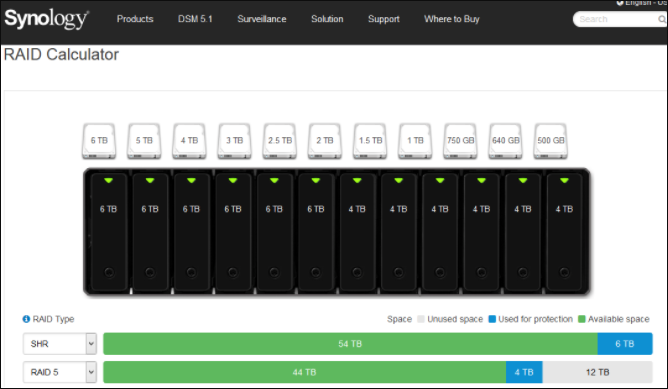
There are four types of RAID calculators in total:
1. RAID Capacity Calculator - offers a simple calculation of capacity.
2. RAID Usable Capacity Calculator - provides a more accurate measure of capacity
3. RAIDZ Capacity Calculator - calculate the simple capacity for RAIDZ, RAIDZ2, and RAIDZ3
4. RAID IOPS Capacity Calculator - determine the IOPS required by a RAID.
Using a RAID calculator can provide numerous benefits, including the ability to enjoy increased data security and reliability, improved system performance, and enhanced data protection against hardware failures and data loss. By leveraging the power of a RAID calculator, you can ensure that your data is safeguarded and your system is optimized for maximum performance and uptime.
- Optimize the storage space utilization.
- Determine unknown RAID parameters.
- Choose the best RAID implementation.
- Discover and analyze unknown RAID arrays.
The RAID Calculator has different requirements for different RAID levels, including 0, 1, 5, 6, 10, and 50, each with its own set of specifications and requirements.
RAID Drive Requirements
RAID 0: Requires 2 drives or more
RAID 1: Requires an even number of at least 2 drives
RAID 5: Requires 3 drives or more
RAID 6: Requires 4 drives or more
RAID 10: Requires an even number of at least 4 drives
RAID 50: Requires at least 6 drives
RAID 60: Requires at least 8 drives
Conclusion
RAID 1 is a level of the redundant array of independent disks that offers improved performance, capacity, efficiency, and fault tolerance through its mirroring feature. While different RAID modes suit various situations, RAID 1 is particularly effective in mirroring data, making it a suitable choice for certain needs. If the RAID fails and data is lost, specialized data recovery software like Qiling can be used to recover the lost data.
Related Articles
- Fix SSD Not Showing Up in Windows 10/11 [Tips]
- USB Unreadable: Recover Files from Unreadable USB Flash Drive
- How to Recover Data from Corrupted or Scratched CD/DVD
- Recover Data from Encrypted (EFS) Hard Drive Partition in Windows
- Completely Recover Data Lost by DISKPART Clean/Format
How to recover data after DiskPart clean? Qiling data recovery software can save you out of the pain and completely recover data lost by DISKPART clean with ease. - How to Recover Permanently Deleted AOL Emails Older Than 7 Days
If you've lost or deleted emails in AOL Mail, there are solutions to recover them. If the emails were deleted within the past 7 days, you can try recovering them from the Trash folder.
Products
Articles & Tutorials
- Data Recovery
- Data Backup
- File Recovery
- File Backup
- System Backup and Restore
- Disk and Partition Clone
- Technical articles
- Mobile articles
- Disk Master Help
- Windows Data Recovery Tutorials
- Windows Secure Delete Tutorials
- Windows Partition Management Tutorials
- Windows File Backup and Restore Tutorials
- Windows System Backup and Restore Tutorials
- Windows Disk Backup and Restore Tutorials
- Windows Clone Tutorials