What Is Network Attached Storage and How to Recover Lost/Deleted Data from NAS
What Is Network Attached Storage
Network Attached Storage (NAS) is a network-based storage system that allows file sharing and data backup across various operating systems, including Windows, Linux, and Mac OS, within a network.
Network Attached Storage (NAS) is a data storage technology that connects special devices directly to a network, allowing them to be accessed by clients through a server or even directly without intermediaries. As one of the three main network storage technologies, NAS uses devices with IP addresses to provide shared storage access.
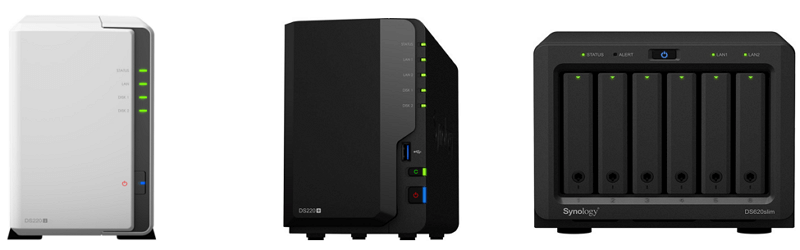
Network Attached Storage's Advantages:
Network Attached Storage (NAS) is a disk array that connects to devices through network cables, offering high capacity, efficiency, and reliability, similar to a traditional disk array. It's easy to manage, scalable, and provides faster response speeds and higher data bandwidth, making it a convenient and efficient storage solution.
Network Attached Storage is easy to install and requires fewer servers, reducing server costs and making high-performance storage systems more accessible.
What Is Network Attached Storage Used for
Network Attached Storage (NAS) is designed for users who need to store and transfer files across multiple clients over a network. This type of storage is ideal for environments where data needs to be transmitted over long distances, making NAS devices a suitable choice for such scenarios.
NAS devices are easy to deploy and provide reliable file-level data consolidation, making them suitable for tasks such as office automation, campus network construction, medical data storage, and home data management.
Popular Network Attached Storage Devices
Choosing a cost-effective NAS device can be a daunting task, but there are several popular options to consider. For homes or small businesses looking to invest in a comprehensive storage solution, NAS devices offer multiple benefits, including centralized storage, data backup, and streaming capabilities. To select a cost-effective NAS device, consider factors such as storage capacity, processor power, and connectivity options. Some popular NAS devices include the Synology DiskStation, QNAP NAS, and Western Digital My Cloud, which offer a range of features and capacities to suit different needs and budgets.
The top NAS equipment brands include Synology, QNAP, NETGEAR, Western Digital, HIKVISION, Buffalo, AUSTOR, TerraMaster, Seagate, and others. For a more informed purchasing decision, PCMag has tested and rated various NAS products, providing a helpful guide to choose the best one for your needs.
The recommended products for a 2-bay NAS include Asustor Drivestor 2 AS1102T, Synology DiskStation DS220j, QNAP TS-253D-4G, and TerraMaster F5-422, with prices ranging from $200 to $700. Each product has its own advantages and disadvantages, and choosing the best one depends on your specific needs and preferences. By understanding the details of each product, you can make an informed decision and find the one that suits you best.
The Best Network Attached Storage Data Recovery Software
For users of Network Attached Storage (NAS), a professional and simple NAS data recovery software is essential. Although NAS devices are generally reliable, unexpected damages can still occur, such as accidental deletion, RAID corruption, disk failure, initializing, or formatting, leading to data loss, and in such cases, a reliable data recovery solution is necessary.
Traditional NAS file recovery solutions often require users to physically remove the RAID disks, connect them to a PC, and install a data recovery tool, which can be a daunting task for average users, making it an impractical solution.
Don't panic, recovering NAS data is easy with Qiling NAS data recovery software. This tool provides a simple way to recover deleted NAS files without pulling out disks, allowing you to connect to your NAS server and start recovery on your Windows PC.
- Recover data from various NAS devices, including Synology, QNAP, ASUSTOR, Buffalo, and Western Digital, among others.
- Restore files from EXT4 and Brtfs file system drives
- To retrieve data on NAS disks in Windows 11/10 and Windows Server 2022/2019/2016, you can use the built-in tools and features of the operating system. The Windows File Explorer can be used to access and view the contents of NAS disks, and the Disk Management tool can be used to manage and configure the NAS disks.
- Recover data from RAID 0, RAID 1, RAID 5, and RAID 10
To recover NAS data on your Windows PC after the connection, download and install a free NAS file recovery program.
Step 1. Select a NAS server and start recovering.
Download and install Deep Data Recovery on your Windows 11/10 64-bit computer. When you open this software, select "NAS Recovery", and it will automatically list all NAS servers, allowing you to choose your target device and start a scan.
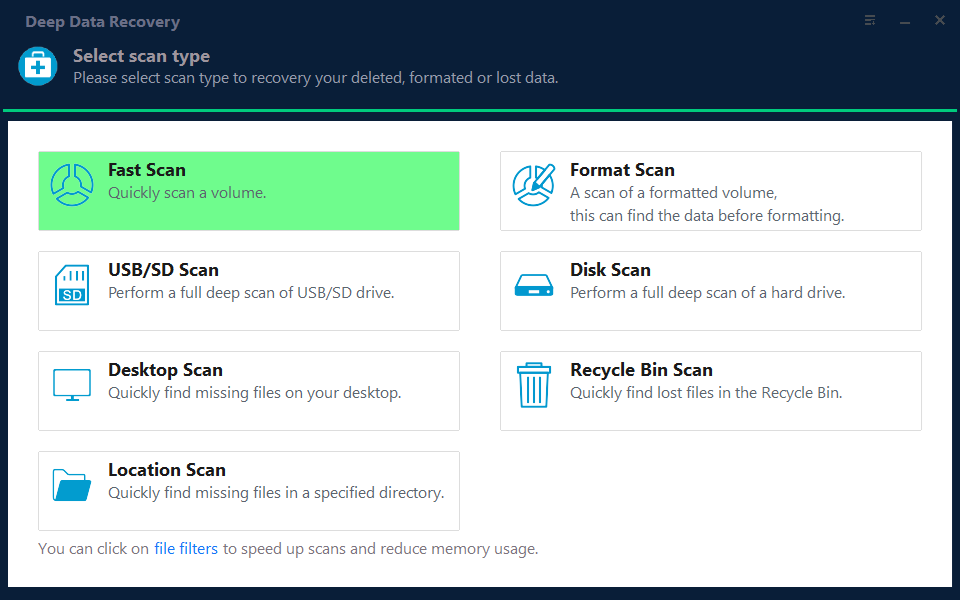
Note: You can choose different search modes based on where and why the data was lost.
Step 2. Enable SSH service on the NAS server.
To enable remote access, go to "Control Panel > Terminal & SNMP", check the box next to "Enable SSH service", and note the port number for remote access. Then, open Deep Data Recovery and click "Next".
Step 3. Connect to the NAS server remotely.
This software automatically detects your IP and Port, requiring only a username and password input. If the detected IP or Port is incorrect, you can manually correct it. After inputting the correct credentials, click "Connect Now" to proceed.
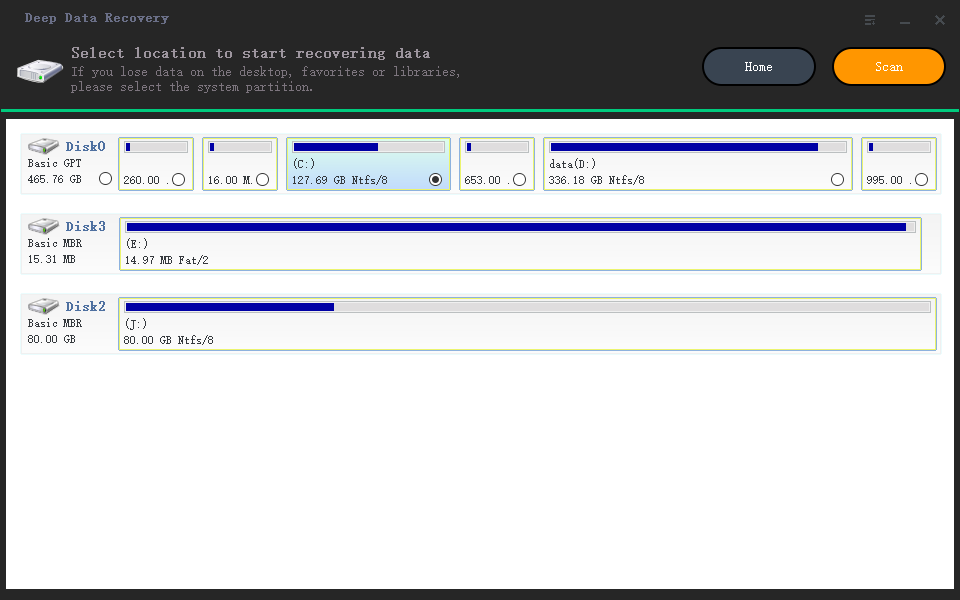
Step 4. Recover lost/deleted NAS data
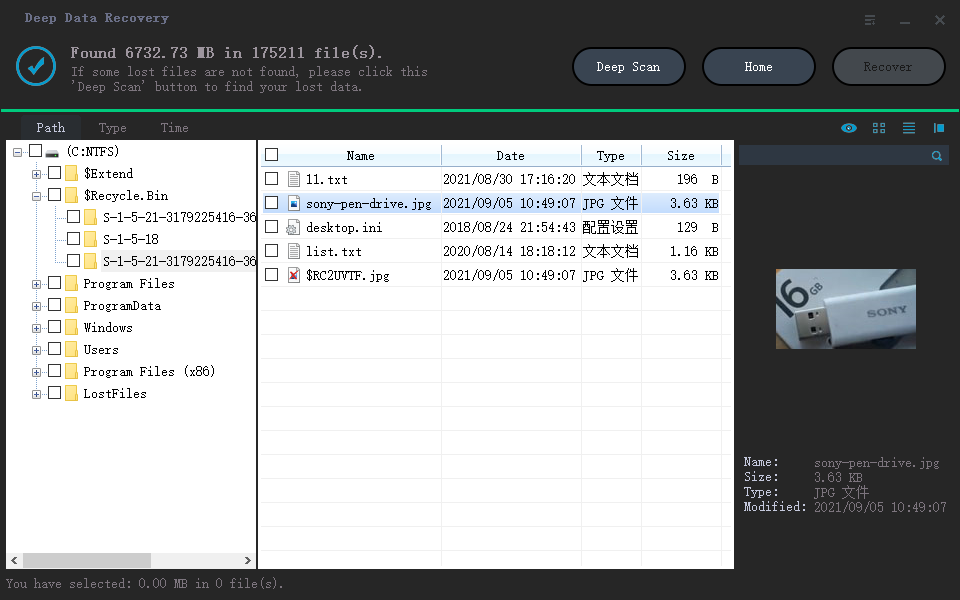
Qiling data recovery software will connect to your NAS and start scanning it. After the scan, you'll see all deleted, lost, or existing files on your NAS server.
To recover lost NAS files, use the "Filter" feature or click "Search files or folders" to find the files on the hard drive. Select the desired files and click "Recover" to save them to a new location.
The Best NAS Data Recovery Service
Qiling provides NAS data recovery services for various manufacturers, operating systems, and configurations, prioritizing your data.
Consult with Qiling data recovery experts for one-on-one manual recovery service, where our decades-experienced engineers can repair damaged RAID structures and restore data from all RAID levels.
- You can restore data from various RAID configurations, including RAID 0, RAID 1, RAID 5, RAID 6, RAID 10, and more, allowing you to recover data from different types of disk arrays.
- Recovering data from enterprise RAIDs, such as those used in QNAP, Synology, WD, Buffalo, and other brands, can be a complex task. However, with the right tools and expertise, it is possible to retrieve valuable data from these systems.
- Retrieve lost RAID data caused by any issues
- Fix disks that become GPT protected partitions
- Recover data from RAID remotely, no need to ship
Final Words
If you have high data security requirements, a large amount of data to be saved and shared, and a need for advanced data management, a Network Attached Storage (NAS) device is likely the best solution for you.
The NAS network storage server is a specialized device that efficiently manages and securely stores data across a network, also serving as a backup system to periodically save databases and application data.
To ensure the security of your data, it's recommended to use professional data recovery software in conjunction with your NAS device. Qiling NAS data recovery offers a convenient and effective solution for recovering data from your NAS device.
Related Articles
- How to Recover Data from Corrupted Windows OS [Easy and Fast]
- How to Create, Find and Watch Valorant Replays 2022
- How to Recover Permanently Deleted Excel File in Windows 10, Mac, iPhone, and Android
- Top 6 Best Excel Repair Tools in 2022
- Recover Pictures Deleted from Years Ago
Are you trying to recover deleted pictures from an SD card, USB flash drive, or other storage devices, even if they were deleted years ago? Yes, it is possible to recover lost photos from your PC, iPhone, or Android device, as long as no new data has been written over the original files. - How to Recover PowerPoint Files Not Saved | Free PowerPoint Files Recovery Methods
You can recover a PowerPoint presentation you didn't save by trying two manual methods or using a free recovery software. To recover manually, try checking the “Recent” list in PowerPoint to see if the unsaved file is still available, or try using the “Undo” feature to go back to a previous
Products
Articles & Tutorials
- Data Recovery
- Data Backup
- File Recovery
- File Backup
- System Backup and Restore
- Disk and Partition Clone
- Technical articles
- Mobile articles
- Disk Master Help
- Windows Data Recovery Tutorials
- Windows Secure Delete Tutorials
- Windows Partition Management Tutorials
- Windows File Backup and Restore Tutorials
- Windows System Backup and Restore Tutorials
- Windows Disk Backup and Restore Tutorials
- Windows Clone Tutorials