Microsoft Has Committed to Right to Repair, What Does It Mean?
Microsoft plans to make it easier for customers to repair its products, with a study on the environmental impact of right-to-repair expected to be completed by the end of the year.
- 1. Microsoft Has Committed to Right to Repair
- 2. What Is the Right to Repair Movement
- 3. How the Right to Repair Movement Affects You
- 4. Don't Wait, Repair Everything by Yourself
Microsoft Has Committed to Right to Repair
The endeavor responds to a shareholder resolution submitted in June 2021 demanding that the firm carefully investigate the environmental effect of making its products simpler to fix, which was encouraged by the more significant right to repair campaign- gathering pace and momentum for years. Today's article will focus primarily on what the 'Microsoft has committed to right to repair' actually means and how it affects you. Let's get started!

What Is the Right to Repair Movement
The right to repair refers to legislation that requires technology makers to provide users with realistic ways to fix their products, including components, tools, diagnostic procedures, and documentation.
Many tech companies have historically restricted access to original components and maintenance manuals, and also encouraged users to use only approved repair locations, often at a higher cost.
In the last year, the right-to-repair campaign has made significant progress, with people wanting to mend their things, and governments and businesses starting to make it easier. The European Union has taken steps to standardize phone chargers, and the FCC has publicly acknowledged the right of consumers to repair their equipment.
How the Right to Repair Movement Affects You
The Right to Repair movement has gained momentum, impacting various stakeholders, including consumers, individual repair businesses, and large corporations like Samsung and Apple, with far-reaching implications for product production and electronic goods purchasing.

Equipment Manufacturers
Some manufacturers are concerned about the campaign's popularity, as they consider their components and guidelines private and don't want them shared with the general public. They view this knowledge as a trade secret or business secret, and are worried that making it available could harm their business. For example, Apple developed a proprietary screw that made it difficult for consumers to open their devices without expensive tools.
The justification for private information, however, is less significant for other businesses. Companies like Dell and Patagonia provide consumers with instructions and spare parts for their manufactured gadgets and products, allowing competent individuals to fix them with the necessary tools and documentation.
Independent Repair Shops
Independent repair businesses can benefit greatly from the success of the Right to Repair campaign, with their owners being among the most vocal supporters of new regulations. This is likely due to the fact that independent repair shops are often forced to rely on third-party repair information and resources, making it difficult for them to gain access to original repair data from manufacturers. By pushing for the right to repair, independent repair businesses can gain the ability to access original repair information, reducing their reliance on third-party sources and allowing them to provide more accurate and efficient repairs.
Repair businesses are advocating for the right to purchase basic items like batteries to help people get more out of their phones or computers, while some businesses are selling parts and equipment to select repair shops, as pressure on mega-corporations grows.
Consumers and the Right to Repair
Legislation should make the means of repairing consumer electronics accessible to the public, and hold firms accountable for providing adequate customer care, to protect consumers against deliberate obsolescence. This would be in the public's interest, as it would give customers control over their own property.
Proponents of the Right to Repair campaign argue that buying a phone is like renting a device from a corporation that will eventually stop supporting it, leaving consumers with no option but to purchase a new one.
Don't Wait, Repair Everything by Yourself
Our users can now repair Microsoft files without waiting for repairs, thanks to the two best methods we've outlined below.
Method 1. Repair Microsoft Office Documents
Repairing damaged Microsoft Office documents can be a challenging task, especially when dealing with extensive corruption and large file sizes, making it difficult to recover the original content.
It is unlikely that an unskilled approach or instrument will fix a document without risking more harm to the document, but Deep Data Recovery offers a simple and efficient method for repairing damaged Word, Excel, or PowerPoint files of any length or complexity.
The toolkit allows users to preview the data within repaired Word, PPT, Excel, and PDF files before storing it in a designated location, utilizing file repair tools. This preview function enables users to assess whether the repair results match the original data of the chosen files before proceeding.
Main Features of the Qiling Repair Tool:
- This program restores Word (.doc and .docx) files to their original format.
- This program repairs and restores Excel (.XLS/.XLSX) file components.
- This tool restores PowerPoint files to their original condition by repairing and recovering them. It can handle various file types, including .ppt, .pptx, and .pptm.
- This software repairs and recovers all contents of damaged, corrupted, or inaccessible PDF files.
- The program has a feature that shows a preview of the corrected files.
Download and install the Office File Recovery Tool to quickly repair corrupted Office files, including Word documents, and restore them to their original state.
Step 1. Launch Deep Data Recovery. Choose file types and click "Fast Scan" to start the recovery process.
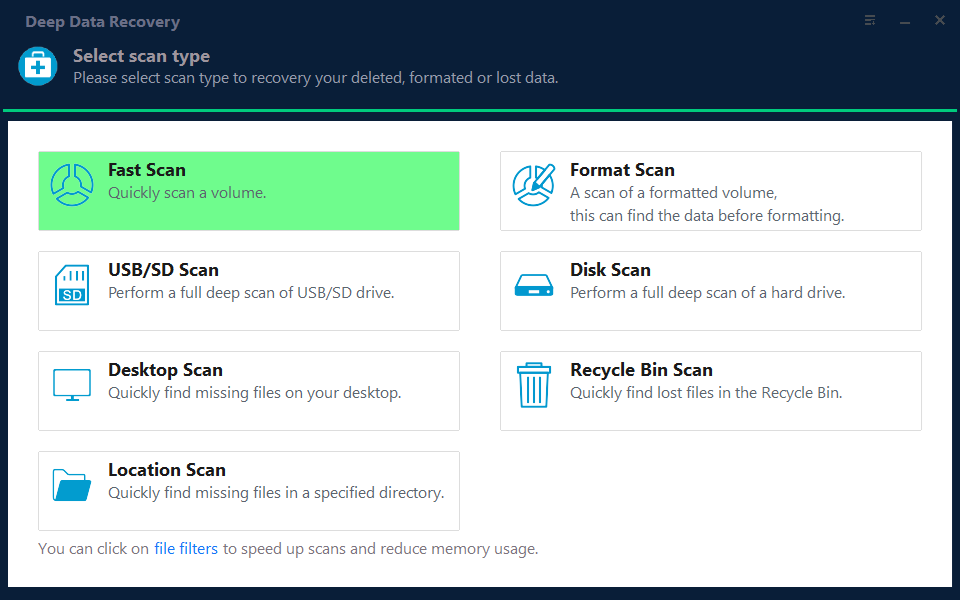
Note: You can choose different search modes based on where and why the data was lost.
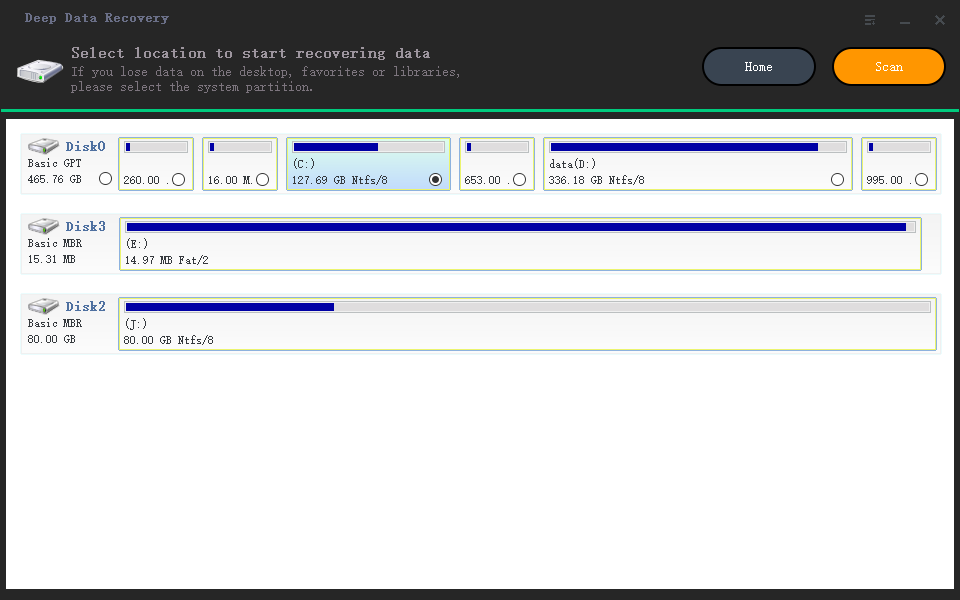
Step 2. Click the "Scan" button to scan the disk with corrupted documents, and this software allows you to fix damaged Word, Excel, PPT, and PDF files in the same steps.
Step 3. Qiling data recovery and repair tool scans for all lost and corrupted files, allowing you to locate them by file type or search for specific file names.
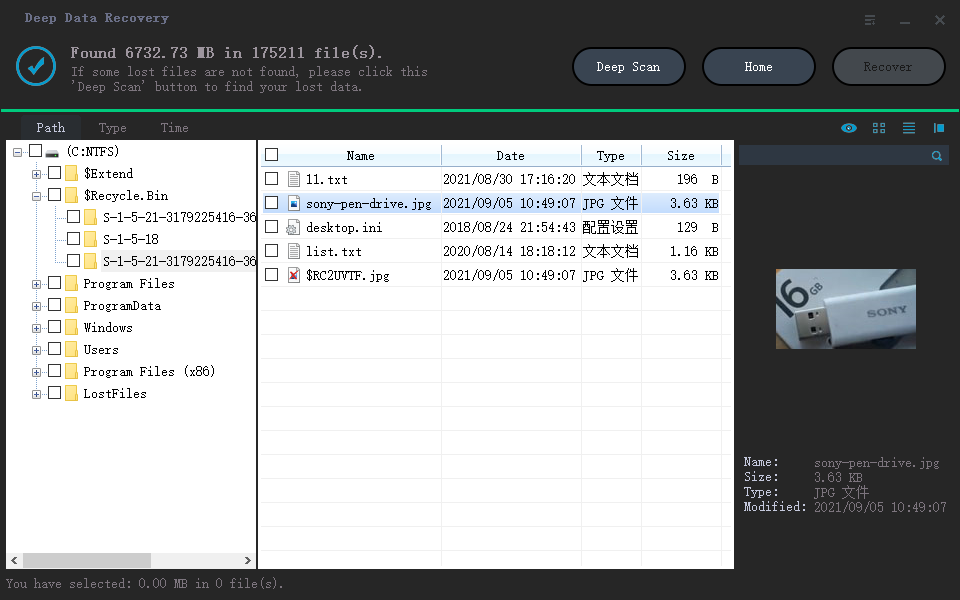
Step 4. Deep Data Recovery can automatically repair damaged documents, allowing you to recover and save Word, Excel, and PDF files to a safe location after previewing them.
Method 2. Repair Devices with File System Errors
If you're tired of struggling with system errors and sluggish computer performance, a solution is available. Qiling CleanGenius can help improve your computer's speed and efficiency by resolving issues and optimizing performance. For related backup and disk management guidance, see Data Backup and Drive Clone Tutorials.
Qiling CleanGenius is a a user-friendly computer fixing tool that's both safe and lightweight, making it a perfect alternative to the CHKDSK command. With just one click, you can easily fix damaged file systems and get your computer back up and running smoothly. This hassle-free tool is designed to provide a quick and efficient solution to common computer issues, saving you time and effort in the process.
Step 1. DOWNLOAD Qiling CleanGenius on your computer and complete the installation.
Step 2. Run the software. Click "Optimization", and then choose "File Showing".
Step 3. Select the drive with a corrupted file system. Tick the "Check and fix file system error" option and click "Execute".
Step 4. Wait the tool performs the repairing task. After that, click the "here" button to check the drive.
Conclusion
Microsoft has committed to the right to repair, which means you can use tools like Qiling Office repair and Qiling CleanGenius to fix and remove errors from your PC. These tools can help you get started with repairing your files and keeping your computer running smoothly.
Related Articles
- How to Recover 0 Byte Word Document in Windows 10/8/7
- Solved: Files Saved to Desktop Not Visible in Windows 10/8/7
- How to Remove Folders and Files from Quick Access Windows 10/11
- My Documents and Settings Folder is Not accessible in Windows 10! Fix It Now!
- Fix USB Access Denied Without Data Loss
If you're experiencing a “USB access denied” error when trying to access saved data on an internal/external hard disk, USB flash drive, pen drive, SD card, or file folder, this article provides can help. - Top 6 Best Hard Drive Data Recovery Services
If you've lost files or documents from your hard drive, consider using one of the top six hard drive data recovery services mentioned in this article. To enhance the efficiency of data recovery, it's recommended to try Qiling data recovery software, which outperforms its counterparts in many ways.
Products
Articles & Tutorials
- Data Recovery
- Data Backup
- File Recovery
- File Backup
- System Backup and Restore
- Disk and Partition Clone
- Technical articles
- Mobile articles
- Disk Master Help
- Windows Data Recovery Tutorials
- Windows Secure Delete Tutorials
- Windows Partition Management Tutorials
- Windows File Backup and Restore Tutorials
- Windows System Backup and Restore Tutorials
- Windows Disk Backup and Restore Tutorials
- Windows Clone Tutorials