Free Download MySQL Recovery Tool to Recover MySQL Database
2 Ways to Recover MySQL Database Files (with Pictures)
Don't worry if you lost files or data from the MySQL database, you can perform MySQL recovery with a tool or with Binlog.
| Workable Solutions | Step-by-step Troubleshooting |
|---|---|
| 1. Recover MySQL with Reliable Tool |
|
| 2. Recover MySQL from Binlog |
|
What Is MySQL Database
A database is a structured collection of data, ranging from a simple shopping list to a vast corporate network, that can be managed using a database management system like MySQL Server, allowing for the addition, access, and processing of data stored in a computer. This makes database management systems a crucial component in computing, whether used as standalone utilities or as part of other applications, due to their ability to handle large amounts of data.

MySQL is a relational database management system (RDBMS) based on SQL, first released in 1998. It has become the world's most popular open-source database, used in various applications such as data warehousing, e-commerce, and Web databases, due to its fast performance, high reliability, ease of use, and cost savings.
The Best MySQL Database Recovery Software (Recommended)
MySQL database files typically have extensions like FRM, MYD, and MYI, with *.frm containing table definitions, *.myi being MyISAM index files, and *.myd holding table data. These files can be lost due to various reasons such as accidental deletion, formatting, partition loss, system crashes, or even virus infections, despite best efforts to prevent it.
If you're facing a MySQL data loss issue without a backup, our advice is to try data recovery software, specifically Deep Data Recovery, which can handle various data loss situations and recover the MySQL database file. It has several highlights that make it a reliable choice.
Deep Data Recovery
- Recover deleted, formatted, and inaccessible data in various data loss situations, including accidental deletion, formatting errors, and system crashes, using specialized software and techniques that can restore lost files and information.
- You can recover files from a formatted hard drive, emptied recycle bin, memory card, flash drive, digital camera, and camcorders using data recovery software. These tools can scan the device and retrieve deleted or lost files, even after a format or emptying the recycle bin.
- Recover a wide range of digital files, including word documents, photos, audio recordings, music, and emails, from any storage device effectively.
How to Recover MySQL with Qiling MySQL Data Recovery Tool
Get back lost MySQL data with this hard disk data recovery software. Download it, launch it, and follow the simple steps to recover lost MySQL files.
Step 1. Run Deep Data Recovery on your computer. Select the file types you want to recover and click "Fast Scan" to begin the process.
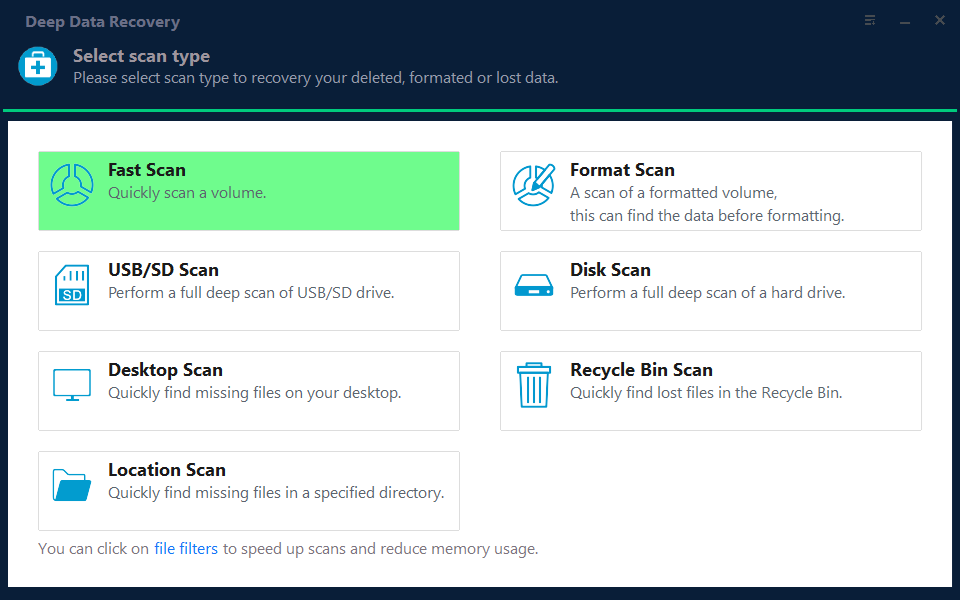
Note: You can choose different search modes based on where and why the data was lost.
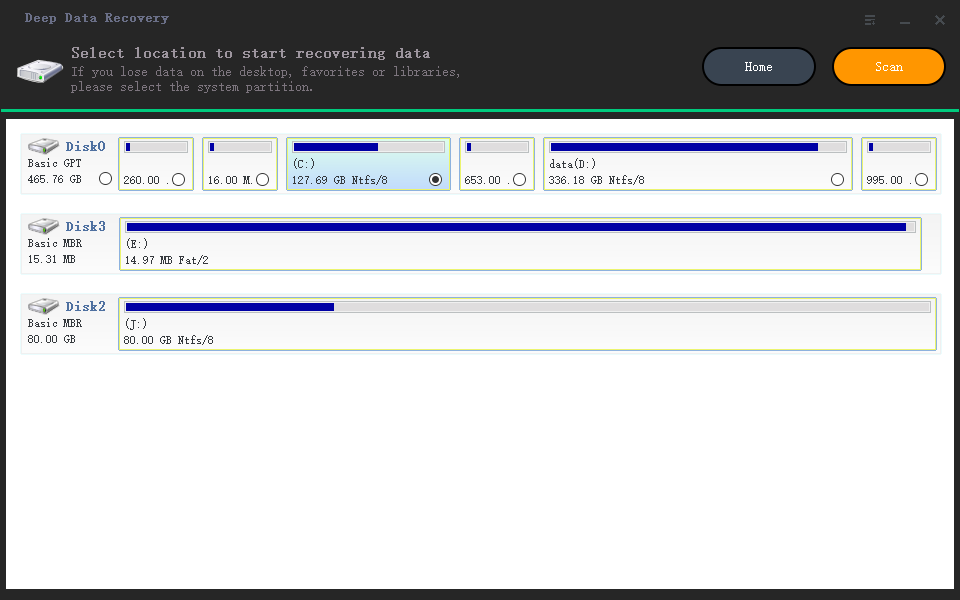
Step 2. Choose the drive where you lost files and click "Scan". If your lost files were on an external storage device, connect it to your computer first. Then, follow the instructions to scan the drive for lost files.
Step 3. The software conducts a rapid scan of deleted files, followed by a deep scan to locate additional lost files. Once the scan is complete, users can utilize the "Filter" feature to quickly narrow down specific file types.
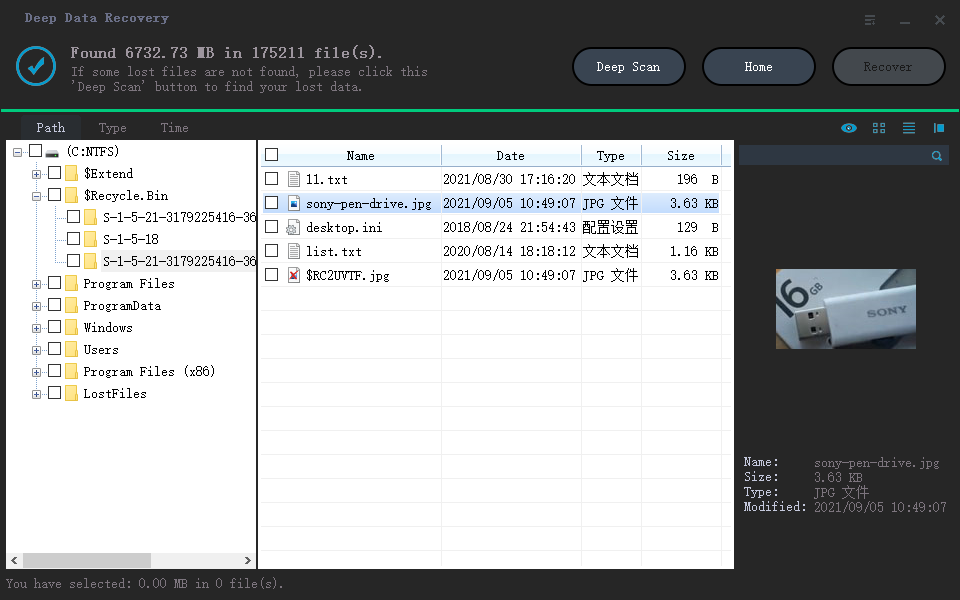
Step 4. To recover files, click the "Preview" button or double-click on a file to view its contents. Then, select the desired files, click "Recover", and save them in a secure location.
If you're experiencing other data loss issues, you can also use this MySQL file recovery software to recover pictures, videos, and documents with just a few clicks.
How to Recover MySQL from Binlog
The prerequisite for recovering data from Binlog is that the MySQL Binlog must be turned on. If the Binlog log is not turned on, ignore this method. You can check the MySQL configuration file if Binlog is enabled and the log location is generally in the /var/lib/mysql directory.
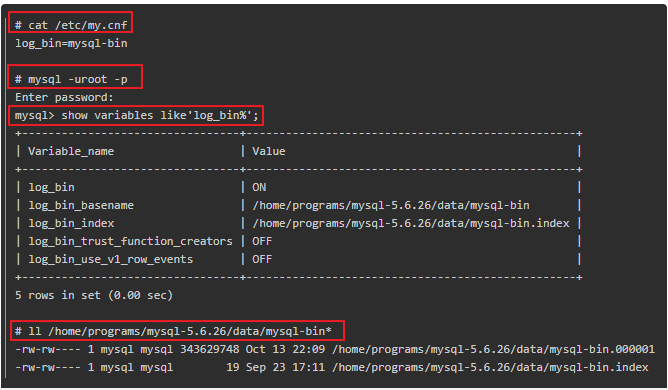
Step 1. log in to MySQL and use the command to view Binlog.
- # cat /etc/my.cnf
- # mysql -uroot -p
- mysql> show variables like'log_bin%';
- # ll /home/programs/mysql-5.6.26/data/mysql-bin*
Step 2. Find the wrong statement in Binlog.
The execution time of the error statement can be found in the Binlog, and the logs can be restored. Alternatively, you can skip restoring the logs and directly restore the entire Binlog. Next, open the SQL file and delete the error statement.
- # sudo mysqlbinlog --base64-output=DECODE-ROWS -v -d ids --start-datetime '2016-10-11 15:22:53' mysql-bin.000001 > /home/stack/data.sql

Step 3. Recover MySQL from Binlog
You can use the MySQL Binlog command to directly restore the Binlog log to a SQL script, and you can specify a start and end time for the restoration.
If multiple Binlog files are generated from the last backup, export them to SQL and import them into the database in order from smallest to largest, starting from the last backup time. This is recommended to be done at the same time as the backup to ensure consistency.
- # sudo mysqlbinlog --base64-output=DECODE-ROWS -v -d ids --start-datetime '2016-10-11 15:22:53' mysql-bin.000001 > /home/stack/data.sql

Step 4. Recover data to MySQL
When restoring data, you may encounter repeated data errors. To resolve this issue, use the -f parameter to ignore the errors. This will allow the restoration process to continue without being halted by the repeated errors.
- # mysql -uroot -p -f ids < data.sql

Conclusion
If you need to recover data from a MySQL database, there are two recommended methods. If you have enabled Binlog, Method 2 is suggested. Alternatively, if you don't have a backup, Method 1 is recommended. Additionally, Qiling data recovery software can also recover FRM, MYD, and MYI files, among others.
Related Articles
- How to Recover Formatted Hard Drive/SD Card/USB Data Using CMD
- How to Recover Data from RAID 1 Disk with Raid 1 Recovery Software
- Top 6 Ways to Fix Windows 10 WHEA Uncorrectable Error
- Free SanDisk Recovery Software Recovers Lost Sandisk Data
- [Solved] PS4 Not Recogizing/Reading External Hard Drive 2023
PS4 not recognizing USB hard drive is a problem that bothers a lot of people. Here are the steps for how to solve the problem. - 6 Ways to Recover Deletd/Corrupted/Crashed PSD Files
Whether you need to recover a PSD file due to accidental deletion, corruption, or a desire to retrieve a file from a temporary location, the guide to recovering a Photoshop file can provide the necessary assistance.
Products
Articles & Tutorials
- Data Recovery
- Data Backup
- File Recovery
- File Backup
- System Backup and Restore
- Disk and Partition Clone
- Technical articles
- Mobile articles
- Disk Master Help
- Windows Data Recovery Tutorials
- Windows Secure Delete Tutorials
- Windows Partition Management Tutorials
- Windows File Backup and Restore Tutorials
- Windows System Backup and Restore Tutorials
- Windows Disk Backup and Restore Tutorials
- Windows Clone Tutorials