Btrfs vs EXT4, All You Need to Know About Btrfs and EXT4!
The main difference between EXT4 and Btrfs lies in their capabilities and compatibility. While both are popular file systems, not all operating systems can handle them equally. Understanding the differences between these two file systems is essential, especially considering that not all OS can deal with all types of file systems. However, a detailed comparison of their features and functionalities would be required to fully grasp their differences.
On Windows, users have a few file system options, such as FAT32 and NTFS, for storing data on their hard drive. In contrast, Linux users have a variety of file system types to choose from, including Btrfs and EXT4.
Let's dive into the differences between Btrfs and EXT4 file systems.
Btrfs File System
Btrfs, commonly known as the B-Tree file system, is an advanced and feature-packed file type that has been a topic of interest since its inception. It operates on the Copy on Write (CoW) mechanism, making it a standout in the industry. This unique approach sets it apart from other file systems, making it a highly sought-after solution.
The mechanism can store modified data, reducing the risk of data corruption. Although it was introduced in 2007, many businesses still use it.
Btrfs is popular because it allows developers to add new functionalities within the same file type, giving that room for innovation and expansion.
Key Features
- Create Snapshots With Ease
The Btrfs file system has been updated to allow developers to create various snapshots with ease, which are not only readable but also writable.
- No Data Corruption
In the Btrfs file type, complete data is created as a copy on write (CoW), which means it doesn't alter the original data on disk but instead creates a copy, ensuring no data corruption even when handling large file sizes.
- Optimized for SSD's
Btrfs is well optimized to work with solid-state drives (SSDs), which are designed for high-speed data transfers, ensuring you get the best performance from your SSD.
Pros:
- Supports maximum file size up to 50 TB
- Less complication for dealing with huge data files
- A stable file type for Linux OS
Cons:
- Data fragmentation remains on the higher side
Ext4 File System
Ext4 is the fourth version of Linux's extended file system, initially known simply as ext. It has evolved over time and is now the latest offering from the OS manufacturer, remaining a standard part of the Linux system even today.
Ext4 is a journal-based file system, meaning it keeps a journal of data saved on the disk. This feature allows for efficient and reliable data management.
Key Features
- Stable File Type
Ext4 has been a stable file type for Linux OS for a long time, making it a reliable choice for storing data, whether you're new to Linux or just looking for a trustworthy file system.
- Backward Compatible
Ext4 is the updated version of earlier file systems, including Ext1, Ext2, and Ext3, and is backward compatible with them, making it a great option for Linux users.
- Journal Based Mechanism
While the data saving mechanism of Ext4 may seem outdated to some users, it actually delivers consistent speeds, which is a key priority for many users. This is why many Linux users still opt for ext4, despite its age, as its reliability is a major selling point.
Pros:
- Tried and tested file type
- Keeps data secure for long
- Suitable for new Linux users
Cons:
- Doesn't allow taking snapshots
Btrfs vs EXT4, What Are the Differences
Let's put aside the EXT4 vs Btrfs debate and focus on the main differences between these two file systems.
| Btrfs Or B-Tree File System | Ext4 (Extended File System) |
| The Btrfs file system supports partition sizes up to 16 EIB (Exibyte). | The Ext4 file type supports partition sizes up to 1 Exabyte (EiB). |
| In a Btrfs file system, you can create a maximum of 2^64 files. | Ext4 lets you create a max of 232 files. |
| It is an updated and also reliable file system | It is an updated and also reliable file system. |
Btrfs vs EXT4 on Synology NAS Device
Choosing between EXT4 and Btrfs as a file system for your NAS hard disk can be a daunting task, especially if you're using a Synology NAS or a similar device. Fortunately, this guide is here to help you make an informed decision. By considering your specific needs and preferences, you can select the best file system for your NAS device, whether it's EXT4 or Btrfs.
Why Go with Btrfs File System?
Btrfs is an excellent file system that offers some great additional features. It retains the reliability of its predecessor while introducing new features, including the ability to create snapshots of snapshots, making it a very useful tool.
Btrfs is the more advanced and feature-packed file system for Linux users, offering a copy-on-write mechanism, which is a welcome addition. This makes Btrfs the better choice if you want a more modern and efficient file system.
- More flexibility
- Less risk
- Want to save maximum files
Why Go with Ext4 File System?
Ext4 is a standard file system for Linux OS, specifically version 4, with some improvements over its predecessors. Unlike Btrfs, it uses a journal-based storage system, offering a more traditional approach to file system management.
While Ext4 has its advantages, its maximum file size capacity is limited compared to Btrfs. This means it may not be the best choice for users who need to store large files. However, it's still a good option for those who want a reliable and widely-supported file system.
- Trusted file system
- No data fragmentation
- Average file size limits
How to Recover Data EXT4/Btrfs RAID/NAS Drives
Although NAS devices are generally reliable, data loss can still occur due to various reasons, making it essential to be prepared for such situations. The NAS drive can lose data due to factors such as hardware failure, software glitches, power outages, physical damage, or human error, making it crucial to have a backup plan in place to prevent or minimize data loss.
- Accidental deletion
- Repeated power failures
- NAS initializing or formatting
Method 1. Restore EXT4/Btrfs Files from NAS Directly
To avoid the hassle of data loss, Qiling NAS data recovery software is available to help. This tool can be used to recover lost data from NAS devices, making it a useful solution for those who need to retrieve important files.
Qiling NAS data recovery software is a reliable tool that facilitates data file recovery from various file systems. Its user-friendly interface and comprehensive features make the recovery process smooth and efficient.
Salient features of Qiling NAS data recovery software:
- Recovering data from a NAS is straightforward, and you don't even need to disconnect the RAID disks, making the process incredibly simple.
- Recover accidentally deleted files from NAS within no time
- Restore lost data from formatted or initialized NAS device
- Previewing files before recovering them allows you to selectively recover only the necessary files, saving time and resources. This approach enables you to prioritize and focus on the specific files that need to be recovered, rather than recovering all files, which can be time-consuming and unnecessary. By doing so, you can efficiently manage the recovery process and minimize the risk of data loss.
For NAS data recovery, follow these steps for various brands: QNAP, Synology, Lacie, Iodata, Buffalo, DLink, Seagate, Western Digital, and more.
Step 1. Select file types
Download and install Deep Data Recovery on your Windows 11/10 64-bit computer. Select file types and click "Fast Scan" to start the recovery process.
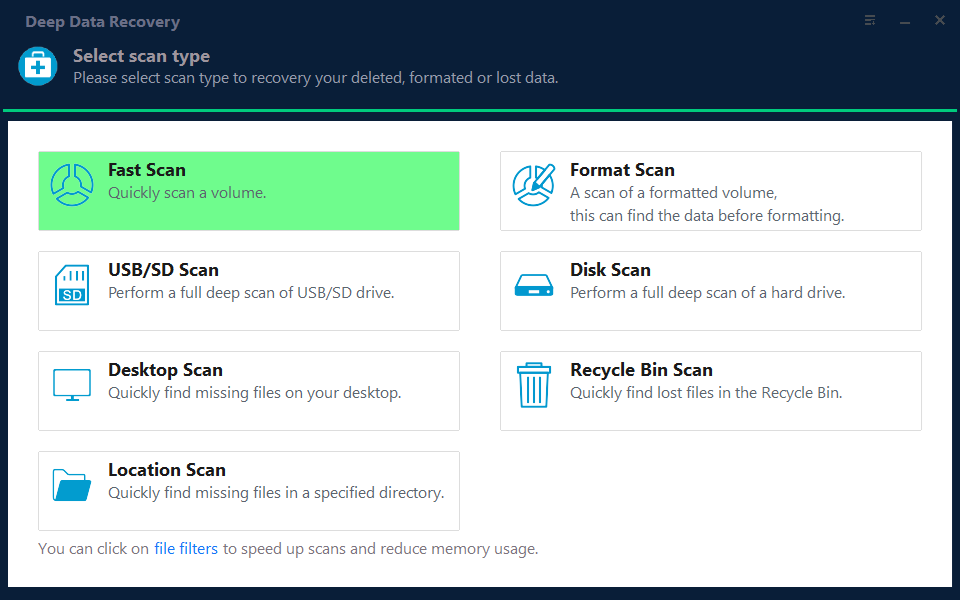
Note: You can choose different search modes based on where and why the data was lost.
Step 2. Select a NAS server and start recovering.
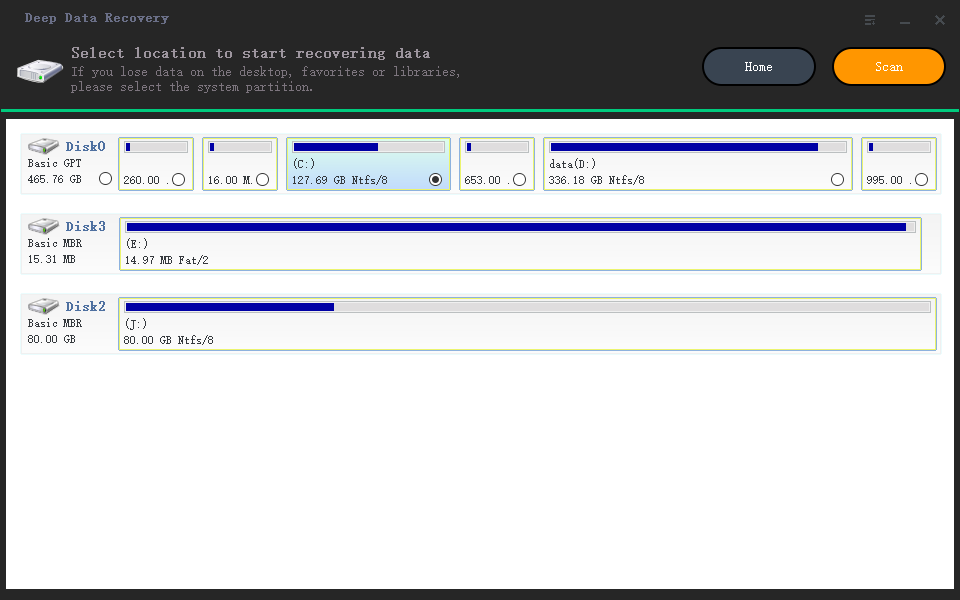
When you open the software, select "NAS Recovery" and it will automatically list all available NAS servers. Choose your target NAS device and click "Scan".
Step 3. Enable SSH service on the NAS server.
To enable SSH service for remote access, go to the "Control Panel > Terminal & SNMP" and check the box next to "Enable SSH service". Note the port number for remote access, then proceed to Deep Data Recovery and click "Next".
Step 4. Connect to the NAS server remotely.
This software automatically detects your IP and Port, requiring only your username and password to be input. If the IP or Port is incorrect, you can manually correct it. Once complete, clicking "Connect Now" initiates the connection.
Step 5. Recover lost/deleted NAS data
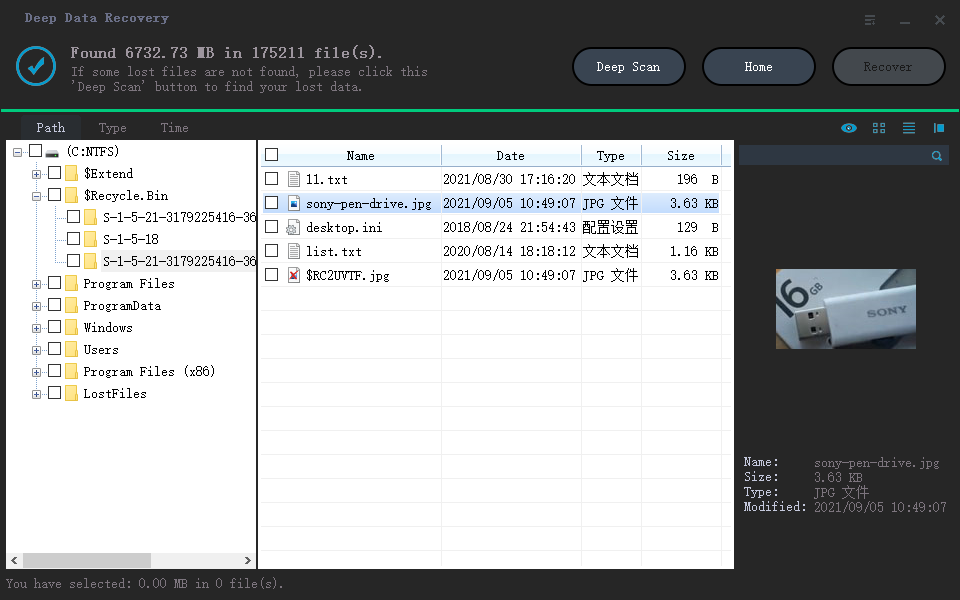
Qiling data recovery software will connect to your NAS, scan it, and display all deleted, lost, or existing files on the server.
To find lost files on the hard drive, use the "Filter" feature or click "Search files or folders" to locate them. Select the desired NAS files that are missing and click "Recover" to save them to a different location.
To recover lost NAS files, click the "Recover" button after selecting the files you want to restore.
Method 2. Restore EXT4/Btrfs Files with Data Recovery Service
If you're experiencing data loss, you can try recovering it yourself using software, or ask data recovery experts for help. Qiling offers various services, including free diagnosis, after which you can contact them for assistance.
Consult with Qiling data recovery experts for one-on-one manual recovery service, which includes the following services after a FREE diagnosis.
- The system is experiencing issues with a corrupted RAID structure, an unbootable Windows OS, and a corrupted virtual disk file, which is hindering the system's functionality and preventing it from operating normally.
- Recover/repair lost partition and re-partitioned drive
- Unformat hard drive and repair raw drive(Bitlocker encrypted drive)
- Fix disks that become GPT protected partitions
Conclusion
The main difference between EXT4 and Btrfs lies in their file storage capabilities, with Btrfs offering more space for storing files, making it a better choice for users who need to store large amounts of data.
The Ext4 file system is a reliable option, but if your NAS drive is reformatted, Deep Data Recovery can efficiently recover all your data, making it a useful tool to have.
Related Articles
- Free Download Easy Recovery Software to Restore Lost Data in 2022
- Fix Unspecified Error When Copying File or Folder on Windows 10
- How to Reset Windows 10 Password in 4 Ways (Step-by-Step Tutorial)
- Recover Data After Formatting Laptop/PC
- How to Recover Deleted Files from Eclipse
The frustration of accidentally deleting files and projects in the Eclipse workspace is a common issue. Fortunately, there are methods available to recover and restore deleted files in Eclipse, providing a solution to this problem. - Recover Deleted Files from GoPro [Files and Videos]
Do you want to recover deleted files from GoPro? If you permanently delete files, we shows you how to recover deleted photos and videos from GoPro with professional recovery software. If you are a GoPro Plus member, you can recover deleted files from the GoPro Plus cloud backup.
Products
Articles & Tutorials
- Data Recovery
- Data Backup
- File Recovery
- File Backup
- System Backup and Restore
- Disk and Partition Clone
- Technical articles
- Mobile articles
- Disk Master Help
- Windows Data Recovery Tutorials
- Windows Secure Delete Tutorials
- Windows Partition Management Tutorials
- Windows File Backup and Restore Tutorials
- Windows System Backup and Restore Tutorials
- Windows Disk Backup and Restore Tutorials
- Windows Clone Tutorials