Qiling Partition Master 6.0 License Key and Safe Activation
This article explains the risks of cracked Qiling Partition Master downloads and shows how to get a valid license code safely from an official source.
Can I Trust Unofficial Qiling Partition Master License Tools?
Unofficial license tools for partition manager software found through search results are not safe or reliable. They may contain viruses, fail to activate the software properly, or make the program unstable from startup.
If you are considering an unofficial copy of Qiling Partition Master, weigh the risks carefully. Although it may appear to unlock full features without cost, it can expose your computer and data to malware, privacy leaks, and update failures.
Pros: Partially free.
Cons:
- Unstable software running - The partition tool is experiencing issues, specifically getting stuck at 99% or crashing unexpectedly. This can be frustrating and may indicate a problem with the tool or the system it's running on.
- Data corruption - Unofficial software may damage partitions or files.
- Update failure - Unofficial software cannot reliably receive updates or use new features, making it outdated and vulnerable to security threats.
- Virus infection - A cracked installer may contain malware or bundled software, which can infect your computer and lead to data loss.
- No technical support - The only authentic tool can get technical support.
Download Genuine Qiling Partition Master 6.0
Although a cracked version may appear to unlock some features for free, its reliability is low and the risk is not worth taking. It may fail, damage your disk, or compromise your data, so using the official version is safer.
New features of v6.0:
- Support to resize NTFS partition.
- Support to merge non-adjacent partitions.
- New UI designed for better performance.
- Support Windows 11.
Overview of features for Windows 11 upgrade:
If Windows 11 is released, Qiling Partition Master can assist with the upgrading process.
- To prepare your hard drive for Windows 11, you can use a tool called MBR to GPT converter. This converter will convert the Master Boot Record (MBR) of your hard drive to a GUID Partition Table (GPT), which is a requirement for Windows 11.
- Migrate Windows 11 operating system to a new disk.
- Upgrade disk by cloning.
- Extend partitions in Windows 11.
How to Get Qiling Partition Master v6.0 License Code
1) You can use the free version of Qiling Partition Master for personal partition management from the official website. 2) If you're a student or teacher, check whether an educational discount is available. 3) If you're a business or organization, contact Qiling's sales team to choose a license that matches your needs.
1. Use an Official License and Get a 30% Discount
The discount is genuine for users, and it is completely safe to install Qiling.
Two versions are available. The Pro version of Qiling Partition Master is designed for individual users who need common partition management features. The Server version is designed for professionals who need advanced tools for larger-scale environments.
Read on this event page to get an ideal discount:
2. Advanced functions - Buy Pro Version from the product page
The website launches promotional activities for big events like Christmas, Black Friday, Halloween, and Valentine's Day. To see if there's a current promotion, go to the Qiling Partition Master Pro page. If not, try the first method.
The comparison between editions highlights the distinctions between professional, server, and lifetime versions, showcasing their unique features and functionalities.
What features you can get from the Qiling Partition Master Pro version:
- Create WinPE bootable disk.
- Recover partitions.
- Clone entire disk and partitions.
- Convert MBR to GPT or vice versa.
- Migrate OS to SSD without re-installation.
If you only need some basic functions like resize, merge, format, delete, wipe, check partitions, move to method 3, and try the free version.
3. Free functions - Download Free Version
If you've recently purchased a Windows 11 pre-installed machine or upgraded from Windows 10, it's time to optimize your disk performance and adjust the new disk layout for better use or free up extra space on the C drive. The basic features can meet your needs for optimizing disk performance.
How to Activate and Using Qiling Partition Master
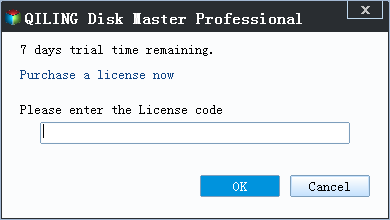
You will receive the license code/key from the email after buying genuine software. Follow the instructions to activate the software.
1 - Activate Qiling Partition Master
Step 1. Download and launch free or pro version.
Step 2. Click the Activate button locate on the top right corner.
Step 3. Type the license key on the box.
2 - How to Use Qiling Partition Master
The "Resize/Move" feature allows you to adjust the size of a selected disk partition as needed, enabling you to shrink a volume, extend another one, or create unallocated space for specific use.
The "Clone" feature allows you to create an exact copy of a hard disk or partition, duplicating its layout and content. This can be useful for upgrading a hard disk, replacing a failing one, or backing up drive data.
"Delete" is a method to remove a disk partition, turning it into unallocated space.
Formatting a drive partition can change the file system, fix corruption issues, and sometimes remove viruses and malware, making it a useful tool in various situations.
The "Allocate space" feature is helpful when one drive partition has a lot of free space, while another partition has limited space, allowing you to move some space from the larger partition to the smaller one, making better use of your disk space.
The "Migrate OS" feature allows users to easily transfer a Windows installation from one drive to another without having to reinstall the operating system.
Qiling Partition Master customers are increasingly converting between GPT and MBR, NTFS and FAT32, and Basic to Dynamic, and are discovering many other functional and practical features to explore.
Final Thoughts
Be cautious with cracked software because it can put your entire disk at risk. To avoid this, download software from the official website, where you can get a secure installer and available discounts.
See more articles:
Related Articles
- How to Fix USB Shows Read Only Windows 11? [Solved]
- Patriot Formatter | The Best USB Format Tool for Patriot Flash Drive
- Add A Second Drive to Windows Server [Full Guide 2022]
- How to Wipe Partition Data to Protect Privacy
- 3 Solutions to File Record Segment is Unreadable
If you're experiencing a “file record segment is unreadable” error on your Windows PC, it's likely due to drive corruption, which can lead to data loss. To resolve this issue, you should take immediate action and try the solutions outlined in this article to fix the problem. - How to Fix Disk Management Console Is Not Up to Date Error [7 Effictive & Quick Methods]
The Disk Management console is not updating error can be frustrating, but it can be resolved with seven fixes. These solutions include running the built-in Windows Update tool, checking for updates in the Control Panel, and restarting the system.
Products
Articles & Tutorials
- Data Recovery
- Data Backup
- File Recovery
- File Backup
- System Backup and Restore
- Disk and Partition Clone
- Technical articles
- Mobile articles
- Disk Master Help
- Windows Data Recovery Tutorials
- Windows Secure Delete Tutorials
- Windows Partition Management Tutorials
- Windows File Backup and Restore Tutorials
- Windows System Backup and Restore Tutorials
- Windows Disk Backup and Restore Tutorials
- Windows Clone Tutorials