What Is FAT File System Format (FAT12, FAT16, FAT32)
In this article, you'll learn:
- What Is FAT File System?
- FAT (File Allocation Table) File System Structure
- Do I Need FAT File System?
- What Is the Difference Between FAT12, FAT16, and FAT32?
- What is the Difference between NTFS and FAT Files?
- How to Create FAT File System Partition?
FAT32 is one of the leading file systems in storage devices. So, what exactly is it?
File systems, such as Fat32, which was introduced in 1996, play a crucial role in organizing and saving various types of data. Their primary function is to create an index on physical storage, effectively containing and managing the data. This enables efficient retrieval and access to the stored information.
The FAT file system format is a type of file system used in operating systems. To understand the differences between FAT32 and other FAT file systems, we need to dive into how the file system works. The FAT file system is a simple, non-journaling file system that stores file metadata in a table called the File Allocation Table (FAT). FAT32 is a specific version of the FAT file system that supports larger file sizes and partition sizes compared to earlier versions like FAT16. The main differences between FAT32 and other FAT file systems lie in their capacity to handle larger files and partitions, with FAT32 being the most widely used and supported version.
What Is FAT File System?
Fat file system, shortened from File Allocation Table, is a file system developed by Microsoft and Caldera for Windows computers. It became a leading MBR/EBR file system after Microsoft introduced Fat32 as part of Windows 95 OSR2.
The file system uses a specific indexing system to identify streams of data and information on a physical device. When formatting, the user can choose FAT as the primary file system, which features a list of passes for each data cluster.
NTFS, primarily used in computers and PCs, has also been used in mobile phone devices as the primary file system format in recent years. Due to its 8-bit structure, cluster numbers increase as the disk drive capacity increases, allowing for larger storage capacities.
Therefore, the introduction of various file systems, such as:
- FAT12 - 12 bit
- FAT16 - 16 bit
- FAT32 - 32 bit
The FAT file system has been used since 1977, but FAT32 was introduced in 1996, a significant improvement over the previous version.
FAT (File Allocation Table) File System Structure
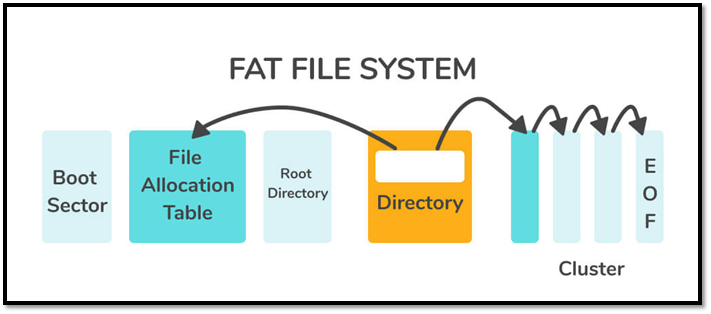
The structure of FAT, an older file format, is relatively simple compared to newer systems like NTFS. It uses sectors, which are essentially blocks of data, to store and organize files. A FAT file system is composed of various sectors, including boot sectors, root directory sectors, and data sectors, which contain the actual file data. These sectors work together to provide a basic framework for storing and retrieving files, making the FAT file system a straightforward and easy-to-understand technology.
- Boot Sector: The part that contains the operating system's boot loader is responsible for powering up a computer device and using the MRB or master boot record partition table, also known as the reserved sector.
- FAT Region: This part identifies the copies of the file on the File Allocation Table, allowing the system to allocate a specific cluster to each data stream, making it easier to manage and access the file.
- Data Region: This is the storage area for data files, such as images, documents, audio files, and other media, which typically takes up the most space and occupies the majority of a FAT partition.
- Root Directory Region: The sector is a directory table that contains information about files and directories in FAT16 and FAT12 systems, but in FAT32, the root directories are stored in the data region.
FAT, FAT16, and FAT32 are all structured similarly, with the main difference being that FAT32 has a larger cluster size and can support larger hard drives, while FAT16 is limited to smaller drives. However, the overall structure and organization of the file system remains the same, with the boot sector, root directory, and data clusters making up the core of the system.
Do I Need FAT File System?
FAT file systems, although outdated, still have their advantages, particularly with FAT32. Compared to earlier versions like FAT16 and FAT12, FAT32 offers significantly more storage capacity, making it beneficial in many ways.
- FAT32, the first FAT file system to exceed 1000GB, supports up to 2TB, whereas FAT16 is limited to a maximum of 2GB.
- FAT32 doesn't use any disk space to store system files, which is why FAT32-formatted USB drives and hard drives often have full storage capacity, i.e., 500GB out of 500GB.
- FAT32 is a file system supported by both Windows and Mac devices, making it a convenient option for users who switch between the two operating systems.
If you need to support older operating systems, such as Windows 98, or have a device with limited storage capacity, a FAT file system might be necessary. However, it's recommended to use FAT32 or a more modern file system for most use cases.
What Is the Difference Between FAT12, FAT16, and FAT32?
The differences between the three primary FAT systems are primarily based on their name and supported bits, such as FAT12, FAT16, and FAT32, which differ in the number of bits allocated for the cluster address and the total number of clusters that can be supported.
- FAT32 is based on 32-bit
- FAT16 is based on 16-bit
- FAT12 is based on 12-bit
Another significant difference between them is their clusters, for instance:
- FAT32: This file system features 4 bytes per cluster or between 65526 and 268435456 clusters.
- FAT16: This one features 2 bytes per cluster, or between 4087 and 65526 clusters. The maximum size of a cluster is 65526 bytes and the minimum is 4087 bytes.
- FAT12: this features less than 4087 clusters
These are the primary differences between these three FAT file systems.
What is the Difference between NTFS and FAT Files?
NTFS and FAT are vastly different file systems, with NTFS being released in 1993, about 16 years after the first FAT file system. NTFS supports larger file sizes, has better security features, and allows for more efficient disk usage, whereas FAT is more basic and limited in its capabilities. This makes NTFS a more modern and robust file system, while FAT is more suitable for older systems and smaller storage devices.
| File Systems | Sharing Data | Activity Log | File compression | File Size | OS Support | File Compression |
|---|---|---|---|---|---|---|
| NTFS | Doesn't support cross-platform, i.e., Mac to Windows and vice versa | Easily Restored | No compression supported | 4Gb to 64GB | Only recognized operating systems | Flexible |
| FAT | Supports cross-platform file sharing | No security and doesn't restore | No compression supported | 4GB Max | Supports more than one at a time | None |
Here's a visual graph of the FAT File System:
Here's one for NTFS:
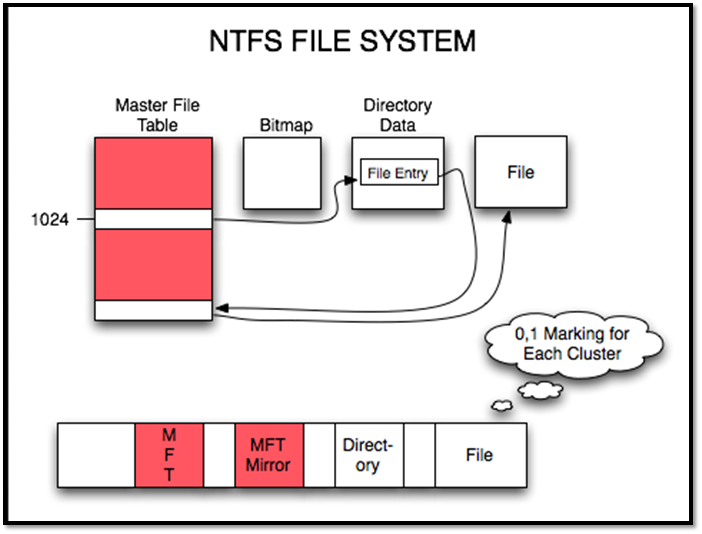
Both NTFS and FAT32 have their own advantages, but NTFS is generally more modern and widely supported in newer storage and operating systems. However, many users still prefer FAT32 for its cross-platform compatibility, making it a popular choice for users who need to share files across different devices and systems.
How to Create FAT File System Partition?
You can create a FAT file system partition using various methods, including formatting a drive, using a bootable USB, or creating a new partition using a disk management tool. Alternatively, you can also use a software tool like Qiling Partition Master to create a FAT partition. Additionally, some operating systems, such as Windows, have built-in tools that allow you to create a FAT partition.
- Formatting from This PC or My Computer
- Formatting from Disk Management
- Picking Partition Type at the time of windows installation
- Formatting in Finder on a Mac
Format USB or External Hard Drive with Qiling Partition Master
While there are some practical ways to create FAT32 partitions, the most effective method is often through a third-party program that allows access to the partition across various operating systems. This approach provides a convenient and efficient way to manage and interact with the partition, making it a popular choice among users.
One such program is Qiling Partition Master, an outstanding partition tool that allows you to format a USB or external Hard Drive for your PC.
Step 1. Launch Qiling Partition Master, select the partition on your external hard drive/USB/SD card, and click the "Format" option to format it.
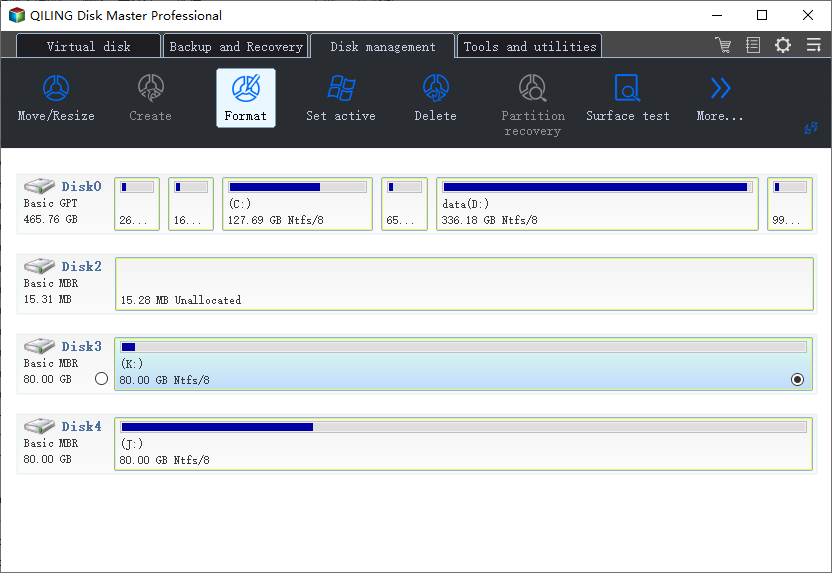
Step 2. Assign a new partition label, file system (NTFS, FAT32, EXT2, EXT3, EXT4, exFAT), and cluster size to the selected partition, then click "Proceed".
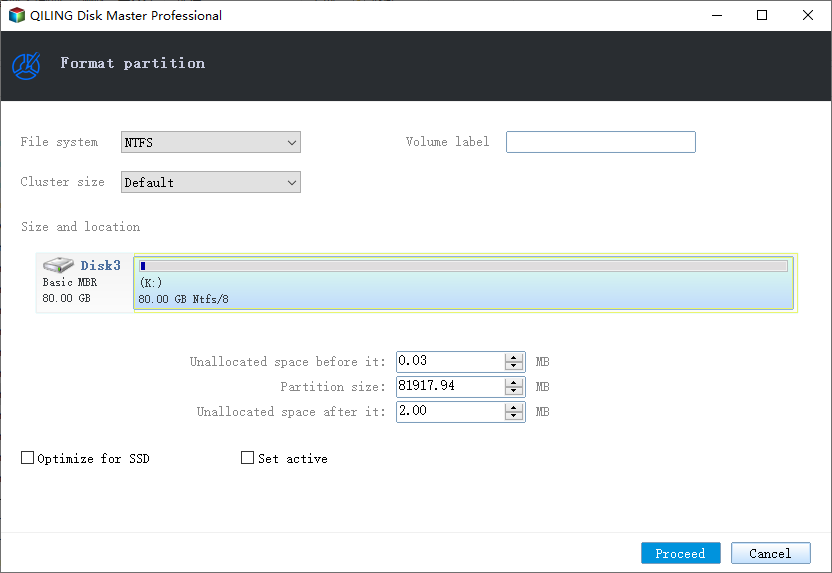
Step 3. To start formatting your external hard drive/USB/SD card, click "OK" in the Warning window.
Why this tool out of all? Here are a few reasons:
- Merge two SSD drives into one
- Create, format, or delete partition without any hassle
- Effectively resize or remove partition without losing data
You can also change your partition's file system to FAT32.
Conclusion
The FAT file system has been around for over four decades and remains one of the most widely used file systems today, continuing to provide reasons to employ it despite its age.
Related Articles
- 2022 Tips to Fix 100 Disk Usage in Windows 7/8/8.1/10/11
- 10 Ways to Resolve 100% Disk Usage on Windows 11/10
- How to Install Windows 11/10 from USB on New PC (2022 Updated)
- How to Convert Boot Disk Between MBR and GPT Styles without Data Loss?
Learn how to convert a boot disk between MBR and GPT without data loss using Qiling Disk Master or Windows tools. - How to Repair Windows 11 with Command Prompt| 2024🔥
Windows 11 can become corrupted due to various reasons, and one way to resolve these issues is by using the Command Prompt to repair Windows 11. This approach provides an alternative solution to resolve the problems and can be found in the article. - Best Solution to Resize FAT32 Partition Without Losing Data
When you want to shrink or extend the FAT32 partition in Disk Management, you will find that you are unable to do this operation. This post offers a step-by-step tutorial to help you easily resize FAT32 partition without losing data.
Products
Articles & Tutorials
- Data Recovery
- Data Backup
- File Recovery
- File Backup
- System Backup and Restore
- Disk and Partition Clone
- Technical articles
- Mobile articles
- Disk Master Help
- Windows Data Recovery Tutorials
- Windows Secure Delete Tutorials
- Windows Partition Management Tutorials
- Windows File Backup and Restore Tutorials
- Windows System Backup and Restore Tutorials
- Windows Disk Backup and Restore Tutorials
- Windows Clone Tutorials