How to Repair File System Error with NTFS File System Repair Freeware
Check the Partition for File System Error with Built-in NTFS RepairTool:
First of all, you can right-click the corrupted NTFS partition in Windows File Explorer.
Step 1. Right-click the corrupted NTFS partition
Step 2. Go to "Properties" > "Tools", click "Check" under "Error Checking"
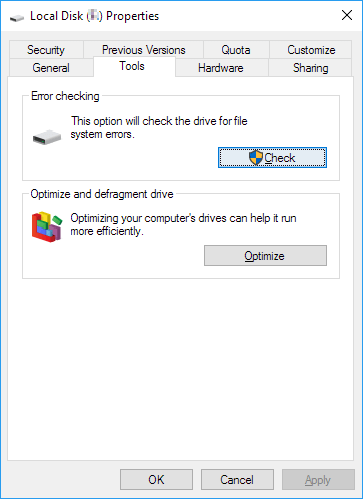
This option will check the selected partition for file system error, and then you can read on to get other additional help on NTFS repair.
Why Need to Repair NTFS File System, And How?
When a file system on a storage device becomes RAW or has errors, it can no longer be used to save data, and existing data on the device becomes inaccessible.
If your devices or storage media devices are experiencing symptoms such as not being able to access files, showing errors, or being unable to read or write data, you may need to repair the file system to resolve the issue.
1. The hard drive partition shows 0 bytes.
2. Storage devices become inaccessible.
3. RAW error;
4. Storage devices become undetectable or unrecognizable;
5. Windows system has boot error etc.
Professional NTFS file system repair software can help solve issues such as corrupted files, lost data, and system crashes. While there are free options available, they may not be as effective as paid software, which often provides more advanced features and better support.
Download the Best Free NTFS File System Repair Software
To repair file system errors on your system hard disk, hard drive partition, or USB/SD card, you can use a free NTFS file system repair software like Qiling Partition Master Free. This software can help fix errors and issues with your file system, allowing you to access and use your storage devices again.
This software allows you to repair file system errors on storage devices and restore or convert file systems on hard drive partitions, USB, or SD devices to NTFS with just a few clicks.
1. How to Restore and Repair NTFS File System
You can download the software for free and follow the tutorial steps to repair the NTFS file system with ease. Just head to the download link and get the software, then follow the steps to fix any issues with your NTFS file system.
Step 1. Click the target partition that has a problem.
Step 2. Choose "Check File System" from top panel.
Step 3. In the Check File System window, check the "Fix the error on the disk" option.
Step 4. Click "Proceed" to check errors on your partition.
2. How to Convert File System to NTFS by Formatting
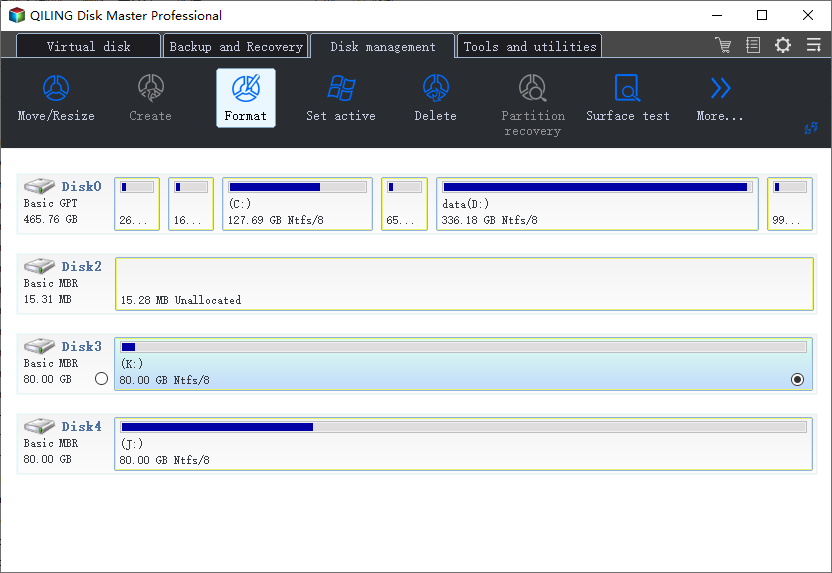
If you need to format an external storage device like an SD card, USB, or external hard drive, connect it to your PC first.
Step 1. Launch Qiling Partition Master, click the partition on your external hard drive/USB/SD card which you want to format and choose the "Format" option.
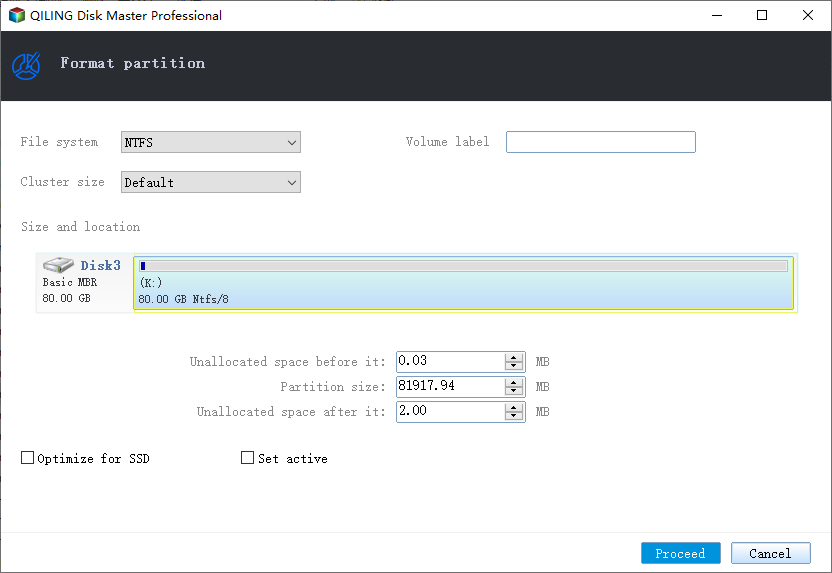
Step 2. Assign a new partition label, file system (NTFS/FAT32/EXT2/EXT3), and cluster size to the selected partition, then click "Proceed".
What Else Can Qiling File System Repair Freeware Do for You
This software can help with various issues, including repairing the file system, recovering deleted files, and restoring data from damaged or corrupted storage devices. It can also help with data recovery from formatted or reformatted storage devices, and recover data from storage devices that have been physically damaged or have faulty sectors. Additionally, it can help with recovering data from RAID systems, and can even help with recovering data from virtual machines.
- Resize and move partition;
- Delete, merge, restore partition;
- 4K alignment SSD;
- Hide/unhide partition;
- Copy or create partition etc.
If you need to migrate your OS to an SSD/HDD or upgrade your hard disk to a bigger one, you may want to upgrade the NTFS file system repair software to its pro version to gain more capacity and advanced operations to manage your hard disk and storage devices.
Other Topics You May Like
- Windows 10 Backup and Restore - Full Solutions to Protect System, Data and Applications
- How to Backup/Save Outlook Emails to Hard Drive Automatically in 3 Ways
- Lenovo VS Dell: Which Is Better Laptop in Terms of Price, Performance, and Much More?
- How to Fix USB Shows Read Only Windows 11? [Solved]
- 4 Easy Solutions to Fix 'Unable to Extend C Drive' in Windows 11
- How to Reallocate Disk Space Without Losing Data in Windows 11/10/8/7
Related Articles
- How to Do with "SMART Status Bad, Backup and Replace" | Guide
When failed to boot computer with Pri Master Hard Disk SMART Status BAD error, you should backup important data to another location before the hard drive fails completely. - 9 Fixes to 'Getting Windows Ready' Stuck in Windows 10/8/7
If you are stuck on the "Getting Windows ready don't turn off your computer" screen in Windows 10 or Windows 8, how to fix it? Here are some effective solutions. - Centralized Backup Software - Backup All Computers on Network
Any enterprise backup software can create centralized backup for all computers within LAN simultaneously? Here is an example along with brief tutorial. - How to Backup SD Card Data Before Formatting-4 Ways Included
You can learn how to backup SD card data before formatting on this page. 4 effective methods are provided. Choose the one that suits you best. - Best Free Microsoft Deployment Toolkit (MDT) Alternative
Want to find a Microsoft Deployment Toolkit alternative to create a Windows 10 image for deployment? How to deploy Windows 10 image to multiple computers simultaneously? Just see the step-by-step guide. - Qiling Image Deploy | SYSPREP Workaround in Windows 7, 8, 10, 11
This article describes a great Sysprep alternative in Windows 7, 8, 10, 11 - Qiling Image Deploy which can deploy system to multiple computers simultaneously.
Products
Articles & Tutorials
- Data Recovery
- Data Backup
- File Recovery
- File Backup
- System Backup and Restore
- Disk and Partition Clone
- Technical articles
- Mobile articles
- Disk Master Help
- Windows Data Recovery Tutorials
- Windows Secure Delete Tutorials
- Windows Partition Management Tutorials
- Windows File Backup and Restore Tutorials
- Windows System Backup and Restore Tutorials
- Windows Disk Backup and Restore Tutorials
- Windows Clone Tutorials