What is Windows Image Boot (WIMBoot)?
Overview
Windows Image Boot (WIMBoot) is a feature in Windows 8.1 that allows you to install and run the operating system from a compressed WIM file, saving device space and speeding up startup times. This feature works by enabling the operating system to be installed and run from a compressed WIM file, and its advantages include saving device space and speeding up startup times, while its disadvantages include potential issues with system updates and compatibility with certain devices. To create a WIMBoot installation, you can follow the steps outlined in this article.
For another Windows boot environment concept, you can compare WIMBoot with Windows PE and how it is used.
1. What is Windows Image Boot (WIMBoot)?
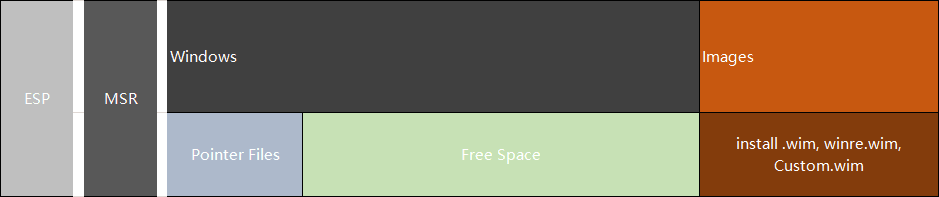
WIMBoot is a technology that enables computers with limited storage space to run system-level functions by reading the Windows imaging file (WIM) from an existing hard drive, saving time and money for OEM manufacturers and speeding up upgrades/installations. This allows Windows devices with less storage space to run the full version of the system while still having ample room for data or applications.
2. How does Wimboot Works?
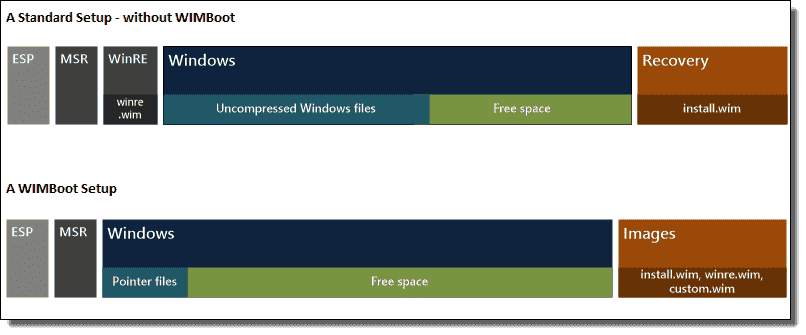
During a traditional Windows installation, system files are written to the local disk twice: first as a compressed archive of the system backup file, and then as an uncompressed archive of the system files. This results in the local system disk storing a compressed version of the system backup file after installation, occupying significant space. In fact, the minimum disk space requirement for Windows 8.1 is 16GB, with the actual installation occupying around 10GB of hard disk space.
When using WIMBoot, the entire Windows installation process is written to the local disk only once and stored in a compressed archive. This archive is stored on the image partition, and the Windows partition has pointers to the corresponding compressed files. As the user adds new files, apps, and updates, they are written to the Windows partition, not the image partition. This allows for efficient storage and management of system files.
The WIMBoot image generated by the WIMBoot can be applied as a system to restore an image, thereby saving local disk space.
3. Advantages of WIMBoot
WIMBoot allows Windows to be installed on fewer partitions, reducing disk space requirements and improving system performance.
After WIMBOOT, the system file becomes an image boot, and disk performance is slightly improved compared to normal mode.
To speed up the process of downloading Windows onto your device, simplify the process and eliminate unnecessary steps.
GRUB can use HTTP instead of TFTP and have more compatibility with boot loading environments like BIOS and UEFI.
In brief, the advantages of WIMBOOT are mainly as follows:
- Save disk space.
- Reduce system file addressing time.
- Reinstalling your system is even easier.
- BIOS/UEFI compatibility.
4. Disadvantages of WIMBoot
One of the disadvantages of using WIMBoot is that it only works on UEFI-based computers, making it incompatible with legacy BIOS systems. Additionally, WIMBoot may not play well with certain security software, potentially causing errors or issues. Furthermore, loading a WIM image at boot time is slightly slower than a normal boot.
Disadvantages are simply:
- Slightly slow to load on boot.
- Only for UEFI-based computers.
- Software compatibility is not so good.
5. How Much Space Does WIMBoot Need?
350 MB of free disk space is required for WIMBoot. This space is used to store the Windows image, which is used to boot Windows. The actual disk space used by Windows will be much less than this, depending on the number of installed applications and features. The rest of the disk space is used to store your personal files.
WIMBoot, a feature in Windows, requires around 4GB of free disk space to compress system files, reducing the typical storage need for Windows system files.
WIMBoot compresses Windows files to take up less space, but the actual space needed will depend on the size of Windows system files, potentially requiring more than 2GB of free disk space if you have many personal files.
WIMBoot is a feature that reduces the storage space Windows uses without significantly impacting performance, making it a great option for those looking to save space on their devices.
6. How To Get WIMBoot
When you buy a Windows 8.1 Update computer, you get a system with WIMBoot installed, including a small storage space, and you can also download it from the provided GitHub link.
To install a new software or application, ensure that your device's hardware and software meet the installation requirements specified by the developer. This typically involves checking the device's specifications, operating system version, and available storage space to confirm compatibility.
Operating System: Windows 8.1 Update
Hardware Requirement: SSD, eMMC
7. How to Create a Wimboot Installation
Here are the steps to test WIMBoot yourself:
First, create a WIM file of your Windows installation.
Then, apply the WIM file to your WIMBoot-optimized image.
Finally, configure your computer to boot from the WIMBoot-optimized image.
To create a Wimboot installation of Windows, follow the instructions provided in the documentation specific to your version of Windows, as it offers detailed guidance on the process.
Conclusion
WIMBoot is a new system installation method for Windows 8.1 that offers significant advantages, particularly for devices with limited storage capacity. By utilizing this method, manufacturers and users can save a substantial amount of space, making it a practical solution for those who need to optimize their storage. If you're interested in learning more about WIMBoot, you can visit the official Microsoft website for further information.
Related Articles
- What Is a TPM, How to Check and Enable TPM 2.0 for Windows 11 [Full Guide]
- We Couldn't Install Windows 11 - Error Code 0x800f0830
- One PC Plays as Two: How to Dual Boot Windows 11 with Windows 10 Together
- 2022 Top 5 Mac Cleaning Software [Unbiased] - Qiling
- Disk Utility First Aid Process Has Failed [with 5 Proven Ways to Fix It]
Fix First Aid process has failed in Mac Disk Utility. Learn causes, repair options, backup steps, and when data recovery is needed. - How to Fix D3dcompiler_43.dll Not Found [Updated 2024]
Are you facing d3dcompiler_43.dll not found issue on your PC? Then follow this easy guide on how to Fix D3dcompiler_43.dll Not Found
Products
Articles & Tutorials
- Data Recovery
- Data Backup
- File Recovery
- File Backup
- System Backup and Restore
- Disk and Partition Clone
- Technical articles
- Mobile articles
- Disk Master Help
- Windows Data Recovery Tutorials
- Windows Secure Delete Tutorials
- Windows Partition Management Tutorials
- Windows File Backup and Restore Tutorials
- Windows System Backup and Restore Tutorials
- Windows Disk Backup and Restore Tutorials
- Windows Clone Tutorials