Recuva Review (Free Download)
What Is Recuva
Data loss can cause significant inconveniences, especially when critical information is lost, potentially halting or disrupting projects. However, tools like Recuva can help recover lost data. As an official tool for Windows, Recuva is designed by Piriform Software to aid in data recovery.
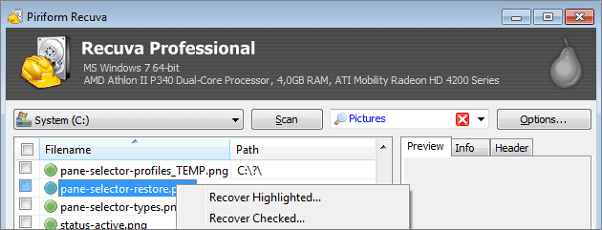
This review examines the features and attributes of Recuva, a device that delivers professional solutions in recovering deleted data files. The tool is considered one of the top data recovery tools and works by helping users recover files that might have been accidentally deleted. The review will look at how Recuva works and its various features.
The Main Features of Recuva
Recuva is a powerful tool that can recover any type of file from rewritable storage media, including documents, pictures, music, and videos. It supports recovery from various devices such as SD cards, external hard drives, and USB sticks, as well as virtual hard drives. The professional version even allows recovery from integrity hard drives, making it a comprehensive solution for data recovery needs.
This file recovery tool offers a range of advanced features, including deep scanning, which is more effective than regular scanning but takes more time. It also features military standard deletion, facilitated by Recuva technology, which permanently deletes files and prevents recovery. The tool's portability is another significant advantage, as it can be booted from a USB to recover files without risking overwriting existing data. Overall, this tool is considered the most effective file recovery tool due to its impressive array of features.
- File recoveryRecuva is a powerful file recovery tool that can retrieve a wide range of lost files, including photos, music, videos, emails, documents, and more, from damaged or recently deleted drives, as well as memory cards, USB sticks, and external hard drives.
- Deep scanningRecuva has a more advanced deep scanning mode that can recover even the hardest-to-find files, making it easier and less stressful to locate long-lost files.
- Secure deletionLeaving files in the Recycle Bin can be risky if they fall into the wrong hands. To minimize this risk, Recuva securely deletes files you want to be deleted for good, using a technique that meets industry and military standards.
- Portability: Recuva is a lightweight software that takes up only 1.5MB of space, allowing for the recovery of all files with ease and comfort.
- Virtual hard drive supportRecuva supports mounting creation and recovery of all data from your virtual hard drive.
A Table of Various Indicators of Recuva
Here are the pros and cons of Recuva:
Pros:
- 1. The free version offers unlimited recovery time without any additional charges.
- 2. The results are filtered.
- 3. There is a portable version
- 4. Can do the secure deletion
- 5. The interface is user-friendly
Cons:
- 1. There are other paid alternatives that offer more reliable recovery options than this tool, providing a better solution for users.
- 2. The free version does not have official support
- 3. Can only be used on Windows
Recuva is a powerful data recovery software that offers a wide range of features and options. A table can be created to showcase all aspects of Recuva, making it easy to see if the software meets your specific recovery needs. This table provides a clear and concise overview of Recuva's capabilities, allowing users to quickly assess whether the software is suitable for their data recovery requirements.
| Indicators | Features |
| Plans and Pricing | The software comes in both free and professional versions, with the latter offering more advanced features. The cost of the professional version is $19.95. |
| Performance and efficiency | The tool has a notable edge in terms of performance and efficiency compared to other similar tools, but there is still room for improvement to take it to the next level. |
| Support | The official support is only provided to users of the professional version. |
| Security | It has security features that protect files on any device. |
Recuva's advantages significantly outweigh its disadvantages, making it a strong competitor among data recovery tools. To utilize Recuva, the following costs are associated with it.
Recuva Pricing and Plans
Recuva comes in two versions, free and professional, with the professional version costing $19.95 per year. The main difference between the two is that the professional version offers more features, while the free version provides advanced file recovery capabilities.
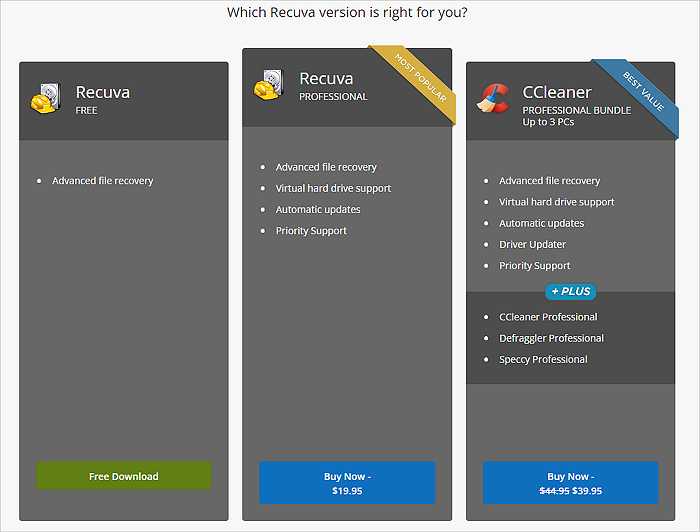
The professional version of CCleaner offers premium support, automatic updates, and support for virtual hard drives, making it a popular choice for commercial customers who use it in their businesses. They have the option to purchase CCleaner Cloud and CCleaner Business. However, the primary users of this tool are home users.
How to install Recuva
Installing this file recovery tool requires following a number of steps, but designers have tried to simplify the process to make it accessible to almost everyone without difficulties.
Step 1. Visit the official website and select between the free and professional versions, with the latter requiring an annual subscription fee.
Step 2. Download the preferred version of the tool, and it will start downloading automatically, taking a few seconds. It's only compatible with Windows operating system.
Step 3. To install the application, click on the install icon, which will prompt the application to install automatically and become one of the applications on your device.
How to Use Recuva
Knowing how to use Recuva is vital for easy and efficient file recovery. To use Recuva, follow the steps listed below:
Step 1. Open Recuva and click on "Next".
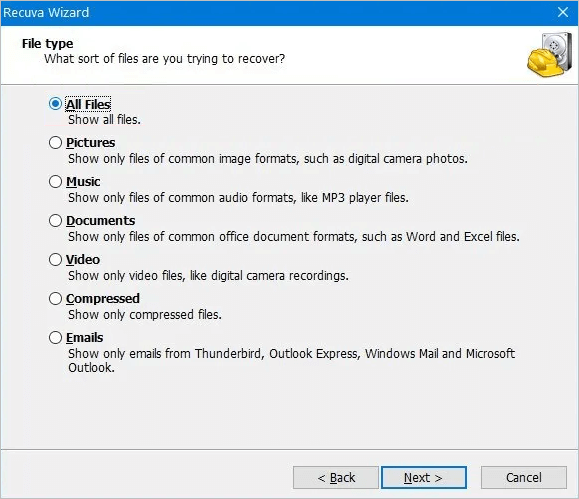
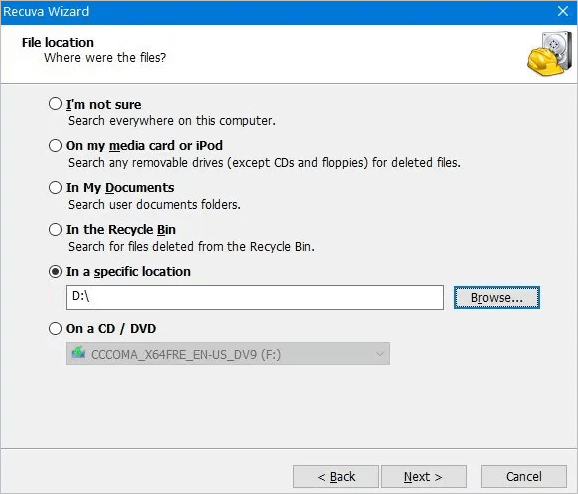
Step 2.To recover deleted files, select the specific file you want to recover or choose the "All Files" option and click "Next". Then, select the original storage location where the deleted files were kept, and click "Next" again.
Step 3. To recover deleted files, start the software, which will initiate the scanning process. On the main interface, select the drive where the deleted files are located and click "Next". After the recovery process is complete, the recovered files may include unnecessary junk files that can be removed.
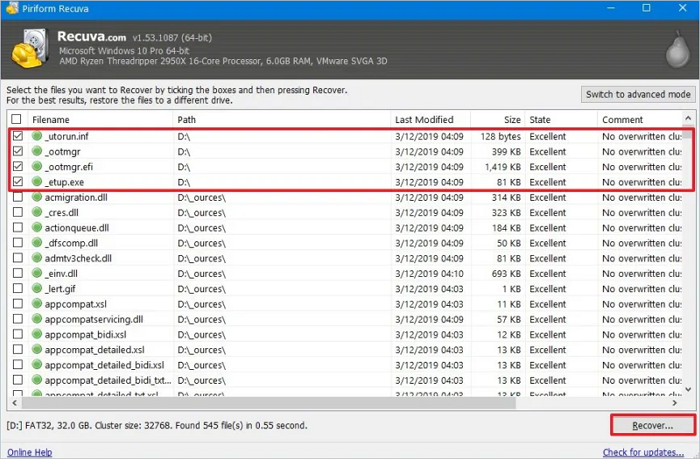
Step 4. To recover files, you can select them by checking their checkboxes and then click "Recover". It's a good idea to choose a different drive to place the recovered files, rather than the one being scanned. This will help prevent any potential issues.
Conclusion
Recuva is a highly efficient file recovery tool that comes in two versions: free and professional. Its advanced features, including secure file deletion and high portability, make it a top choice for users. The tool offers flexibility, allowing users to select the version that best suits their needs.
Recuva is a file restoration tool that offers in-depth scanning, making it more thorough than ordinary scanning. Most of its advanced features are available in the professional version, while the free version has some limitations. Despite this, the tool is still helpful and useful for recovering deleted files, and its installation and usage do not require any professional knowledge, making it accessible to almost anyone. However, it could benefit from some improvements to make it more effective.
Besides Recuva, other good data recovery software options include Deep Data Recovery and Qiling, which are both newbie-friendly with easy-to-use interfaces and fast, accurate data recovery capabilities. You can try Deep Data Recovery to recover your data.
Recuva FAQs
Before using Recuva, it's essential to understand what the program can do and how it can help. Recuva is a powerful data recovery tool that can retrieve deleted files, restore lost data, and even recover files from formatted or corrupted storage devices. By using Recuva, users can potentially recover important files that were accidentally deleted or lost due to system crashes or other issues. However, it's crucial to note that the effectiveness of Recuva depends on various factors, including the type of file, the storage device, and the timing of the deletion or loss.
1. Is Recuva safe?
The product has been thoroughly tested by professionals before its release, ensuring its quality and effectiveness. It also boasts high portability, allowing users to safeguard their files on any device.
2. Is Recuva trustworthy?
The website is trustworthy because many users have successfully recovered their files using it.
3. How much data can Recuva recover?
The system can recover large amounts of data, including documents and images, but is best suited for smaller quantities.
4. Can Recuva permanently delete files?
The professional version of the software has a secure delete option that is military-grade, allowing users to permanently delete files with sensitive information.
5. Does Recuva work on SSD?
The recovery process on an SSD works as long as the necessary steps are followed.
Related Articles
- Best Hard Drive Recovery Solutions | Recover Data from Hard Drive
- 4 Methods | How to Convert RAW to FAT32 for Micro SD Card/USB
- [Fixed] Google Chrome Not Downloading Files
- Stellar Data Recovery Review [2022 Update]
- How to Format SD Card on Chromebook [With Specific Steps]
Chromebook offers a simple option to format SD cards through the Chrome OS File Manager, eliminating the need for additional apps or actions. - Google Chrome Syne Keeps Pausing? Find Fixes Here
Google Chrome sync allows you to sync your bookmarks, history, and settings across all your devices, but some users experience a problem where the sync process keeps pausing. This issue can be caused by various factors, and to resolve it, several troubleshooting methods can be tried.
Products
Articles & Tutorials
- Data Recovery
- Data Backup
- File Recovery
- File Backup
- System Backup and Restore
- Disk and Partition Clone
- Technical articles
- Mobile articles
- Disk Master Help
- Windows Data Recovery Tutorials
- Windows Secure Delete Tutorials
- Windows Partition Management Tutorials
- Windows File Backup and Restore Tutorials
- Windows System Backup and Restore Tutorials
- Windows Disk Backup and Restore Tutorials
- Windows Clone Tutorials