It Takes Two Lost Save File, How to Recover?
The majority of mystery and arcade games keep players engaged by fostering curiosity about what happens next. This curiosity drives players to continue playing until they see the game's conclusion, as they don't want to lose the progress they've made to reach their current level.
- Information About It Takes Two
- It Takes Two Lost Save Files, Please Help!
- How to Restore and Recover It Takes Two Progress
It Takes Two is a game that players wish to replay until completion, but some have encountered a frustrating issue where they lose progress after reloading the game. To help players recover their lost data, this article provides a solution for It Takes Two data recovery.

Information About It Takes Two
It Takes Two is a game developed by Hazelight Studios, known for restoring couch co-op. It Takes Two excels in co-op play, especially when played with a loved one in the same room.
In the game It Takes Two, players control Cody and May, a couple on the verge of divorce, who are transported to a fantastical world as dolls after telling their daughter about their decision. They must work together, guided by Dr. Hakim's magical book, to find a way to reunite and return to their real bodies.
The levels in It Takes Two are set in unique fantasy interpretations of real locations, such as a toolshed with living tools, a backyard tree with arguing squirrels, or a massive snow globe. Each level is filled with humor and originality, making them a delight to play through. The sheer absurdity of some levels is sure to put a smile on players' faces.
The game has multiple levels, each with its own set of "couple's challenges" and a primary mission. These challenges are different from minigames, where players compete against each other rather than collaborate. They are not essential but provide a fun distraction and give a competitive edge.

Also read: Xbox One Won't Turn On
It Takes Two Lost Save Files, Please Help!
It Takes Two is a popular co-op game available on PC, PS4, and Xbox, where players connect with loved ones to solve puzzle levels and progress through challenges. However, users have been experiencing issues with losing their progress and saved files, particularly in certain situations.
- Their computer or gaming console shut down due to running out of power.
- They've reloaded the game after some time
- They reinstall their Window and launch the game
The game's Auto-save feature occasionally saves only half of the progress, resulting in a restart at the middle of a previously completed level when the game is reopened.
If you have lost a saved file in It Takes Two and are wondering how to recover your lost progress, there is no manual save option in the game, making it hard to know when the game is saved and when not. However, if you have encountered this issue, the following guidance will help.
How to Restore and Recover It Takes Two Progress
Unintentional deletion, a sudden power loss, challenging drive formatting, or other problems might cause "It Takes Two" game enthusiasts to lose sensitive game data stored on their computer's hard drive. However, users who do not have backups of their "It Takes Two" game files may find it difficult to restore their data. It will take a long time for players to recover their lost game files or restore their game progress if a data loss has occurred.
To recover lost game data, consider using file recovery software like Deep Data Recovery, a top-rated hard drive data recovery tool. This software can help locate and recover saved game files, even if the hard drive is not encrypted, making it a reliable option for recovering It Takes Two game data.
Qiling free data recovery software has been helping people worldwide recover lost, formatted, and inaccessible data for over a decade, thanks to ongoing research and development. It stands out for its ease of use, fast deep scan speed, high success rate of 99% or above, and responsive customer support.
To recover your lost It Takes Two files and progress, download Deep Data Recovery due to its features that allow you to easily retrieve lost data.
- It is a 100% secure platform that provides top-notch protection to your data, ensuring it remains safe and confidential.
- The device is compatible with all operating systems and gaming consoles, making it a versatile and user-friendly option for a wide range of users.
- You can recover the deleted files from the hard drive if it's not wiped
- It has a user-friendly interface, which makes it perfect for even the novice users
Step 1. Select file types and click "Fast Scan" to start
Launch Deep Data Recovery, select file types, and click "Fast Scan" to begin the recovery process.
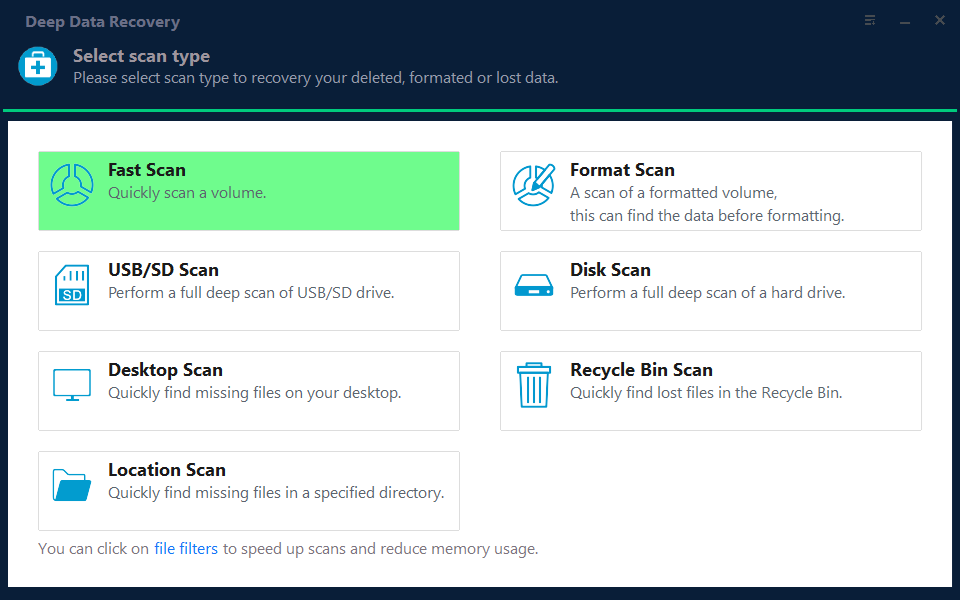
Note: You can choose different search modes based on where and why the data was lost.
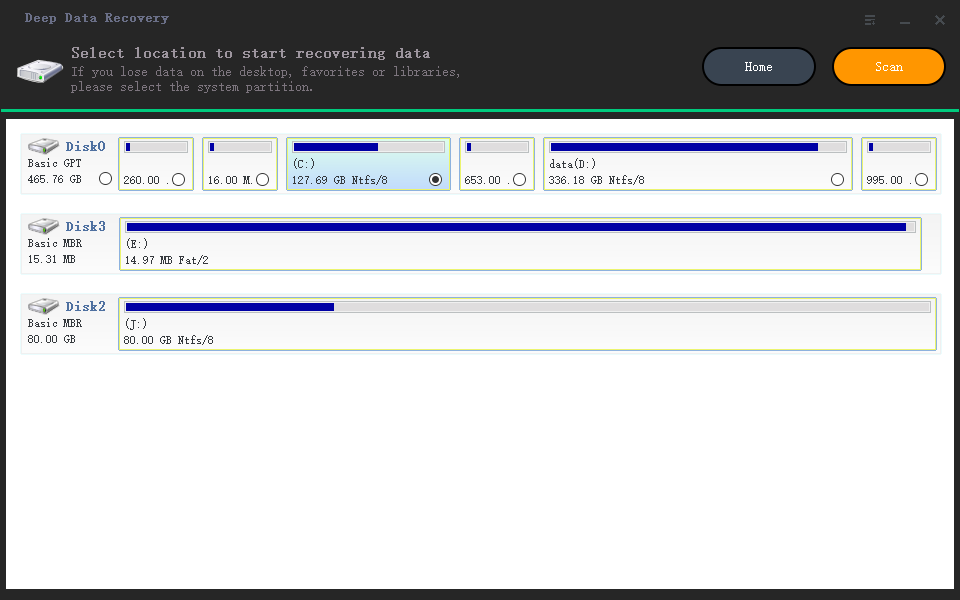
Step 2. Select a location and start scanning
Choose the partition where you lost data. Then, click "Scan".
Step 3. Filter and preview files
To find the files you need, use the file format filter on the left or upper right corner, and then click the "Preview" button or double-click a file to preview its content.
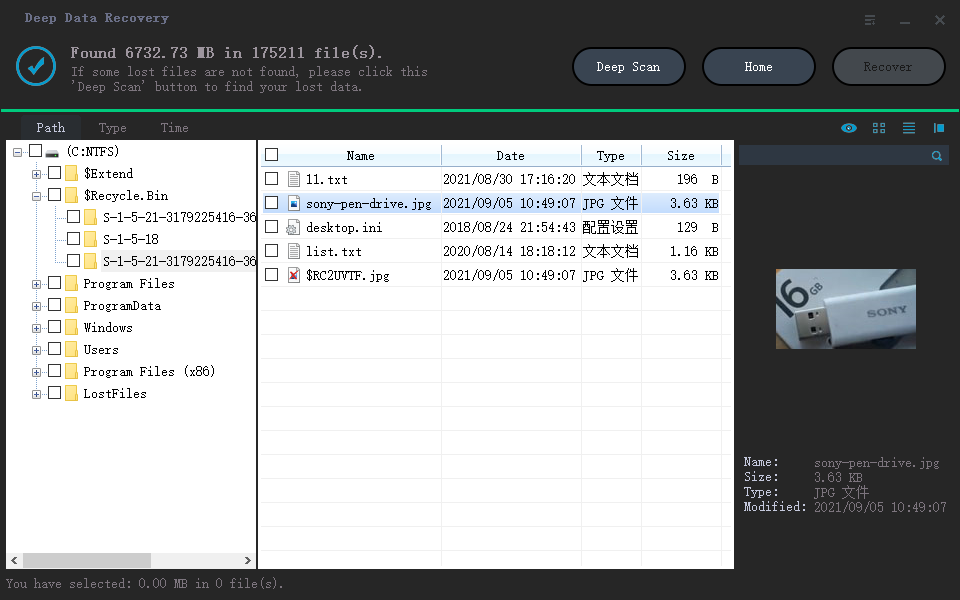
Step 4. Recover lost data or files
To recover lost data, select the file by clicking the checkbox next to it, then click the "Recover" button to restore the data to a secure location.
Also read: Elden Ring Lost Progress or No Longer Available on Xbox/PS4/PC
How to Find Game Data/File Location of It Takes Two
To find the It Takes Two game data on your PC, follow these steps: since the Qiling data recovery wizard restores files to their original location, it's essential to know where to find the game data. Most users are unaware of the saved file location on their PC, so this section provides guidance. The steps to locate the It Takes Two game data/file on your PC are not specified in the provided text, but it's implied that you need to follow the recovery wizard's instructions to find the correct location.
Step 1. To access the File Explorer on your PC, search for it in the "Search" menu.
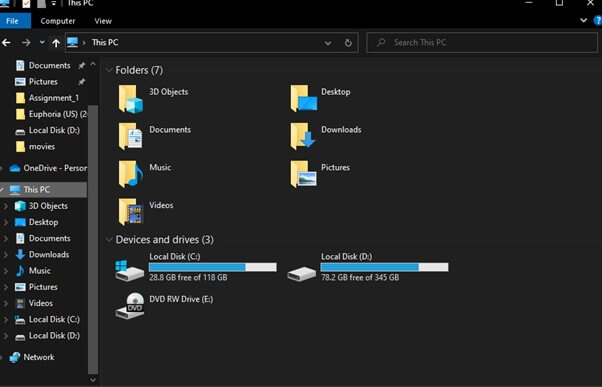
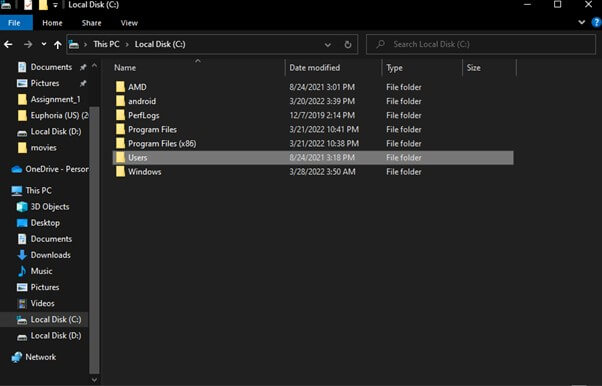
Step 2. To access the Users folder, go to Local Disk (C: ) and select the Users folder, then choose the folder with your name.
Step 3. Go to the AppData folder, select Local, and find the It Takes Two game folder.
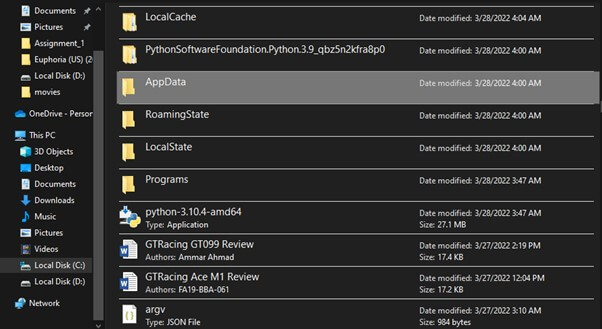
Then, replace the old data with the recovered game file. You can start the game again to see if it works.
Conclusion
It Takes Two has become a popular game, enjoyed by many who play it with loved ones. However, since there's no manual save option, players often lose their progress when reloading, which can be frustrating. Fortunately, after reading this article, players can now recover their game data, making the experience even more enjoyable.
We recommend using Qiling data recovery software to recover lost saved files of the It Takes Two game, thanks to its user-friendly interface and 100% data protection.
Related Articles
- How to Remove/Delete Directory in Linux
- File Recovery Software to Restore Deleted Files on Dell Laptop
- Fixes for The Type of the File System Is RAW, CHKDSK Is Not Available for RAW Drives
- Where Do My Downloads Go? Find & Open Downloads on PC, iPhone/iPad, or Android [Beinners' Guide]
- How to Factory Reset an Acer Laptop on Windows 10/8/7
If you want to learn how to factory reset your Acer laptop running Windows 10/8/7, this guide is for you. It will walk you through the process of restoring your laptop to its original settings. - Factory Reset ASUS Laptop F9 Not Working [Why & How to Fix]🔥
If you've accidentally deleted important files or lost data on your Dell laptop, you can use a data recovery software to restore the lost files. You can download a Dell file recovery software to help you recover the lost data with simple steps.
Products
Articles & Tutorials
- Data Recovery
- Data Backup
- File Recovery
- File Backup
- System Backup and Restore
- Disk and Partition Clone
- Technical articles
- Mobile articles
- Disk Master Help
- Windows Data Recovery Tutorials
- Windows Secure Delete Tutorials
- Windows Partition Management Tutorials
- Windows File Backup and Restore Tutorials
- Windows System Backup and Restore Tutorials
- Windows Disk Backup and Restore Tutorials
- Windows Clone Tutorials